TL;DR
Publish PDFs with selectable text, descriptive filenames, useful titles, accessible structure, and crawlable links. Use an HTML companion page when mobile reading, frequent updates, or conversions matter, then check indexing and measure both search visits and downloads.
A useful downloadable report deserves more than a filename like final-v7.pdf. The most practical seo tips for PDF documents help search engines understand the file while making it easier for people to read, navigate, and act on.
PDF: Portable Document Format, standardized as ISO 32000, preserves document formatting across different software and devices. PDF SEO: The practice of improving a PDF's content, discoverability, and technical delivery for organic search.
For businesses publishing guides, catalogs, or research, the file and its supporting webpage should serve distinct purposes. Earlyseo can fit into the broader content-planning workflow around those downloadable resources.
Table of Contents
When should a PDF have an HTML companion page?
A PDF should have an HTML companion page when readers need mobile-friendly information, frequent updates, or a clear next action before downloading. PDFs suit printable guides, formal reports, and fixed-layout documents. HTML usually offers greater control over navigation, conversion tracking, structured content, and the surrounding website experience.
Choose the format around the reader's task
Format selection should follow the intended use, not the software used to create the content.
| Publishing approach | Best use | Main consideration |
|---|---|---|
| PDF only | Printable checklists or standalone reports | Reading and navigation depend on the PDF viewer |
| HTML only | Frequently updated advice or product information | Requires a separate printable version if needed |
| HTML plus PDF | Research reports, buying guides, or downloadable resources | Each version needs a clear purpose and maintenance plan |
A local contractor might publish an HTML explanation of seasonal maintenance and offer a printable checklist. An online store might explain sizing on a webpage and provide a downloadable measurement sheet.
The companion page should contain useful information, not just a download button. An introduction, key findings, publication date, and intended audience give visitors a reason to stay. A content strategy for new blogs can help connect that page to related educational content.
A PDF works best as a purposeful resource, not an automatic substitute for a webpage.
How can businesses optimize PDF documents for search?
Businesses can optimize PDF documents through six practical steps:
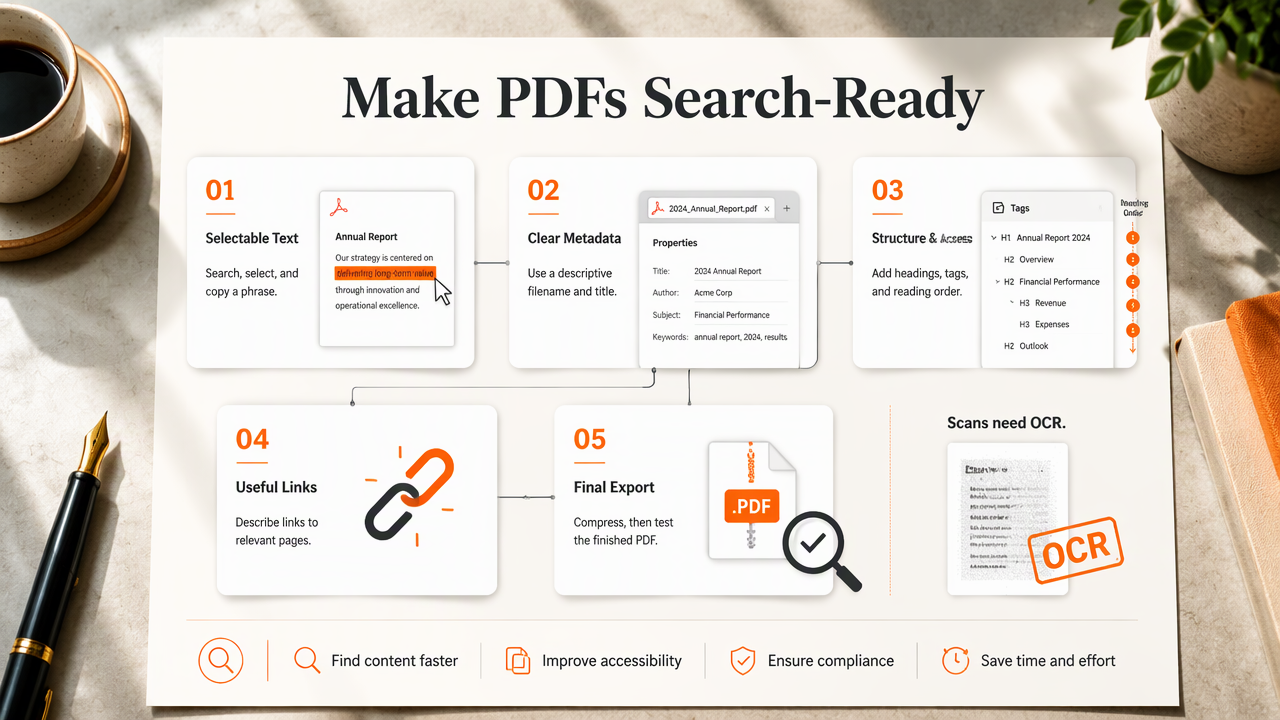
- Export selectable text rather than page images.
- Choose a descriptive filename and document title.
- Organize content with clear headings and tags.
- Add relevant, descriptive links.
- Improve accessibility and reading order.
- Compress the file and test the final export.
Make text searchable and titles descriptive
Searchable text gives readers and extraction tools usable words instead of pictures of words.
Attempt to select a sentence, search for a phrase, and copy a paragraph into a plain-text editor. Scanned documents may need optical character recognition, or OCR. Check the result carefully, especially names, numbers, tables, and unusual fonts.
Use a filename such as commercial-roof-maintenance-guide.pdf rather than document123.pdf. Keep it readable, use hyphens between words, and avoid stuffing several keyword variations into it.
Set the PDF's document title in its properties. A useful title might be Commercial Roof Maintenance Guide: Inspection Checklist. Align that property with the visible cover title. Complete the author and subject fields where relevant, but don't treat metadata keywords as a shortcut to rankings.
The opening page should explain the document's subject and audience. A search-focused content brief can establish those details before design begins.
Build accessible structure and useful links
Accessible structure makes a PDF easier to navigate and interpret.
- Export a tagged PDF with logical heading levels and reading order.
- Set the document language and add meaningful alternative text to informative images.
- Identify table headers and check how complex tables read with assistive technology.
- Add bookmarks for longer reports and descriptive text for links.
- Link to relevant service, product, or supporting information pages.
A link labeled "commercial roof inspection services" gives more context than "learn more." Place it where the related service is discussed, rather than filling every page with sales links. The same relevance principle guides an internal linking strategy.
Compress oversized images while preserving legibility. Use the exporting application's web-optimization settings where available, then test the downloaded file on a phone. Accessibility and compression support usability; neither guarantees a ranking increase.
How can PDF indexability be checked and controlled?
PDF indexability can be checked by reviewing access, server responses, indexing directives, and search-engine inspection tools. A public document generally needs an accessible URL and a discoverable link. Businesses should decide whether the file or its HTML companion is the preferred search destination before applying indexing or canonical controls.
Check delivery and choose the preferred URL
A technically sound PDF should load from a stable URL without requiring a login.
- Confirm that the URL returns the intended file successfully.
- Check that its response uses the appropriate
application/pdfcontent type. - Review
robots.txtand anyX-Robots-Tagresponse header. - Link to the file from a relevant, crawlable webpage.
- Inspect the URL in Google Search Console and review its indexing status.
For a PDF that should remain accessible but stay out of search results, a server-side X-Robots-Tag: noindex header is an option. Blocking crawling in robots.txt isn't equivalent: crawlers need access to see a noindex directive.
When substantially equivalent HTML and PDF versions exist, an HTTP Link header can identify the preferred canonical URL. Canonicalization is a signal, not a guarantee. A short summary page isn't necessarily equivalent to a full report.
Document URL changes also belong in a website migration checklist. Redirect replaced files where appropriate and update the links pointing to them.
Keep AI-readability claims grounded in 2026
Clear text and explicit source details are sensible publishing choices, but AI citation outcomes remain uncertain.
The 2025 Qwen3-VL Technical Report concerns a vision-language model. The 2024 survey of LLM security and privacy addresses a different issue: security and privacy in language-model systems. Neither source establishes a PDF SEO ranking benefit.
A business report should label its author, date, methods, and source links clearly. Those details help readers evaluate it without relying on assumptions about how an AI system processes the file.
Search indexability, accessibility, and AI citation visibility are separate outcomes. One doesn't prove the others.
How Earlyseo fits the PDF publishing workflow
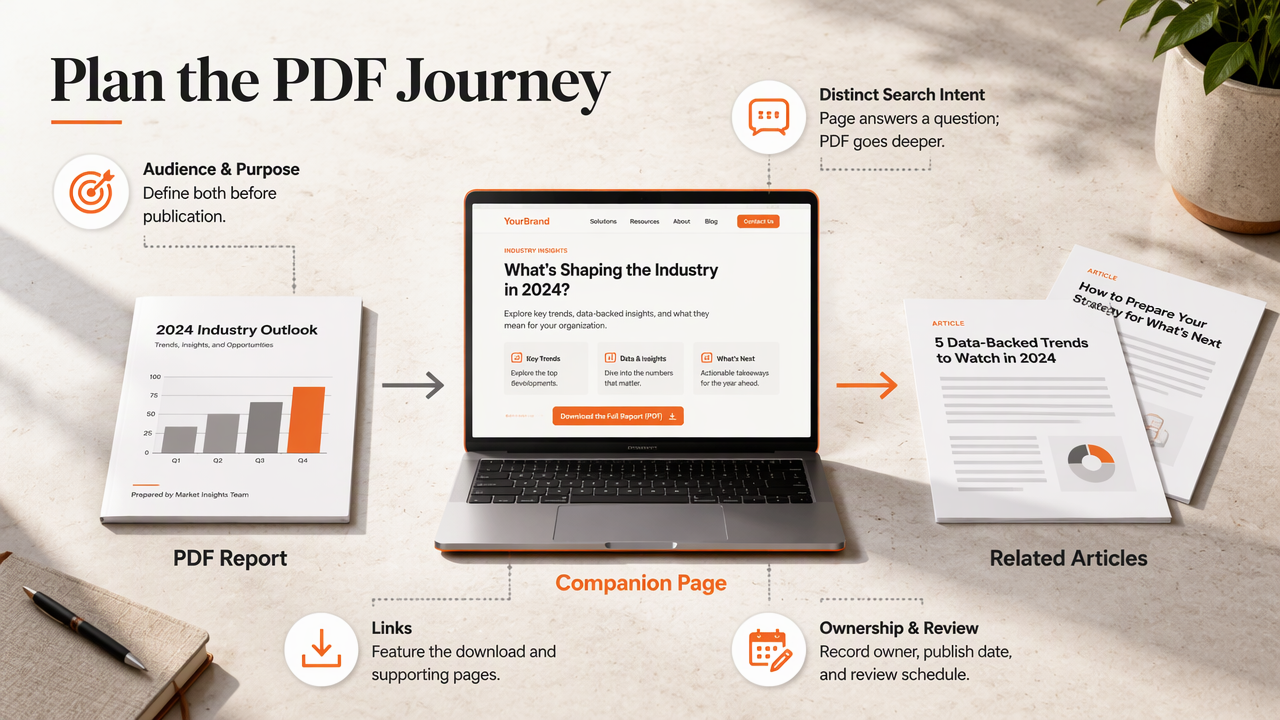
Earlyseo fits the content-planning layer around downloadable resources, including the HTML pages that introduce and support them. A practical workflow treats the report, companion page, and related articles as connected assets with distinct search intents.
Coordinate the companion page and publishing checks
The companion page needs an owner, a target audience, and a clear purpose before publication.
A repeatable publishing brief can record:
- The question answered by the webpage and the deeper material in the PDF.
- The primary download link and relevant supporting pages.
- The document owner, publication date, and review schedule.
- The intended indexed URL and technical checks.
The platform's SEO operations offering provides a relevant starting point for organizing the surrounding SEO workflow. PDF export settings, server headers, and accessibility testing should remain explicit tasks in the publishing brief.
For measurement, separate companion-page search performance from download activity. Google Search Console can show search performance for indexed URLs; website analytics can record download-link clicks when configured. A click on a download link doesn't establish that the document was read.
FAQ: PDF search visibility and publishing choices
These practical distinctions help businesses choose how to publish and maintain downloadable content.
Can Google index a scanned PDF?
Google can process some scanned documents, but publishers shouldn't rely on image-only pages for dependable text extraction. OCR adds a searchable text layer, which should be checked for accuracy. Selectable text also improves searching and copying within the document, making OCR worthwhile beyond search visibility.
Does a PDF need a meta description?
A PDF doesn't use an HTML meta description tag in the same way a webpage does. Its title and subject properties can describe the document, but publishers shouldn't assume they control the search snippet. A clear opening paragraph and a descriptive document title provide useful context.
Should every PDF be indexed?
Not every PDF needs to appear in search results. Public guides and research may deserve indexing, while duplicate downloads or temporary documents may not. Confidential files require authentication or restricted access, not merely noindex. Indexing controls manage search visibility; they aren't a substitute for proper security.
Conclusion
Start with the most valuable public download: check its text, title, tags, links, and response headers. Then decide whether an HTML companion page would better support discovery and conversions. Businesses coordinating that wider content plan can explore Earlyseo at earlyseo.com and assign an owner to each publishing check before releasing the next report.