TL;DR
Keep temporarily unavailable products live, redirect permanent discontinuations only to genuinely equivalent replacements, and remove pages with no remaining purpose. Before changing URLs, check search demand, backlinks, customer support needs, and replacement relevance.
A discontinued product doesn't automatically need a deleted page. The strongest SEO optimization tips for discontinued products start with a business decision: does the URL still help shoppers, existing owners, or searchers looking for a replacement?
Discontinued product SEO: Managing permanently unavailable product pages so their content, links, and HTTP responses accurately reflect what remains useful.
For stores planning ongoing content work, Earlyseo offers a relevant starting point alongside a clear product-retirement policy. In 2026, the practical priority remains matching each URL to its actual purpose, rather than applying one rule across the whole catalog.
Table of Contents
When should a product page stay, redirect, or disappear?
A discontinued product page should stay live when it serves useful demand, redirect when a genuinely equivalent replacement exists, and return 404 or 410 when neither condition applies. Temporary stock shortages usually call for a live page with an accurate availability message, not permanent removal.
Product status and the correct URL response
The decision depends on availability, replacement fit, and the page's remaining value.
| Product situation | Recommended treatment | What visitors should see |
|---|---|---|
| Temporarily out of stock | Keep 200 OK |
Stock status, restock information if known, relevant alternatives |
| Permanently discontinued, useful reference content | Keep 200 OK |
Clear discontinuation notice, specifications, support resources |
| Permanently discontinued, equivalent successor | Use a 301 redirect |
A replacement that satisfies substantially the same need |
| Permanently discontinued, no useful content or replacement | Return 404 or 410 |
A helpful removal page with navigation |
| One variant unavailable | Usually retain the parent page | Accurate availability for each selectable variant |
Equivalent replacement: A successor that matches the original product's main purpose, audience, and essential compatibility requirements.
A newer filter cartridge that fits the same appliance may qualify. A different appliance from the same brand usually doesn't.
Signals worth checking before changing a URL
Review evidence at the individual URL level before retiring pages in bulk:
- Organic queries and clicks in Google Search Console.
- Referring links and their context.
- Visits to manuals, specifications, or compatibility information.
- Stock forecasts and confirmed successor products.
- Assisted purchases through alternative-product links.
Backlinks are a reason to investigate, not a reason to redirect anywhere available. A page linked as a repair reference may be more useful as an archive than as a sales redirect.
Choose the response that matches the page's remaining purpose, not the response that merely keeps every URL alive.
How should retained product pages be optimized?
Retained product pages should explain availability immediately and give visitors a useful next step.
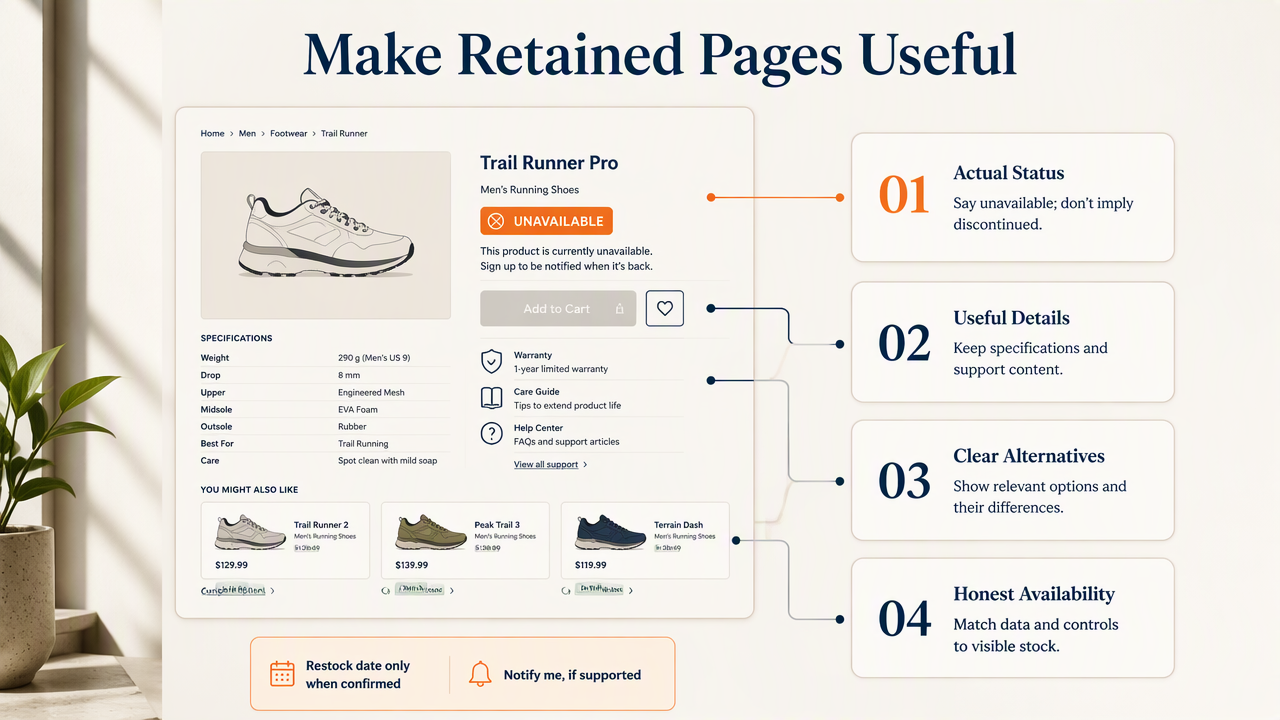
- Label the product's actual status.
- Preserve useful specifications and support content.
- Add relevant alternatives with clear differences.
- Align structured data with visible availability.
- Keep purchase controls consistent with what can actually be ordered.
Separate purchase intent from ownership needs
For temporary shortages, show a restock date only when one is confirmed. A notification option can help if the store actually supports it. Avoid calling an item discontinued simply because inventory reached zero.
For permanent retirement, put Discontinued near the product name and explain whether a successor exists. Keep model numbers, dimensions, manuals, and compatibility details when they answer real questions. Existing owners often need information that has nothing to do with buying another unit.
Retaining an indexed page requires useful content, not just an unavailable badge. The broader ecommerce SEO guide for small stores provides context for balancing product information with catalog structure.
Make alternatives specific and availability consistent
Explain why each recommended alternative fits. For a retired running shoe, relevant differences might include cushioning, width options, intended surface, and sizing. Three random bestsellers don't answer the same buying question.
Check consistency across the visible page, Product and Offer structured data, and any Google Merchant Center feed. Use availability values supported by the relevant system; don't assume every Schema.org value is supported in every Google feature.
- Remove purchase buttons when ordering isn't possible.
- Keep the retained page's canonical pointing to itself.
- Maintain a live sitemap entry when the page remains intended for indexing.
- Preserve reviews only when they clearly belong to the original product.
A successor's reviews shouldn't silently become the discontinued model's reviews. Clear product identity helps shoppers compare accurately.
How should redirects and removals be implemented?
Redirects and removals should be implemented as verified URL changes, not just storefront edits.
- Export affected URLs and record their destinations.
- Apply
301,404, or410responses. - Update internal links and sitemaps.
- Check redirects, canonicals, and availability feeds.
- Monitor crawling, search traffic, and replacement-page engagement.
Redirect to a close replacement without a chain
A permanent 301 redirect fits a genuine successor, such as a replacement printer cartridge with matching compatibility. Send the old URL directly to the final destination, and make the successor page explain relevant differences where helpful.
Redirecting every retired item to the homepage can confuse visitors and may be treated as a soft 404. A broad category isn't automatically an equivalent replacement either. Product similarity should be evaluated from the searcher's need, not the store's desire to preserve traffic.
When many URLs change together, the website migration SEO checklist is a useful companion for mapping and testing.
Return a real removal status and repair navigation
Use 404 Not Found when the resource isn't available, or 410 Gone when removal is intentional and permanent. Both can lead to removal from search results. A 410 isn't a ranking trick, and neither response needs to be disguised with a successful 200 status.
A custom error page can still offer search, category navigation, and support links while returning the correct HTTP response.
After implementation:
- Remove redirected and deleted URLs from XML sitemaps.
- Update category cards, breadcrumbs, and editorial links.
- Check variant URLs separately from parent product URLs.
- Test the actual HTTP response, not just the visible message.
The internal linking strategy guide helps frame ongoing link maintenance. Google Search Console can then show how Google processes the changes, while analytics can reveal whether visitors use the replacement pages.
How Earlyseo handles this
Earlyseo belongs in the content-planning side of a discontinued-product workflow, while HTTP responses and catalog changes belong in the store's technical implementation. A useful division of work separates customer-facing explanations from URL configuration, with a shared brief connecting the content team, merchandising team, and developer.

Turn retirement decisions into clear content briefs
The platform's SEO operations offering is a relevant place to explore organized SEO work. Product-retirement briefs should specify the original model, stock status, intended search audience, approved alternatives, and information that must remain accessible.
A simple handoff keeps responsibilities visible:
- Merchandising: Confirm permanent retirement and replacement suitability.
- Content: Write availability notices and accurate comparisons.
- Development: Configure responses, links, and templates.
- SEO: Review indexing intent and monitor results.
Stores using Shopify can pair this process with the Shopify SEO playbook. Platform-specific checks matter because storefront visibility, product publication, redirects, and sitemap behavior are separate settings.
The practical benefit is a repeatable process: every retired product gets a documented decision rather than an improvised edit.
FAQ: Discontinued product SEO decisions
Discontinued product SEO questions usually turn on three details: whether availability is temporary, whether a useful replacement exists, and whether the old page still answers a real need.
Stock status, URL status, and indexing intent are separate decisions.
Should out-of-stock products be removed from Google?
Temporarily out-of-stock products generally shouldn't be removed solely because inventory is unavailable. Keep the page accessible, describe its status accurately, and offer a useful next step. Permanent discontinuations need a separate review of search demand, support value, and replacement suitability before deciding whether the page should remain indexed.
Is a 410 response better than a 404 for discontinued products?
A 410 response explicitly signals permanent removal, while 404 means the requested resource wasn't found. Neither is universally better for discontinued products, and both can result in deindexing. The more important choice is whether removal makes sense at all, followed by consistent responses, updated links, and clear navigation.
Can a discontinued product redirect to a category page?
A category redirect can make sense when that category genuinely satisfies the old page's intent, but it shouldn't be the default. A close product successor is usually more precise. When visitors need model-specific specifications or support, retaining a useful archive may serve them better than sending them to general shopping results.
Conclusion
Start with a batch of retired product URLs and assign each one a documented outcome: retain, redirect, or remove. Confirm replacement compatibility, update customer-facing content, and test the resulting HTTP responses before expanding the work across the catalog.
For ongoing content planning, Earlyseo at earlyseo.com can sit alongside the store's technical workflow. The immediate next step is a retirement register with a decision, owner, and review date for every affected URL.