TL;DR
Small websites usually need clear navigation and indexable pages, not enterprise crawl-budget projects. Check Google Search Console, keep sitemaps clean, and control duplicate URLs before spending time on advanced crawl analysis.
Crawl budget for small websites usually isn't the main obstacle to organic visibility. A small business site with a manageable set of useful pages generally benefits more from clear internal links, reliable hosting, and content worth indexing than from chasing a higher crawl count.
The practical question in 2026 isn't how to make Googlebot visit everything more often. It's whether Google can discover and access the pages that matter, without getting lost in unnecessary URL variations. That distinction keeps technical SEO useful rather than turning it into busywork.
Table of Contents
What is crawl budget for small websites?
Crawl budget for small websites is the set of URLs Google can and wants to crawl during a given period. Google's definition combines crawl capacity and crawl demand. For most small sites, the useful goal is making important pages easy to discover and fetch, not increasing an assumed daily allowance.
Googlebot: Google's web crawler, which collects web documents for Google's searchable index.
Crawl capacity: How much crawling a site can support without its server becoming overloaded.
Crawl demand: How much Google wants to crawl, based on factors such as known URLs and the need to revisit content.
Google's Crawl Budget Management guidance, listed in the supplied research with a July 2026 update, frames budget around capacity and demand together. A site therefore doesn't have one permanent, guaranteed quota.
Crawling, indexing, and ranking mean different things
Crawling retrieves a page; indexing evaluates and stores eligible content; ranking determines where indexed content appears in search results.
A page can be crawled without being indexed. An indexed page can also rank poorly. Those outcomes require different investigations, so a single crawl metric can't explain every visibility issue.
A successful Googlebot visit proves access, not guaranteed indexing or rankings.
For a new business site, the distinction helps separate technical work from content work. The guide to common SEO mistakes on new websites provides related checks beyond crawler activity.
When does a small site need crawl-budget attention?
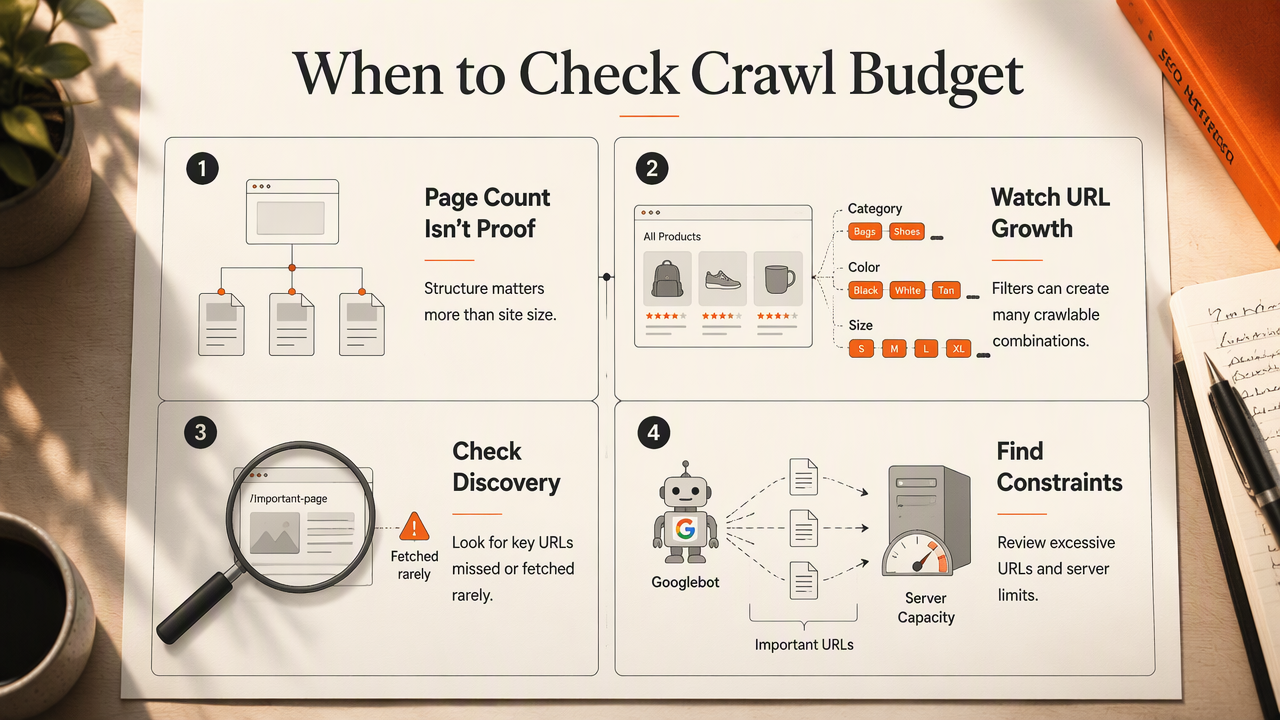
A small site needs crawl-budget attention when important URLs remain undiscovered or infrequently fetched alongside evidence of excessive URL generation or server constraints. Page count alone doesn't establish the problem. A compact catalog with many filter combinations can expose more crawlable URLs than a larger, neatly organized brochure site.
Small-site crawl myths versus practical reality
The most useful distinction is between improving access and assuming that more crawling automatically improves search performance.
| Myth | Reality | Practical response |
|---|---|---|
| Every small site needs crawl-budget optimization | Most need basic crawlability and indexing checks first | Inspect important pages before planning advanced analysis |
| More crawls mean better rankings | Crawling enables evaluation but isn't a ranking guarantee | Measure indexing and search performance separately |
| Visible page count reveals site size | Filters, search results, and parameters can multiply URLs | Review generated URL patterns |
| A sitemap forces Google to index pages | A sitemap helps discovery but doesn't guarantee inclusion | Submit useful, canonical, indexable URLs |
| Blocking a URL removes it from search | Crawl blocking and index exclusion serve different purposes | Choose controls based on the intended outcome |
The warning signs worth investigating
Repeated evidence across important pages matters more than one delayed visit.
- Newly published service or product pages lack internal links.
- Search Console reports server errors or host availability issues.
- Crawl activity includes many filter or session URLs.
- Important updated pages remain unfetched while duplicate variants receive visits.
A local business with a straightforward service menu should prioritize useful service pages and location information. That work fits naturally with local SEO on a limited budget, rather than an enterprise crawler project.
How can a small site diagnose crawl problems?
- Diagnose crawl problems by selecting important URLs in Google Search Console.
- Check URL Inspection for discovery, crawling, and indexing status.
- Review Crawl Stats for response errors and host availability.
- Compare sitemap entries with intended indexable pages.
- Examine server logs only when basic reports leave a specific question unanswered.
Match the investigation to the page status
A URL's reported status narrows the investigation better than a sitewide crawl total.
Discovered, currently not indexed: Google knows the URL but hasn't crawled it yet. Review internal discovery paths, site conditions, and whether the URL deserves priority.
Crawled, currently not indexed: Google has fetched the URL. Investigate content usefulness, duplication, and canonical signals before assuming insufficient crawl capacity.
Blocked or inaccessible: Check robots.txt, authentication, response codes, and hosting. A live inspection can help test current access, although it doesn't guarantee indexing.
These statuses aren't complete diagnoses. They indicate where to investigate next, and reports may reflect an earlier state rather than the current page.
Use a small, repeatable inspection sample
A representative sample makes checks manageable without hiding the most valuable pages.
For example, a store could inspect its homepage, a category page, a current product, a recently updated product, and a filtered listing. A service business could replace product examples with its main service and location pages.
Record the inspection date, HTTP status, indexing status, canonical URL, and internal-link source. Repeat checks after fixes rather than treating one screenshot as a permanent diagnosis.
Following a redesign or domain move, the website migration SEO checklist helps keep redirects and discovery paths in the same review.
How can small websites improve crawl efficiency?
- Improve crawl efficiency by linking important pages from relevant navigation and content.
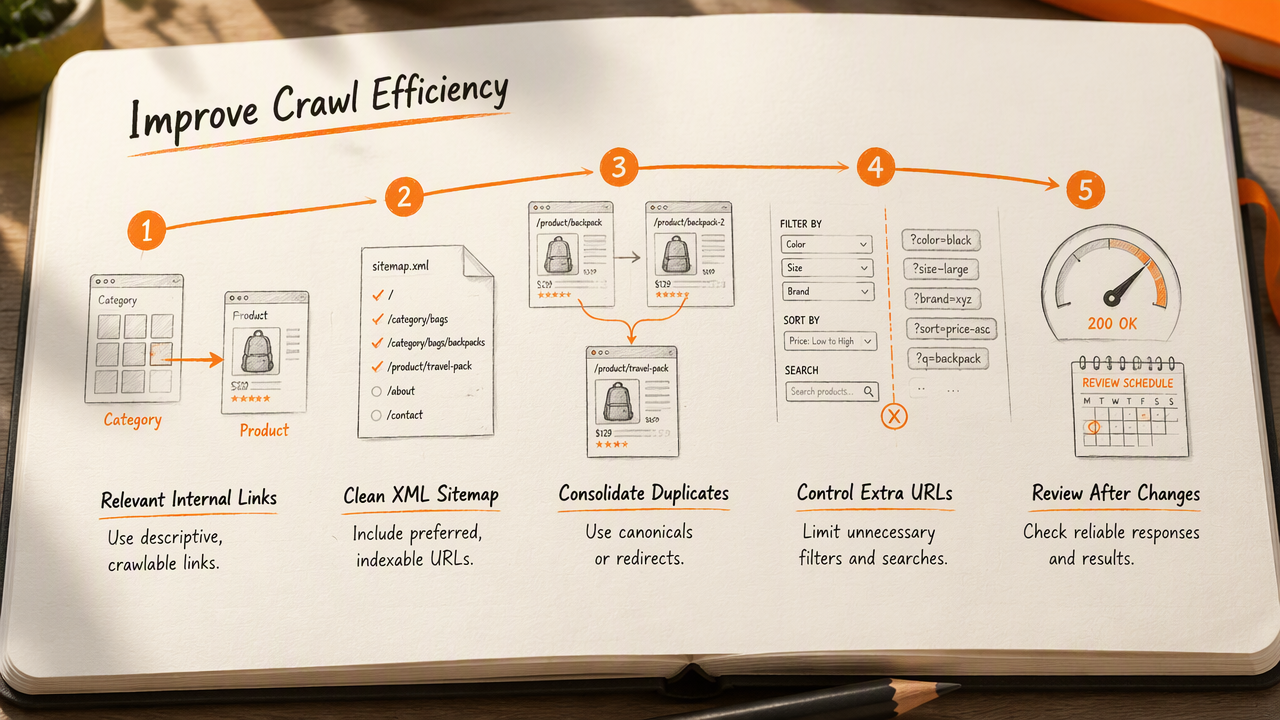
- Keep XML sitemaps limited to preferred, indexable URLs.
- Consolidate duplicate URL signals with appropriate canonical tags or redirects.
- Control unnecessary filter and search URLs.
- Maintain reliable responses and review results after meaningful site changes.
Give valuable pages clear discovery paths
Internal links provide discoverable routes and help explain relationships between pages.
Use ordinary crawlable links with descriptive anchor text. Product pages should connect to relevant categories, and service pages should be reachable through clear navigation. Avoid leaving an important page accessible only through an onsite search form.
Sitemaps complement those links rather than replacing them. Include preferred URLs that return successful responses, and update modification dates only when content actually changes.
For stores, small-store ecommerce SEO guidance connects crawl-friendly category structure with useful product content.
Choose URL controls according to the goal
Each URL control solves a different problem, so blanket blocking can create confusion.
- Redirect: Send visitors and crawlers to a replacement when a URL has permanently moved.
- Canonical tag: Indicate the preferred version of duplicate or closely similar content.
noindex: Request exclusion from search results while allowing crawling to read the instruction.robots.txt: Restrict crawling of selected paths; don't treat it as guaranteed deindexing.
A noindex instruction on a blocked page may never be seen. Useful category filters also deserve individual review: some satisfy real search demand, while others produce near-identical combinations.
Control low-value URL generation without hiding pages that serve a distinct search need.
How Earlyseo handles this
Earlyseo provides a website-analysis starting point for small businesses organizing their SEO review.
Its website analysis page is a relevant next step for a site-level assessment. Google Search Console remains the source for Google's reported crawl and indexing information; combining that evidence with a structured review supports clearer priorities.
The practical output should be a short action list with named pages, intended outcomes, and follow-up dates. Fixing discovery, confirming access, and checking indexing separately makes progress easier to evaluate.
Small-site crawl budget FAQ
Small-site crawl questions are best answered by separating crawler access, indexing decisions, and business priorities.
How can a website find its crawl budget?
Google Search Console's Crawl Stats report shows observed crawl activity, not a fixed allowance. Review requests, response patterns, and host availability alongside URL Inspection. A changing daily count is normal, so the useful question is whether important pages are being reached and refreshed, not whether the count meets an arbitrary target.
Does faster hosting increase crawl budget?
Reliable, responsive hosting can support crawling when server capacity is a constraint. It doesn't force Google to request more pages, because crawl demand also matters. Hosting improvements should address measured availability or response problems, rather than serve as a speculative upgrade for a small site that already responds consistently.
Should small websites remove every duplicate page?
Small websites should manage duplicate URLs according to their purpose, not delete every repeated page automatically. Tracking parameters may need consistent canonical signals, while an obsolete page may need a redirect. Useful filters can remain valuable landing pages. The goal is a clear preferred version without removing content that serves distinct intent.
Will submitting a sitemap get every page indexed?
Submitting a sitemap helps Google discover listed URLs, but doesn't guarantee crawling, indexing, or rankings. Each page still needs accessible content and appropriate indexing signals. A clean sitemap is most useful when it reflects the site's preferred pages and works alongside internal links, rather than listing every generated URL.
Conclusion
Crawl budget for small websites is best treated as a focused diagnostic issue, not a standing enterprise project. A practical next step is to inspect several valuable URLs, verify their discovery paths, and schedule a follow-up after any changes.
For a structured starting point, Earlyseo offers website analysis. Small-business teams can visit earlyseo.com and pair that review with Search Console evidence to set their next technical SEO priorities.