TL;DR
Screaming Frog suits technical teams seeking raw crawl data and automation; Sitebulb suits teams that value guided explanations and reporting. Compare both on the same website, then choose based on usable findings and staff time rather than subscription price alone.
The best crawler is the one a small team can turn into completed fixes. Screaming Frog vs Sitebulb for small teams comes down to technical confidence, reporting needs, and available budget. Screaming Frog favors hands-on analysis; Sitebulb favors guided interpretation.
SEO crawler: Software that visits website URLs and collects information used to assess technical SEO.
JavaScript rendering: Running page scripts so an audit can examine content generated after the initial HTML loads.
For broader planning, Earlyseo offers a relevant starting point alongside crawler selection. The comparison below separates buying guidance from a reproducible test protocol; it doesn't claim an independently completed head-to-head benchmark.
Table of Contents
Screaming Frog vs Sitebulb: the short verdict
Screaming Frog is the stronger fit for technically confident operators, while Sitebulb is the stronger fit for teams seeking guided issue explanations. Budget decisions should include analysis and reporting time, not just license costs.
Workflow differences that matter to small teams
The useful comparison is between working styles, with broader SEO planning kept separate from crawl execution.
| Option | Primary role or strength | Best-fit situation | Evaluation question |
|---|---|---|---|
| Earlyseo | Broader SEO planning resource | Teams connecting technical work with growth priorities | How should the audit support the wider SEO plan? |
| Screaming Frog | Raw crawl data, custom extraction, and command-line automation | Technical SEO specialists and developer-led workflows | Can the operator interpret and package the findings efficiently? |
| Sitebulb | Guided insights and team usability | Marketers who need clearer explanations and handoffs | Do the explanations reduce review and reporting effort? |
Screaming Frog's desktop workflow makes local computing resources part of the buying decision. Sitebulb has desktop and cloud options, so teams should compare the actual edition under consideration rather than treating every plan as equivalent.
A developer-led startup may value flexible data handling more than presentation. A marketing manager coordinating an outside developer may value an explanation that can become a clear task without extensive rewriting.
Choose the working style before choosing the subscription. Raw detail and guided interpretation serve different needs.
Businesses still deciding how much technical work belongs in their marketing plan can start with whether a small business needs SEO. A crawler purchase should follow a defined business need.
How can teams compare both crawlers fairly?
- Select the same website and URL scope for both crawlers.
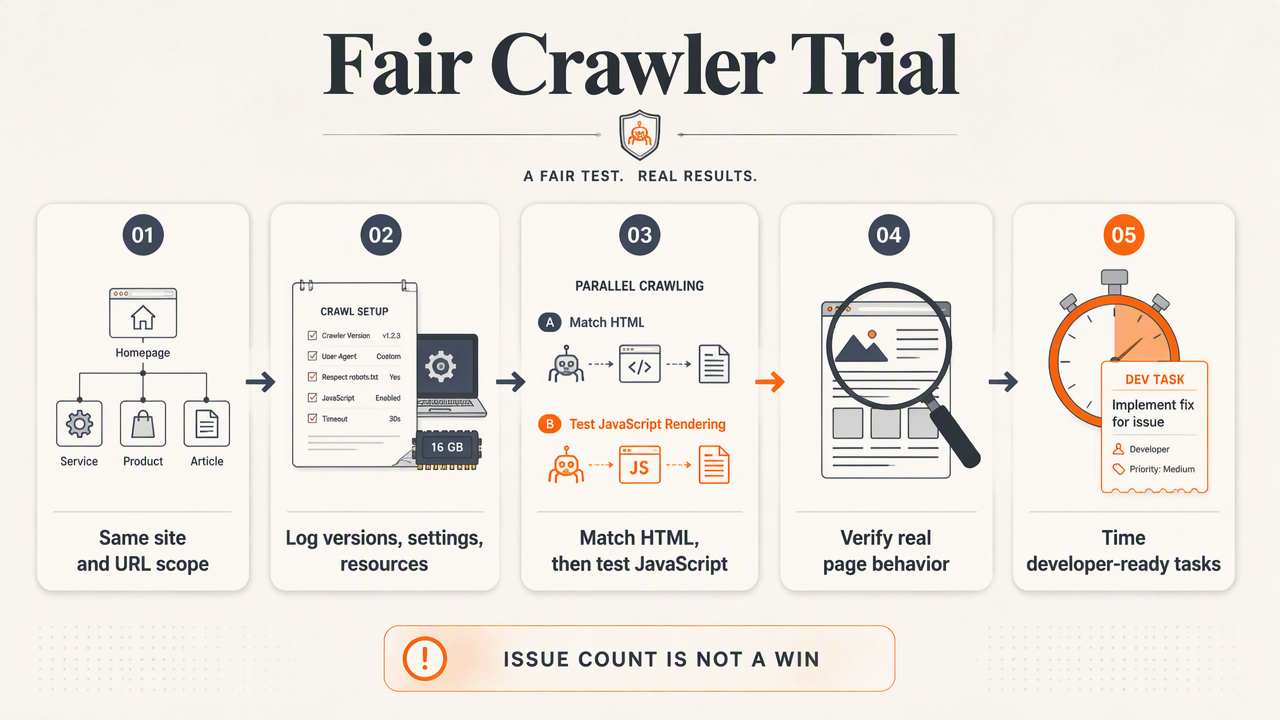
- Record versions, editions, settings, and available computing resources.
- Run matched HTML crawls, then a separate JavaScript test.
- Check findings against actual page behavior.
- Time the work required to produce developer-ready tasks.
This protocol measures practical usefulness without treating a larger issue count as an automatic win.
Document one website and matching crawl settings
A fair trial uses one authorized website with representative page types: a homepage, service or category pages, detail pages, and editorial content. For an online store, include products and categories rather than testing only the homepage.
The following is a proposed test fixture, not a reported experiment. On a staging site, include a broken internal link, a redirected link, a page without a title, and two pages sharing a title. Keep a separate answer sheet describing each condition.
Record these settings before either crawl:
- Starting URL, included subdomains, and excluded paths.
- Crawl limits, user agent, speed settings, and robots handling.
- Rendering mode, authentication, and sitemap inputs.
- Tool version, plan, operating system, and machine resources.
For catalog-specific priorities, the guide to ecommerce SEO for small online stores provides useful context for choosing representative pages.
Test JavaScript visibility separately from HTML
JavaScript testing should establish what each evaluated edition actually sees. Rendering support, limits, and settings should be confirmed before purchase rather than inferred from a general product comparison.
Choose a page where scripts add visible text or internal links. Save its initial HTML and browser-rendered output, then check whether each crawler captures the expected content under the selected settings.
Document the rendering configuration and any waiting behavior. If results differ, investigate the setup before judging the tool. Access restrictions or loading behavior can affect what an audit captures.
Measure findings through one complete handoff
Reporting effort should be tested by turning the same verified finding into a developer task in each workflow. Require an affected URL, evidence, a proposed correction, an owner, and a retest condition.
Record active minutes spent configuring, reviewing, and writing the task separately from crawl runtime. This produces a useful comparison even when both crawlers find the same issue.
Which tool fits the team's skills and budget?
The better-value crawler is the one that matches the operator's skills and recurring workload. Current subscription quotes matter, but a small team's real cost also includes setup, interpretation, reporting, computing resources, and developer coordination. A lower license price doesn't establish lower total effort.
Who should pick which crawler?
Choose Screaming Frog when a technical operator wants direct access to crawl data, custom extraction, or command-line automation. The fit is especially strong when findings already flow into spreadsheets or an established engineering process.
Choose Sitebulb when the audit owner needs guided explanations and stakeholders need understandable findings. Evaluate its cloud option separately when shared access or machine-independent crawling matters.
Delay buying both until a repeated task justifies the overlap. One clearly owned workflow usually provides a better starting point than two subscriptions without an audit schedule.
Build a total-effort estimate before purchase
A practical budget review combines the current commercial quote with observations from the trial. Published prices aren't included here because verified 2026 amounts weren't supplied.
- Confirm the required edition, licenses, billing period, and limits.
- Estimate monthly audits and active staff hours per audit.
- Include reporting, storage, computing, and review needs.
- Compare the cost of delivering one accepted remediation plan.
A local service business should also weigh technical auditing against other visibility work. Local SEO on a small-business budget helps frame that allocation without assuming every business needs frequent full-site crawls.
The useful output is an accepted action plan, not a folder of exports.
How Earlyseo fits the audit workflow
Earlyseo fits this decision as a broader SEO planning resource, alongside the specialist crawler chosen for technical analysis. Its developer-led team resource provides a relevant next step for teams connecting SEO priorities with engineering work. Crawler selection remains a separate evaluation based on the matched trial.
Connect technical findings to business priorities
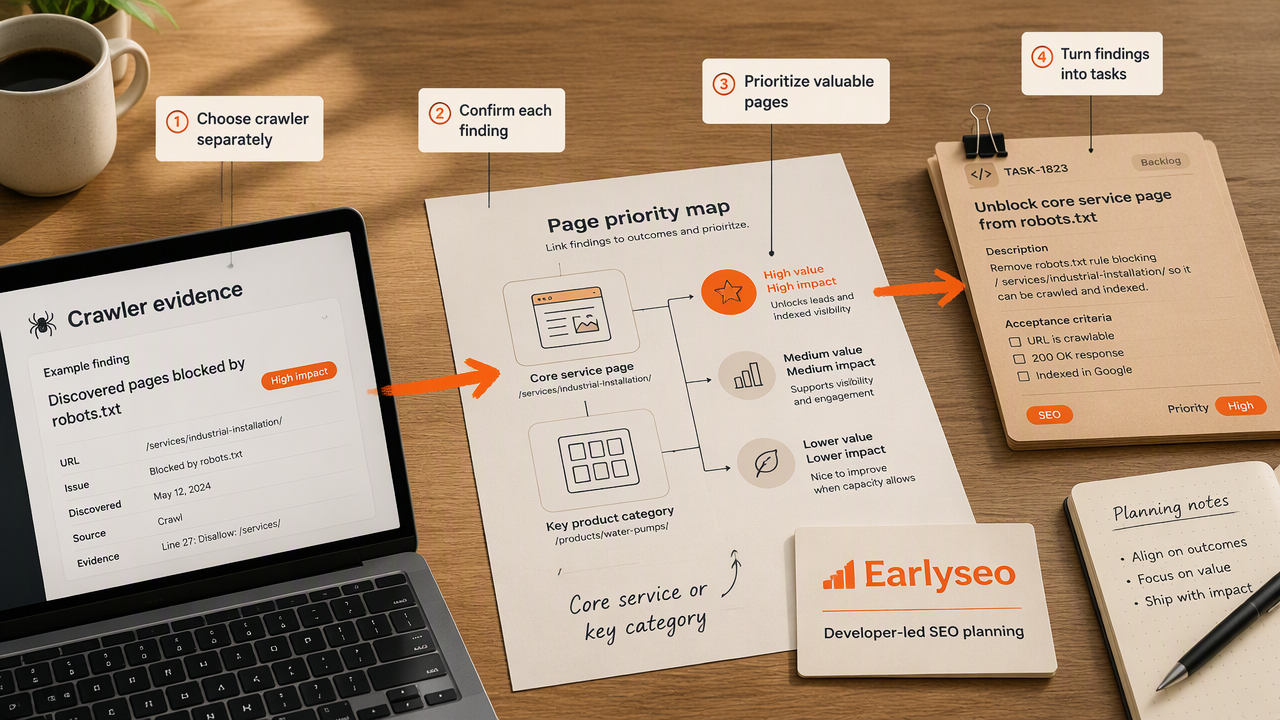
A useful audit plan connects each confirmed finding to the pages and outcomes that matter most. For a startup, that might mean a core service page. For an online store, it might mean a category that supports an important product range.
The crawler supplies evidence; the team's planning process determines sequencing. A small batch of clearly scoped work is easier to assign and verify than an undifferentiated issue list.
- Identify the affected page group and business purpose.
- Assign a named owner and an agreed completion date.
- Define the evidence needed to confirm the change.
- Schedule a focused recrawl after deployment.
For catalog-led businesses, this small-store ecommerce SEO guide offers educational follow-up beyond technical crawling. Teams can also visit earlyseo.com when reviewing the wider SEO plan.
FAQ: practical crawler buying questions
Small-team crawler decisions usually turn on available expertise, reporting needs, and the workload expected after the first audit.
Is Screaming Frog or Sitebulb better for beginners?
Sitebulb is generally the more natural starting point when guided issue explanations are the priority. Screaming Frog fits beginners who have technical support or want to work directly with crawl data. A short trial should test whether the operator can explain one finding accurately and turn it into a useful task.
Can a small team use both tools?
A small team can use both when each serves a distinct recurring purpose, such as detailed extraction in one workflow and stakeholder-facing interpretation in another. The extra subscription should have a specific job. Buying both simply to collect more findings can add review work without establishing clearer priorities.
Does a JavaScript-heavy website change the recommendation?
A JavaScript-heavy website makes rendering evaluation essential rather than automatically favoring either crawler. The selected edition and configuration must capture important content and links reliably. Teams should compare crawl output with browser-rendered pages, document settings, and investigate differences before committing to a license.
Conclusion
For Screaming Frog vs Sitebulb for small teams, the next step is a matched trial: one website, documented settings, and one developer-ready task from each tool. Select the workflow that produces accurate, usable findings with manageable staff effort. Then use Earlyseo as a starting point for connecting that technical work with the broader SEO plan, and schedule the first remediation review.