TL;DR
Use a 301 redirect for a permanent URL change and a 302 redirect when the original page will return. The choice signals which URL should remain in search results, rather than creating an automatic ranking penalty. Map equivalent pages, update internal links, and test each redirect before launch.
A permanent move needs a permanent signal; a temporary detour doesn't. The practical answer to 301 vs 302 redirects for SEO is straightforward: use 301 when a page has permanently moved and 302 when its original address should remain the long-term home. For businesses changing product URLs, merging service pages, or rebuilding websites in 2026, the harder task is choosing the right destination and keeping every signal consistent.
URL redirection: A technique that sends a browser or crawler from one URL to another.
301 redirect: An HTTP response indicating a permanent move.
302 redirect: An HTTP response indicating a temporary move.
Table of Contents
What is the difference between 301 and 302 redirects?
The difference between 301 and 302 redirects is the intended duration of the move: a 301 identifies a permanent replacement, while a 302 identifies a temporary destination. Both send visitors elsewhere, but they give search engines different signals about which URL should represent the content over time.
Status-code decision table
The correct code follows the business intent, not a blanket rule that every redirect should be permanent.
| Decision | 301 redirect | 302 redirect |
|---|---|---|
| Intended duration | Permanent | Temporary |
| Original URL's future | Replaced by the destination | Expected to return |
| Search signal | Strong signal favoring the destination as canonical | Weaker signal favoring a canonical change |
| Typical business use | Domain move or permanent URL rename | Short campaign or temporary replacement |
| Best planning question | Has the old address been retired? | Will the original page return? |
Google's redirect documentation distinguishes permanent redirects as strong canonical signals and temporary redirects as weak signals. Canonical means the representative URL Google selects for indexing.
The status code isn't the only evidence available. Page content, internal links, sitemaps, and other signals also help search engines understand the relationship between addresses.
Choose the redirect that describes the actual move. A 302 isn't automatically bad for SEO, and a 301 doesn't guarantee rankings.
When should a business use each redirect?
A business should use a 301 redirect when an address is permanently replaced and a 302 redirect when the original address is expected to return. The choice should follow the page's planned future, not the campaign's importance or a general preference for one status code.
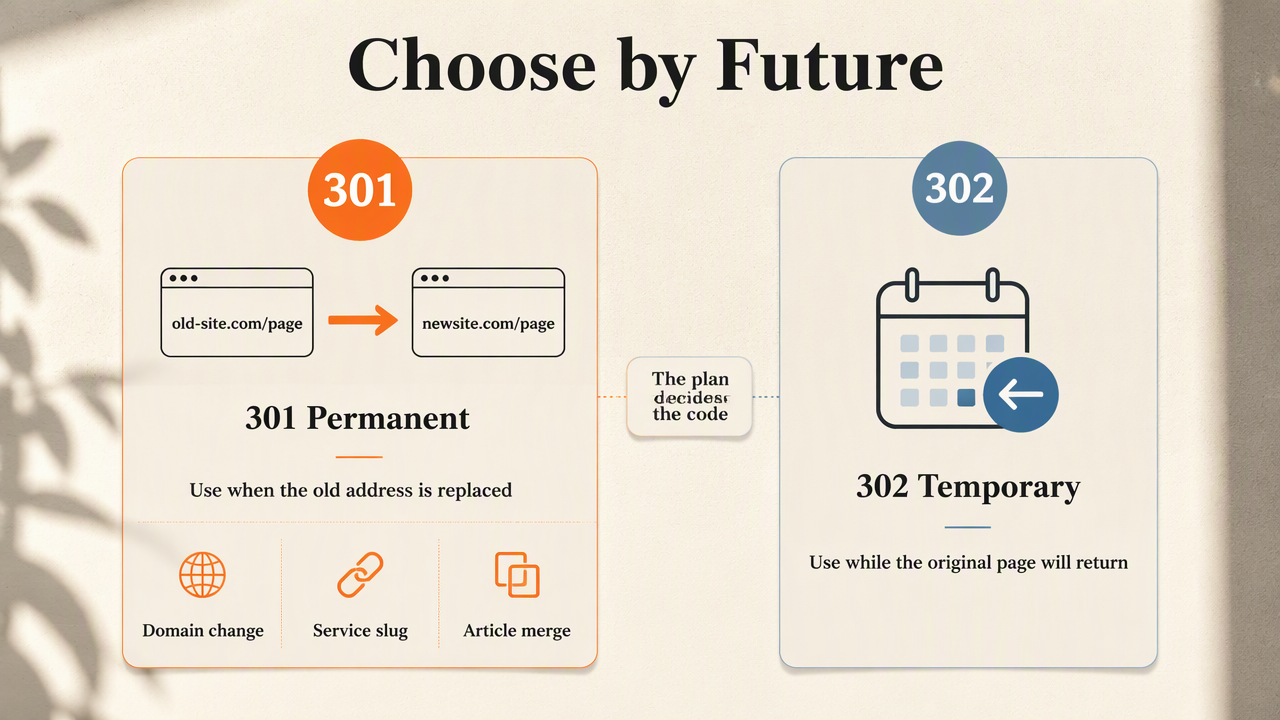
Permanent moves: domains, services, and product URLs
Permanent redirects suit changes that establish a new lasting address. Examples include moving from an old domain to a new domain, changing a service-page slug, or merging overlapping articles into one stronger resource.
- Domain change: Map each old page to its equivalent on the new domain.
- Service consolidation: Send retired service pages to a page that genuinely covers those services.
- Product URL rename: Redirect the previous product address to the same product's new URL.
For example, a retailer changing /products/red-mug-old to /products/red-mug would normally use a 301. The product remains the same; its address changes.
A website migration SEO checklist provides useful follow-up planning for changes involving many URLs.
Temporary moves: campaigns and short-term substitutions
Temporary redirects suit situations where the source URL retains a clear future purpose. A business might temporarily direct an event page to a registration page, then restore the original event information after registration closes.
The plan should record:
- The original URL and temporary destination.
- The reason for the detour.
- The owner responsible for restoring the page.
- A review date or clear end condition.
A sold-out product doesn't automatically need a redirect. Keeping its page available with availability information and relevant alternatives may better serve shoppers. Broader e-commerce SEO guidance helps connect URL decisions with product-page strategy.
How should redirects be implemented and checked?
Redirect implementation should start with a URL map and end with checks of both HTTP responses and search performance.
- Inventory the affected URLs.
- Match each source to a relevant destination.
- Select the permanent or temporary status.
- Configure server-side redirect rules.
- Update supporting links and sitemaps.
- Test responses and monitor indexing.
Build a destination map before changing rules
A destination map gives every redirect a documented purpose before deployment. A simple spreadsheet can contain the source URL, destination URL, status code, reason, owner, and review date.
Relevance matters more than convenience. An old plumbing-repair page should lead to the replacement plumbing-repair page, not an unrelated homepage. If no equivalent resource exists, a normal not-found response may be more appropriate than a forced redirect.
For permanent moves, update navigation, contextual links, and sitemap entries to the destination. That avoids asking crawlers and visitors to take an unnecessary detour. An internal linking strategy helps keep these changes consistent across a growing site.
Inspect the response, not just the browser result
A browser reaching the expected page doesn't prove that the correct status code was returned. Browser developer tools or an HTTP header check such as curl -I https://example.com/old-page can reveal the response and its Location header.
Check that:
- The source returns the intended
301or302response. - The destination loads successfully and contains the expected content.
- The rule doesn't create a loop.
- The redirect goes directly to the final destination where possible.
- Important query parameters are handled intentionally.
Permanent browser caching can make changed rules harder to inspect. Testing with an uncached request helps separate the current server response from a previously stored browser response.
Monitor indexing alongside business outcomes
Redirect monitoring should track which pages appear in search and whether visitors still complete valuable actions. Google Search Console's URL Inspection and indexing reports can support checks of important source and destination URLs.
A status code alone doesn't determine the outcome of a migration. Changed content, missing pages, blocked crawling, and altered navigation can affect performance too. Record the launch date and compare destination-page impressions, clicks, and conversions without assuming every fluctuation comes from the redirect type.
Keep the redirect map available for later releases. It becomes especially useful when another redesign changes the same addresses.
How Earlyseo fits redirect planning
Earlyseo fits redirect planning as part of the broader work of organizing content and SEO activity around a website change. A useful workflow connects the URL map with decisions about which pages to retain, consolidate, refresh, or publish next.
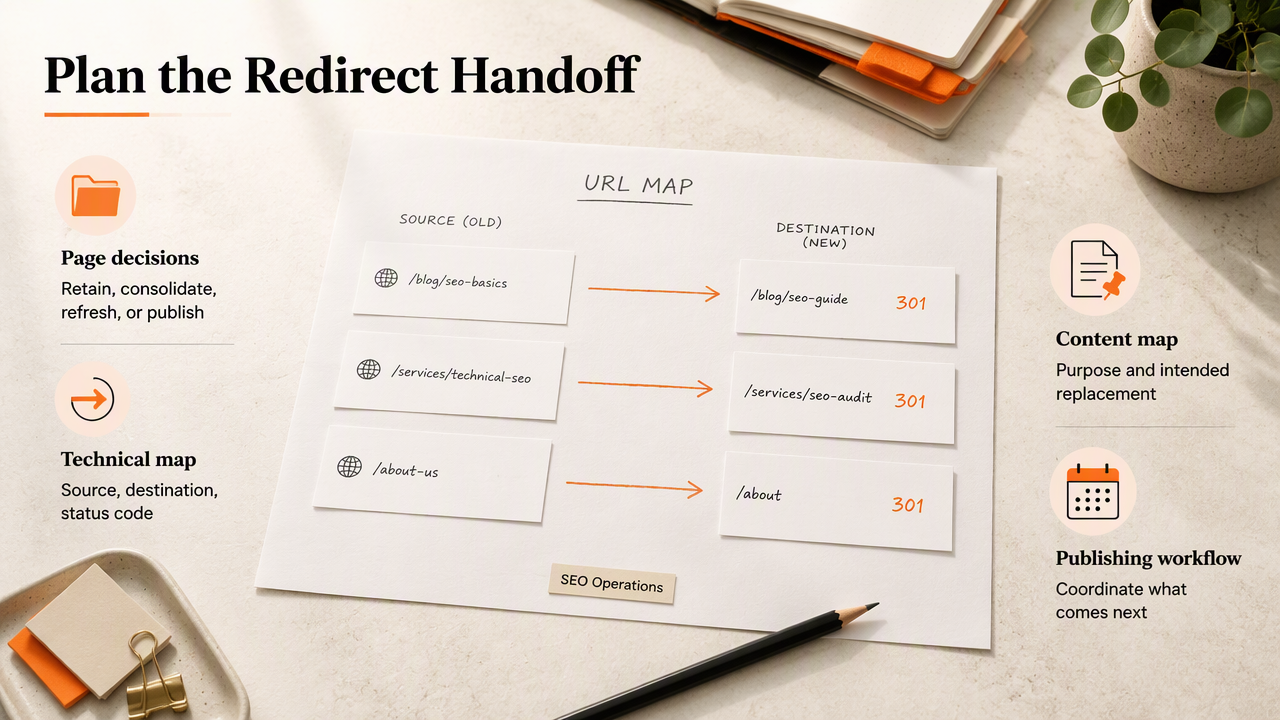
Connect URL decisions with the content plan
The SEO operations feature is a relevant starting point for teams considering Earlyseo alongside their publishing workflow. Redirect planning benefits from a shared record of each page's purpose and its intended replacement.
A practical handoff should include three items:
- Technical mapping: Source, destination, and status code.
- Content mapping: The topic and search intent each destination serves.
- Release ownership: The person approving publication and the person checking implementation.
The 90-day SEO sprint offers a related planning resource for organizing follow-up work. Teams evaluating the platform can visit earlyseo.com to review how it fits their wider SEO process.
FAQ: Redirect decisions that need extra context
Redirect edge cases are best resolved by separating the HTTP instruction from the page's long-term purpose.
Can a 301 redirect be reversed?
A 301 redirect can be reversed by changing the server configuration and restoring the original page. Permanent describes the instruction's meaning, not an irreversible technical action. However, cached responses and search engines' existing understanding may take time to change, so a planned short-term move should normally use a temporary redirect instead.
How long can a 302 redirect stay active?
A 302 redirect has no universal SEO expiration date that determines when it becomes unsuitable. Its duration should match a genuine temporary need. If the business decides that the destination is now the permanent home, the redirect should be updated accordingly rather than relying on search engines to infer a changed intention.
Should every deleted page redirect to the homepage?
Deleted pages shouldn't automatically redirect to the homepage because that destination often doesn't satisfy the original request. A relevant replacement is the better choice when one exists. When content has been removed without a suitable replacement, returning a 404 or 410 response can communicate that situation more accurately than an unrelated redirect.
Are JavaScript redirects equivalent to HTTP redirects?
JavaScript redirects aren't identical to server-side HTTP redirects because they depend on script processing rather than an immediate HTTP redirect response. Google can process JavaScript redirects, but server-side redirects are the clearer choice when available. Businesses should confirm how their hosting platform or content management system actually implements the selected redirect.
Conclusion
The right redirect reflects the page's future: permanent replacement or temporary detour. Before the next URL change, assign an owner to build the mapping sheet, confirm destination relevance, and test the returned status codes. Then schedule an indexing review after launch. For the surrounding content and publishing plan, Earlyseo provides a relevant next stop for teams organizing their SEO work.