TL;DR
Compare source HTML, browser-rendered HTML, and Google's inspected page before changing a JavaScript framework. Prioritize accessible content, crawlable links, and consistent indexing directives; use server-side or static rendering where critical content needs a dependable HTML baseline.
A page that looks complete in a browser isn't proof that Google can index its content. The most useful seo tips for javascript rendering problems start with evidence: what the server returns, what JavaScript adds, and what Google actually sees. For startups, local businesses, and online stores, this comparison helps separate technical fixes from content decisions.
JavaScript rendering: The process of executing JavaScript to build or update a page's content and structure. JavaScript SEO: Making that content discoverable, renderable, and eligible for indexing by search engines.
Table of Contents
What causes JavaScript rendering problems in SEO?
JavaScript rendering problems in SEO occur when scripts prevent search engines from accessing or reliably assembling important page content. Common causes include inaccessible resources, execution errors, and content that requires interaction. However, an unindexed page doesn't automatically indicate a rendering failure: crawl access, rendering, and indexing are separate diagnostic stages.
Separate access, rendering, and indexing
The first job is identifying which stage needs attention, rather than labeling every missing URL a JavaScript issue.
- Crawl access: Can Google fetch the page and required resources? Check HTTP responses,
robots.txt, authentication, and firewall rules. - Rendering: Can scripts execute and expose the main content? Check script requests, API responses, and runtime errors.
- Indexing: Does the accessible, rendered page qualify for inclusion? Check
noindex, canonical signals, duplication, and content usefulness.
A product page with visible descriptions but an unintended noindex directive has an indexing configuration issue. A page returning only a loading shell because its content API fails has a rendering issue.
Successful rendering makes content available for evaluation; it doesn't guarantee indexing or rankings.
Make essential content independent of interaction
Search-critical content should appear without a click, scroll, login, or consent choice. Descriptions, service details, and navigation links need a dependable loading path.
Progressive enhancement: A design strategy that provides basic content and functionality first, then adds richer features for capable browsers. Applied to SEO, it means a useful page remains available before optional JavaScript enhancements run. The Search Atlas JavaScript SEO guide provides related background on JavaScript processing and auditing.
How can source and rendered HTML reveal the cause?
Diagnose JavaScript rendering problems by comparing the same URL across three views:
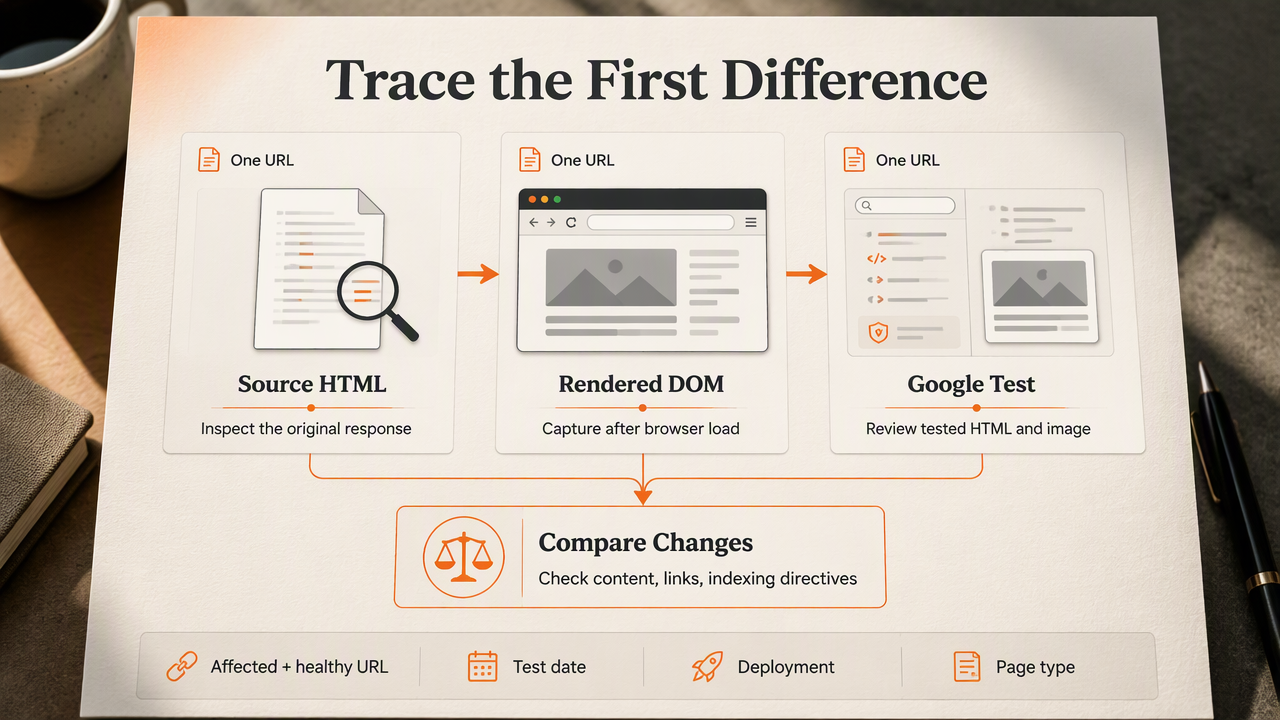
- Save the server's source HTML.
- Capture the browser's rendered DOM after loading.
- Inspect Google's tested HTML and screenshot.
- Compare content, links, and indexing directives.
- Investigate the first meaningful difference before selecting a fix.
Build a repeatable three-view check
Choose one affected URL and one healthy URL using the same template. Record the test date, deployment version, and page type so later comparisons remain useful.
Source HTML: Use View Source or an HTTP client to inspect the original response. Search for the title, main heading, product description, canonical tag, robots directive, and internal links.
Browser-rendered HTML: Use the browser's Elements panel to inspect the DOM after scripts run. The Network and Console panels help identify unavailable assets, unsuccessful API requests, or exceptions.
Google's inspected page: In Google Search Console, run URL Inspection and a live test where available. Examine tested HTML, the screenshot, and resource details. Compare the live result with information about the indexed version; they can reflect different moments.
Interpret differences without overreacting
Content absent from source HTML but present in both rendered views indicates client-side dependence, not necessarily an immediate indexing failure. Content present in the browser but absent from Google's tested HTML needs closer investigation of resources, timing, and interaction requirements.
A screenshot alone isn't enough. Text may appear below the captured viewport, while an apparently complete screenshot can hide incorrect canonical or robots signals.
The strongest diagnosis names the missing element, the view where it disappears, and the dependency responsible.
Which fixes match each rendering symptom?
The right fix targets the specific dependency or signal that differs between the source, browser, and Google-tested page. A framework migration shouldn't be the default response. Start with resource access, executable scripts, accessible content, and consistent directives, then consider changing how critical HTML is delivered.
Match observable symptoms to practical fixes
| Symptom | Likely area to investigate | Practical fix |
|---|---|---|
| Main content remains a loading shell | API requests or script execution | Repair the dependency; deliver essential content in initial HTML where practical |
| Browser shows text that Google's test omits | Interaction, timing, or resource access | Remove interaction requirements and inspect failed resources |
| Navigation uses click handlers without link URLs | Link discovery | Use <a href="..."> links for indexable destinations |
| Source and rendered robots directives conflict | Metadata generation | Produce consistent indexing directives in the server response |
Unknown routes return a normal page with status 200 |
Routing and status handling | Return an appropriate 404 or 410 for missing content |
| Correct content points to an unrelated canonical | Canonical configuration | Align the canonical with the intended indexable URL |
For navigation changes, an internal linking strategy helps connect technically crawlable links with useful page relationships.
Choose server rendering without rebuilding everything
Server-side rendering, or SSR: Generates HTML on the server for a request. Static rendering: Generates HTML ahead of requests. Client-side rendering, or CSR: Builds substantial page content through browser-executed JavaScript.
SSR or static rendering can provide a stronger baseline for product descriptions, service pages, and editorial content. Interactive filters, carts, and account controls can still use JavaScript. Next.js, created by Vercel, supports React applications with server-side and static rendering, but adopting a framework alone doesn't ensure correct SEO implementation.
For stores, prioritize indexable product and category templates rather than every interface state. Broader ecommerce SEO guidance helps determine which pages deserve that attention. Dynamic rendering for bots isn't a preferred long-term architecture; equivalent content delivery is easier to maintain without a separate bot-specific version.
How should rendering fixes be verified and maintained?
Verify JavaScript rendering fixes through a repeatable release check:
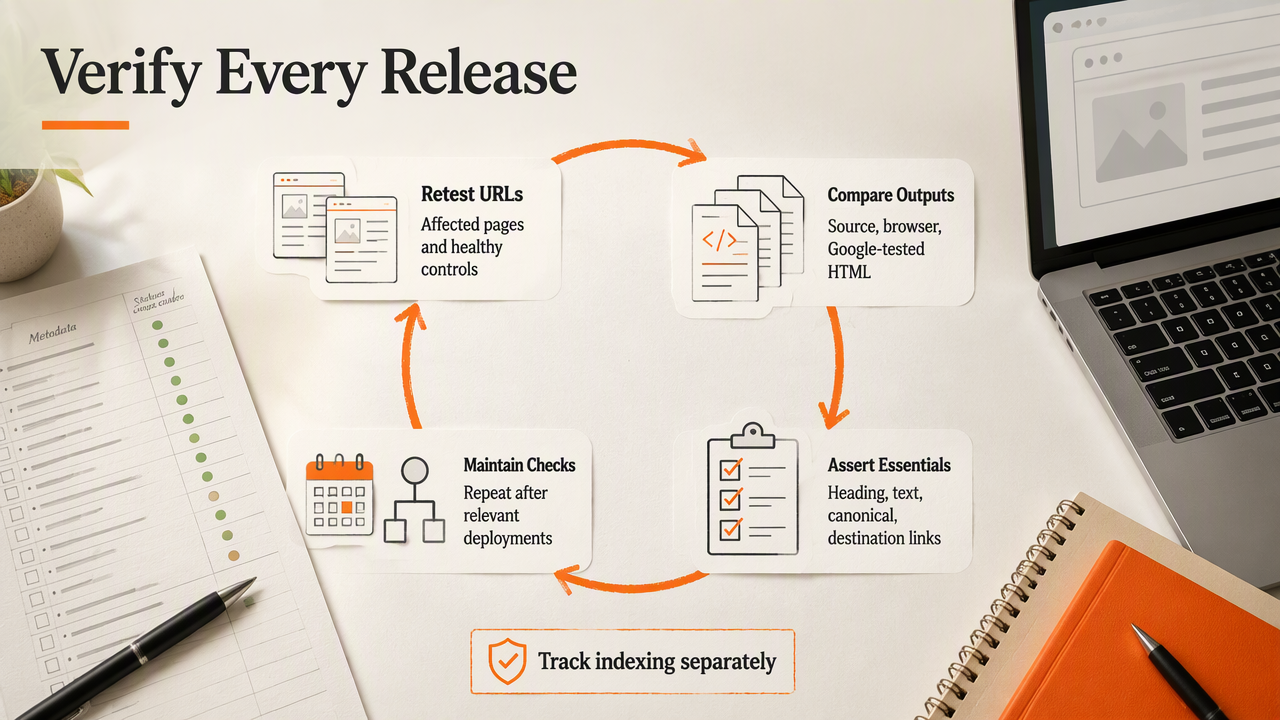
- Retest affected URLs and healthy controls.
- Compare source, browser, and Google-tested HTML.
- Confirm content, links, metadata, and status codes.
- Check representative templates and languages.
- Track subsequent indexing separately from the live test.
- Repeat checks after relevant deployments.
Turn successful fixes into regression checks
A durable check records expected elements rather than relying on visual impressions. Useful assertions include a nonempty main heading, visible descriptive text, a consistent canonical, and working destination links.
- Test a product, category, article, and service page when those templates exist.
- Include translated routes if locale selection changes content delivery.
- Check direct URL loads as well as navigation inside the application.
- Repeat after changes to routing, consent tools, dependencies, or caching.
A website migration checklist adds useful controls when deployments also change URLs or templates.
How Earlyseo fits the ongoing SEO workflow
Earlyseo fits the planning and follow-up stage, where verified technical changes become part of a repeatable SEO routine. Teams can connect template checks, content priorities, and reporting through an SEO operations workflow.
The useful handoff is concrete: an affected URL, expected content, test evidence, an assigned owner, and a verification date. Developers can handle implementation while marketing teams organize publishing priorities around pages with confirmed access and rendering.
Frequently asked questions about JavaScript SEO
JavaScript SEO decisions depend on observable page behavior, not the framework name alone.
Can Google index pages that use client-side rendering?
Google can render JavaScript and index client-rendered content, but successful execution depends on accessible resources and suitable implementation. Critical text shouldn't require interaction or private session state. The useful test is whether Google's inspected HTML contains the intended content, links, and metadata, rather than whether a browser loads the page correctly.
Does server-side rendering guarantee better rankings?
Server-side rendering can make essential content available in the initial HTML, reducing dependence on client execution. Rankings still depend on factors beyond delivery, including relevance, content quality, and indexing signals. SSR also needs correct status codes, canonical tags, and crawl access; it doesn't replace ordinary technical SEO or useful content.
How long does indexing take after a rendering fix?
A rendering fix doesn't create a predictable indexing deadline. A live inspection can verify the current response, while the indexed version may still reflect an earlier crawl. Teams should document the deployment date, confirm the corrected page, request indexing where appropriate, and monitor Search Console rather than promise a fixed turnaround.
Live-test success and index inclusion are separate milestones.
Conclusion
Effective seo tips for javascript rendering problems follow a simple order: compare evidence, identify the affected stage, apply a targeted fix, and verify representative templates. A documented test makes the next deployment easier to evaluate.
For an organized next step, add the verified fixes to a 90-day SEO sprint. Teams can explore Earlyseo for the broader content workflow and visit earlyseo.com when planning ongoing publishing priorities.