TL;DR
Spreadsheets still work for small SEO plans with one owner, light content volume, and simple reporting. SEO task management software becomes the better choice when work needs repeatable workflows, approvals, briefs, reporting, and visibility across campaigns.
Execution problems, not strategy gaps, usually slow SEO growth once keyword research, content ideas, and technical fixes start piling up. The comparison of SEO task management software vs spreadsheets matters because both can track tasks, but only one is built for recurring SEO workflows, ownership, and reporting at scale.
Task management: Task management is the process of planning, testing, tracking, and reporting work through its lifecycle, according to the Wikipedia definition provided in the research data.
Spreadsheets are familiar, cheap, and flexible. Software adds structure, automation, permissions, and workflow visibility. The right choice depends less on company size and more on how many campaigns, stakeholders, content assets, and deadlines sit inside the SEO process.
Table of Contents
What is the real difference between SEO task management software and spreadsheets?
SEO task management software organizes SEO work as workflows, while spreadsheets organize SEO work as rows, columns, and manual updates. A spreadsheet can track a task list, but dedicated software connects tasks to briefs, approvals, owners, recurring processes, content status, and performance checkpoints.
A spreadsheet usually starts as a simple SEO tracker: keyword, page URL, task, owner, due date, and status. That setup works well when a founder or small team needs a shared view of work. Problems appear when the file becomes the system for content planning, technical fixes, agency communication, and reporting at once.
Project tools promoted in recent SERP results, including 2025 and 2026 competitor pages, focus on repeatable workflows, centralized assets, and visibility across campaigns. That shift reflects how SEO now works: content, technical SEO, internal links, local pages, and competitive updates need coordinated execution, not just a static checklist.
Side-by-side comparison for 2026 SEO teams
| Area | Spreadsheets | SEO task management software |
|---|---|---|
| Best use case | Small task lists and early planning | Multi-step SEO execution |
| Setup speed | Fast and familiar | Slower, but more structured |
| Cost | Often free or low cost | Usually paid monthly |
| Ownership | Manual assignee columns | Built-in owners, roles, and alerts |
| Content workflow | Status columns and comments | Briefs, drafts, approvals, publishing steps |
| Reporting | Manual filters and charts | Dashboards and recurring views |
| Risk | Version confusion and missed updates | Tool overhead if poorly configured |
| AI readiness | Limited context for automation | Better structured data for workflows |
Key insight: spreadsheets are planning surfaces; SEO task platforms are execution systems.
When is a spreadsheet enough for SEO work?
A spreadsheet is enough when SEO work has few owners, low publishing volume, simple deadlines, and limited reporting needs. It remains a practical starting point for founders, local businesses, and small stores that need visibility before investing in a dedicated operations layer.
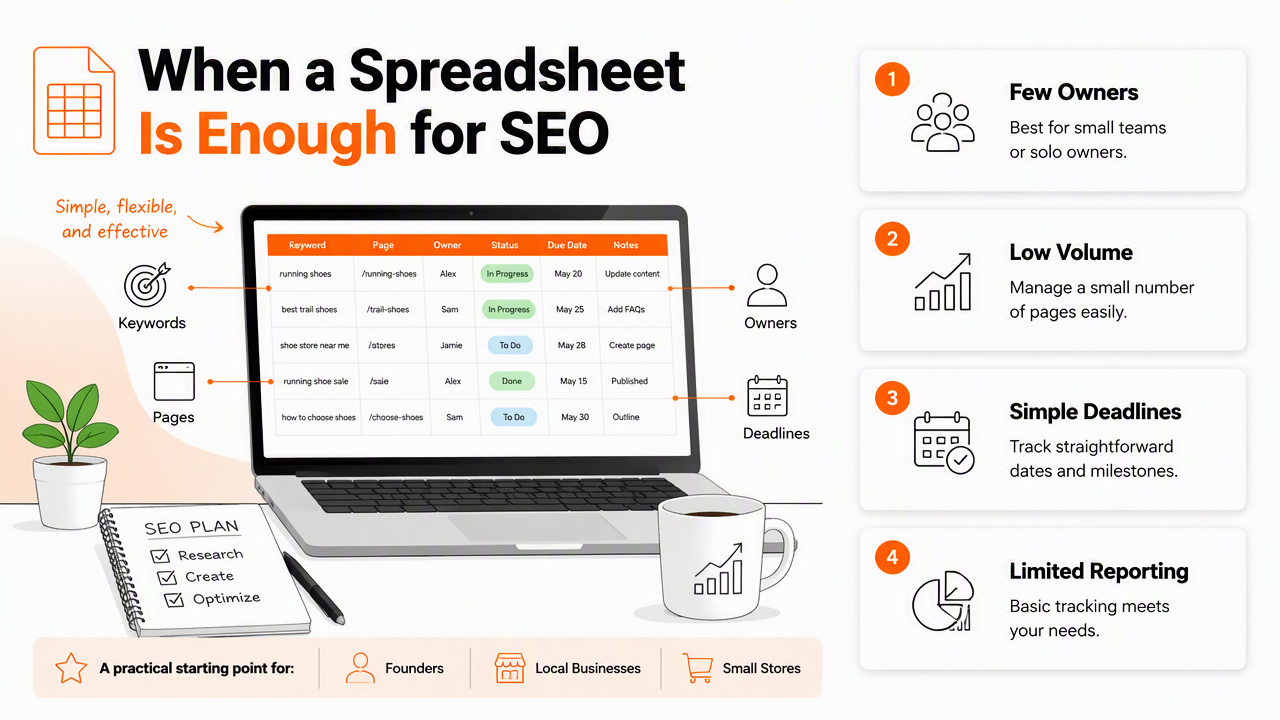
Spreadsheets are especially useful during the discovery phase. A new site can map target keywords, note page ideas, log technical fixes, and record content status without needing a formal process. For early-stage planning, a simple content strategy guide can sit beside a tracker, such as a content strategy for new blogs, until publishing volume grows.
The strongest spreadsheet use cases have one clear owner. A local business owner tracking service pages, Google Business Profile tasks, citations, and blog ideas may not need complex software. A small ecommerce store can also manage early category-page improvements before moving into a deeper Shopify SEO playbook.
Spreadsheet signals that the setup is still healthy
- One person owns the SEO plan.
- Fewer than 20 active SEO tasks are open at once.
- Content production happens monthly, not weekly.
- Reporting is needed occasionally, not every week.
- No agency, contractor, or approval chain is involved.
- Technical SEO tasks are simple and easy to verify.
A spreadsheet also works when experimentation matters more than process. Early SEO often needs fast edits, quick page tests, and rough prioritization. A lightweight tracker keeps the team from overbuilding operations before organic traffic proves which pages deserve more effort.
Research outside SEO still supports the value of reducing process burden. A 2022 workplace review by Souchet, Lourdeaux, and Pagani examined mental overload as part of workplace risk research, which makes a practical point for SEO operations: tools should reduce cognitive load, not add another layer of busywork (Virtual Reality, 2022).
When does SEO task management software become necessary?
SEO task management software becomes necessary when SEO work needs repeatable workflows, shared accountability, approvals, reporting, and campaign visibility across multiple people. The trigger is usually complexity, not headcount.
A growing marketing team may have writers, editors, designers, developers, and founders touching the same organic growth plan. A spreadsheet can show that a blog post is "in progress," but it rarely shows whether the brief is approved, the draft is blocked, internal links are assigned, metadata is ready, and publication is scheduled.
Dedicated platforms become more useful when workflows repeat. A 90-day SEO sprint, for example, often needs keyword validation, content briefs, production, technical cleanup, internal linking, and performance review. Teams following a 90-day SEO sprint usually benefit from task dependencies and status views that a spreadsheet can imitate only with careful manual upkeep.
Upgrade triggers by team type
| Team type | Spreadsheet is enough when | Software is better when |
|---|---|---|
| Startup founder | One founder tracks a short SEO backlog | Contractors, deadlines, and publishing cadence appear |
| Small business | Local pages and basic blog tasks are simple | Reviews, service pages, citations, and content need coordination |
| Marketing manager | A small content calendar is manageable | Campaigns span writers, designers, and developers |
| Ecommerce team | Category fixes are occasional | Product, collection, and blog SEO run in parallel |
| Agency | One client has light needs | Multiple clients need briefs, approvals, and reporting |
Missed handoffs are a strong warning sign. If tasks depend on memory, chat threads, or file names, the spreadsheet is no longer acting as a source of truth.
Agencies feel this faster than in-house teams. Client SEO needs briefs, status updates, publishing proof, and reporting trails. A dedicated agency SEO content workflow gives account managers a clearer operating model than a shared sheet with dozens of tabs.
How Earlyseo handles SEO task workflows
The Earlyseo platform is built for SEO operations, so tasks connect to strategy, briefs, content execution, and performance-focused workflows instead of sitting in an isolated tracker. That matters when a team wants fewer handoffs between planning and publishing.
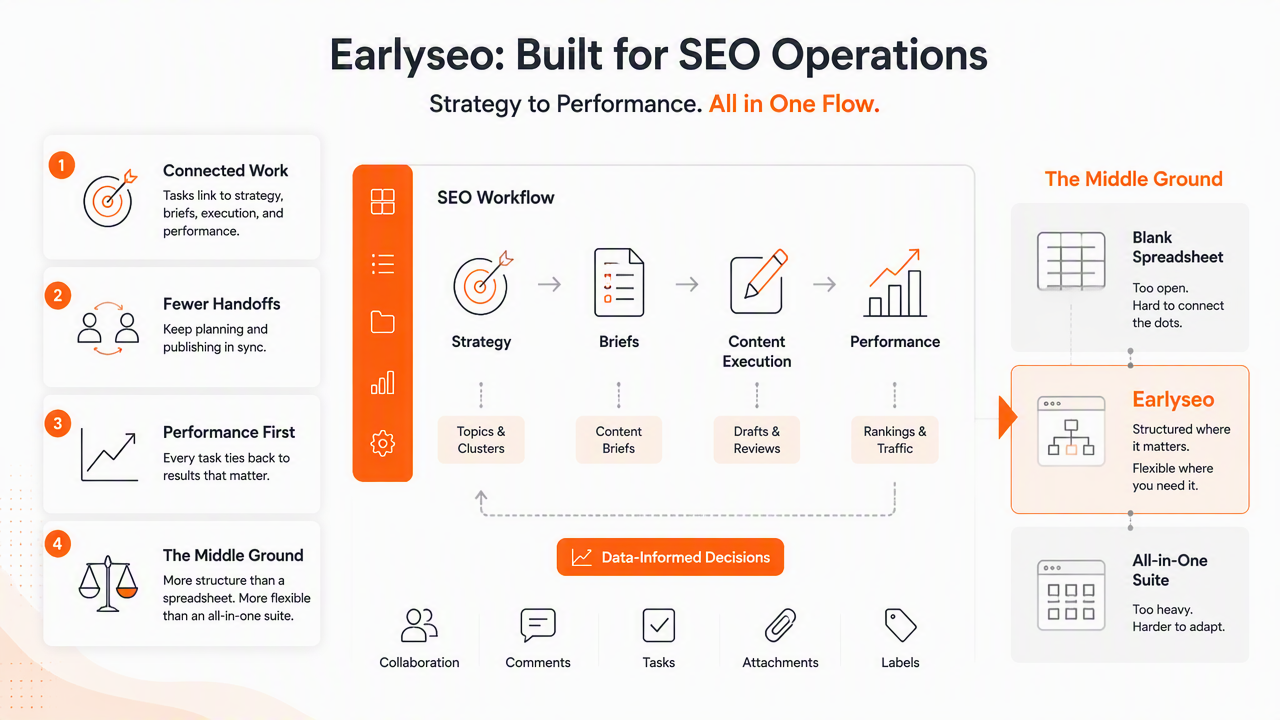
Earlyseo fits the middle ground between a blank spreadsheet and a generic project management system. Generic tools can manage tasks well, but SEO teams still need keyword context, competitor awareness, content briefs, internal linking, and publishing priorities. With Earlyseo, those pieces can live closer to the actual work.
For teams creating repeatable pages, content briefs are often the turning point. A spreadsheet may list "write landing page," while an SEO workflow should include search intent, competitor gaps, title direction, internal links, and required sections. A reusable SEO content brief template helps standardize that step before writing starts.
Workflow fit across common SEO jobs
| SEO job | Spreadsheet approach | Earlyseo-style workflow |
|---|---|---|
| Keyword planning | Keyword rows and volume notes | Prioritized topics tied to execution |
| Content production | Status column | Brief, draft, review, publish, improve |
| Competitor research | Manual notes | Competitor-aware content planning |
| Internal linking | Separate tab | Links assigned as part of page workflow |
| Reporting | Manual exports | Work tied to SEO outcomes |
Earlyseo is also useful when teams create content in more than one market or language. International SEO adds translation, localization, hreflang checks, and market-specific search intent. A dedicated international SEO workflow keeps that work from becoming a maze of tabs.
AI is raising the bar for structured SEO operations. A 2022 ACM paper by Ganguli, Hernandez, and Lovitt studied predictability and surprise in large generative models, a reminder that AI systems perform best when inputs are structured and context is clear (ACM FAccT, 2022). In SEO, cleaner task data gives human teams and AI assistants better context.
Who should pick which option?
The best choice depends on workflow maturity, not software preference. A spreadsheet should be the default for simple visibility; SEO task management software should become the default when repeatability, accountability, and reporting carry real business value.
Founders often should start with a spreadsheet for speed, then move once content production becomes consistent. Marketing managers should switch sooner if campaign visibility affects revenue or leadership reporting. Agencies should treat software as operating infrastructure, especially when approvals and client communication slow delivery.
Decision table for founders, marketers, and agencies
| Decision maker | Pick spreadsheets when | Pick software when | Practical recommendation |
|---|---|---|---|
| Founder | SEO is still experimental | Contractors or weekly publishing start | Start simple, upgrade after repeatable traction |
| Small business owner | Local SEO tasks are few | Service pages, reviews, and content pile up | Use a spreadsheet until follow-up work gets missed |
| Marketing manager | One campaign is active | Several channels and stakeholders touch SEO | Use software to protect deadlines and reporting |
| Ecommerce owner | Product SEO is occasional | Collections, blogs, and technical fixes overlap | Use software once SEO affects merchandising cadence |
| Agency lead | One client needs light tracking | Multiple clients need proof of progress | Use software as the client delivery system |
Practical rule: if the same SEO process repeats three times, it deserves a workflow rather than another copied spreadsheet tab.
The shift does not need to happen all at once. A healthy migration moves active work first, then templates, then reporting. Archive old sheets instead of importing every stale task. That keeps the new system clean from day one.
Training matters too. A 2024 systematic review by Alharbi, Nurfianti, and Mullen examined simulation-based learning in nursing education and found the topic strong enough for systematic review because structured practice affects skills development (BMC Medical Education, 2024). SEO teams can apply the same lesson: new workflow tools need practice, examples, and clear operating rules.
FAQ: SEO task management software vs spreadsheets
SEO teams usually ask the same practical questions before switching from a sheet to software. The answers below focus on workload, cost, and implementation risk.
Is Google Sheets still good for SEO task management?
Google Sheets is still good for SEO task management when the work is small, simple, and owned by one person. It works well for keyword lists, content calendars, and early technical SEO logs. It becomes weaker when approvals, recurring tasks, reporting, and multi-person workflows need reliable follow-through.
What is the biggest risk of staying in spreadsheets too long?
The biggest risk is losing operational clarity. Tasks may exist, but ownership, blockers, priority, and status often become unclear across tabs and comments. SEO work then depends on memory and meetings instead of a trusted workflow. That slows publishing, technical fixes, and content refreshes.
Does SEO software replace project management tools?
SEO software does not always replace project management tools. Some teams keep company-wide tools for general work and use SEO-specific software for content workflows, keyword priorities, briefs, and optimization tasks. The best setup depends on whether SEO needs its own structured process or only simple task visibility.
When should an agency stop using spreadsheets for client SEO?
An agency should stop using spreadsheets once client delivery requires repeatable briefs, approval trails, publishing calendars, and status reporting across accounts. Sheets can support early client work, but they often become hard to maintain when every account has different deadlines, blockers, and reporting expectations.
Conclusion
The right answer in SEO task management software vs spreadsheets is not "software always wins." A spreadsheet is the right starting point for lean SEO planning, especially when work is simple and one person owns it. Software becomes the better choice when SEO turns into a repeatable production system with briefs, approvals, internal links, reporting, and multiple contributors.
The next step is simple: audit the active SEO backlog, count repeated workflows, and identify where handoffs fail. If the same delays keep showing up, the team has outgrown the sheet. Earlyseo can support that move with SEO operations built around execution, and more workflow guidance is available on earlyseo.com.