TL;DR
Give each archive page a stable URL, a self-referencing canonical, and crawlable links to neighboring pages. Keep valuable articles accessible beyond pagination, then test deep archive pages before applying indexing restrictions.
A paginated archive should work as a path to older content, not just a numbered navigation bar. The most useful seo optimization tips for paginated archives focus on three things: distinct URLs, sensible canonical tags, and links search engines can follow.
For startups and small businesses publishing regularly, those details help keep a growing library accessible. Earlyseo fits into the broader content-planning workflow; the archive template remains an implementation task for the website team.
Paginated archive: A blog, resource library, or category listing divided into separate pages, each displaying part of the collection.
Table of Contents
What makes a paginated archive SEO-friendly?
An SEO-friendly paginated archive gives each meaningful listing page a distinct URL, exposes navigation through ordinary links, and connects visitors to individual articles. Its purpose is discovery: search engines and readers should be able to reach older resources without depending on search boxes, button clicks, or endless scrolling.
Treat archive pages as different slices of one collection
Page two usually contains different article links from page one. A shared heading or template doesn't make those pages identical. Canonical decisions should reflect the main content and linked resources, not merely repeated navigation.
Useful terminology keeps implementation discussions precise:
- Canonical URL: The preferred URL declared for a page; search engines can evaluate other signals before selecting it.
- Crawlable link: A standard anchor element with an
hrefpointing to a destination. - Indexability: Whether a page is eligible for inclusion in search results.
- Crawl depth: The number of links needed to reach a page from a starting point.
Separate numbered archives from filtering systems
A numbered blog archive typically follows one ordering rule, such as newest first. Filtering combines choices such as topic, author, or format and can generate many additional URLs. These need separate decisions rather than one blanket pagination rule.
A content strategy for a new blog should establish useful topic collections before adding filters. The archive can then support those collections without becoming the site's only navigation system.
How should archive URLs and canonicals be configured?
Archive URLs and canonicals should identify each distinct page consistently:
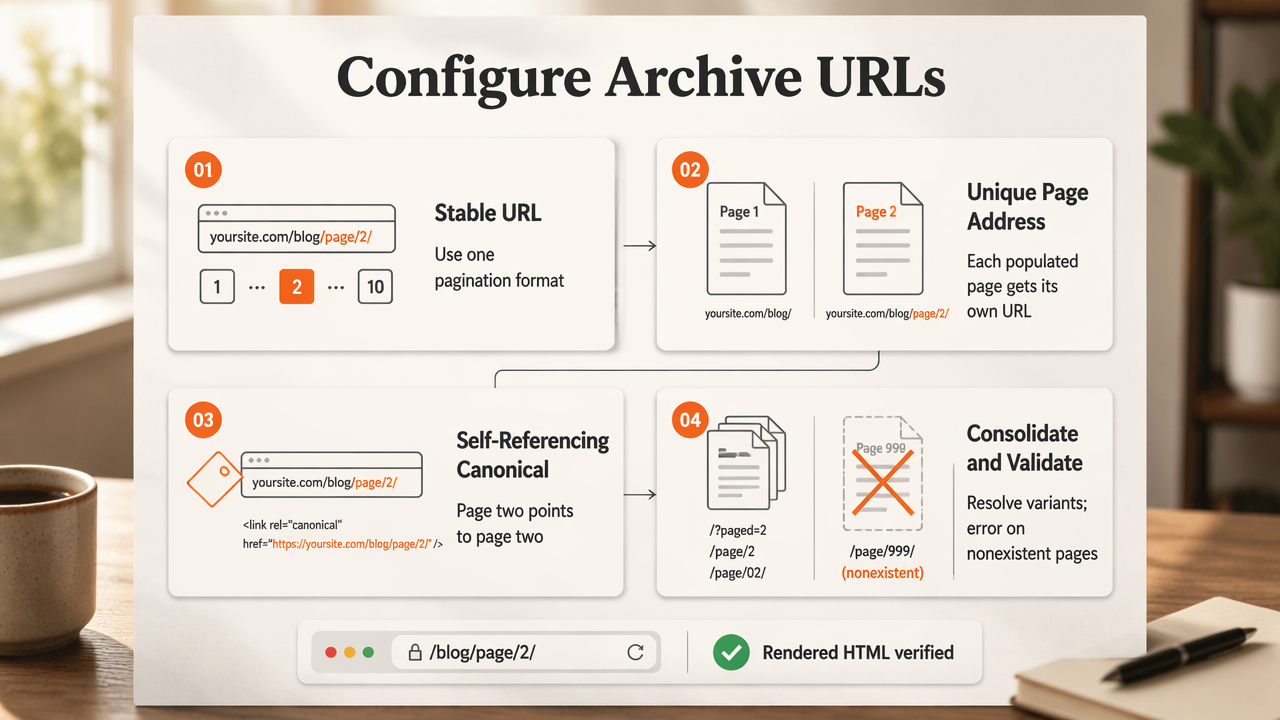
- Choose one stable pagination URL format.
- Give each populated page its own address.
- Declare that page's preferred URL in its canonical tag.
- Consolidate duplicate URL variants.
- Return an appropriate error for nonexistent pages.
- Verify the rendered HTML after deployment.
Annotated self-referencing canonical example
For an illustrative route such as /blog/page/2/, the canonical should normally identify page two, not the archive homepage. The following template token represents the full absolute URL of the current page; it must be replaced during rendering.
<!-- Page 2: insert its full preferred URL here -->
<link rel="canonical" href="{{absolute_page_url}}">
A self-referencing canonical doesn't guarantee indexing. It communicates the preferred address while allowing the page to remain a distinct part of the archive.
URL and indexing decisions by archive condition
Distinct article listings and duplicate URL variants call for different treatments.
| Archive condition | Recommended treatment | Reason |
|---|---|---|
| Populated page with different article links | Self-referencing canonical | Preserves the distinct listing |
| Alternate URL showing exactly the same listing | Redirect where practical, or canonicalize to the preferred URL | Consolidates duplicate addresses |
| First-page alias | Consolidate with the main archive URL | Keeps one preferred entry point |
| Page number beyond the collection | Return 404 |
Avoids an endless sequence of empty listings |
Don't canonicalize every page to page one merely because titles or introductions repeat. Also avoid blanket noindex rules for deeper pages when those pages provide useful discovery paths.
When changing URL formats, map existing addresses to their replacements rather than redirecting everything to the homepage. A website migration SEO checklist provides a useful framework for validating redirects and internal links.
How should pagination links support crawling?
Pagination links should let search engines discover archive pages without interacting with the interface:
- Render standard anchors with valid
hrefvalues. - Link to the previous and next available pages.
- Include useful numbered links and an archive entry link.
- Keep article links accessible in rendered HTML.
- Test navigation with JavaScript disabled.
Annotated crawlable navigation example
A page-two template can expose its neighbors through ordinary HTML. These paths illustrate a route pattern, not destinations on the publisher's website.
<nav aria-label="Blog archive pages">
 <!-- Link back to the first listing -->
 <a href="/blog/">Previous</a>
 <span aria-current="page">2</span>
 <!-- A real destination, not a click handler -->
 <a href="/blog/page/3/">Next</a>
</nav>
JavaScript can enhance this navigation, but the underlying links should remain usable. A load-more button can coexist with numbered URLs when each page can also load directly.
Google's current treatment of next and previous tags
Google doesn't use rel="next" and rel="prev" to identify pagination sequences. In 2026, those attributes aren't a substitute for crawlable links, distinct URLs, or correct canonicals. Existing attributes can remain for other consumers, but adding them isn't the core SEO fix.
Pagination works through discoverable page URLs and links, not through a special tag that merges the archive into one ranking page.
Give valuable articles shorter discovery paths
An article shouldn't depend solely on visitors reaching page 18. Relevant topic hubs, related-reading sections, and contextual links provide additional routes to evergreen resources.
A practical internal linking strategy can connect important articles from newer content. Numbered archives then serve as a complete browsing route rather than carrying the entire discovery workload.
How can teams audit paginated archives?
Teams can audit paginated archives by comparing the template's intended behavior with actual responses and rendered pages:
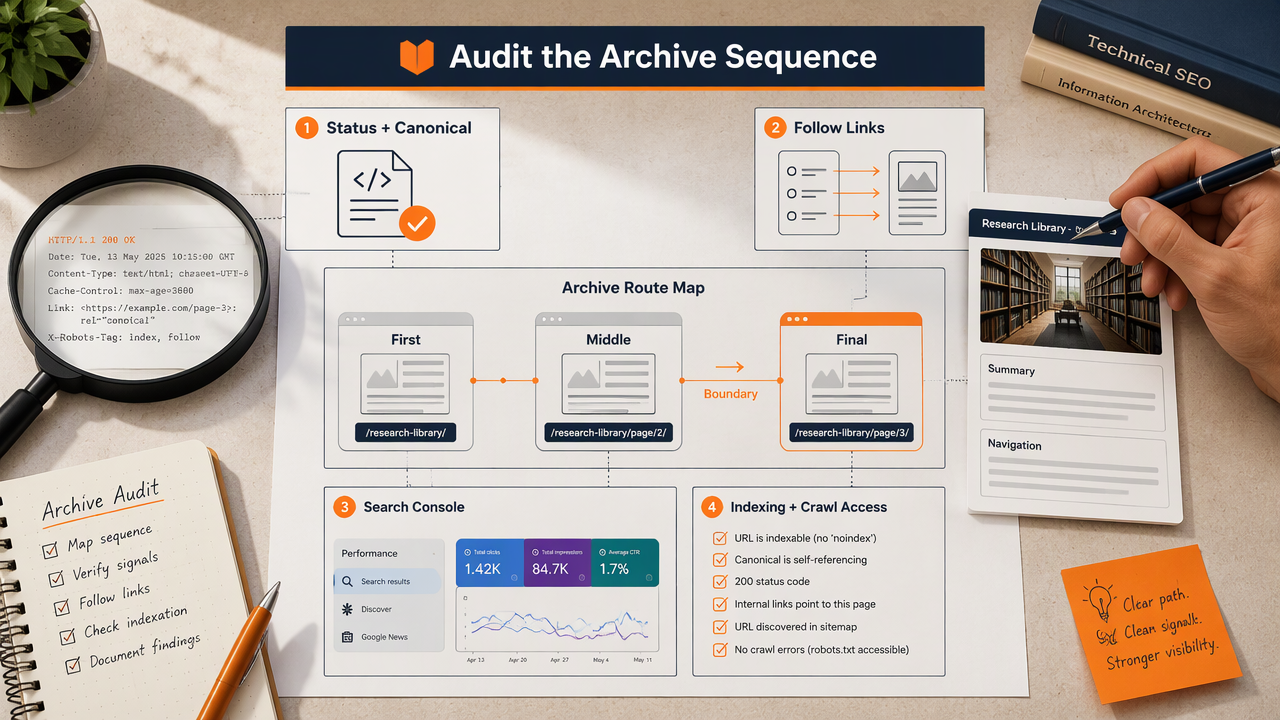
- Sample the first, middle, and final archive pages.
- Check status codes and canonical targets.
- Follow pagination and article links.
- Inspect indexing directives and crawl access.
- Review selected URLs in Google Search Console.
Check titles, content, and archive boundaries
Use descriptive titles such as Research Library - Page 3 so the sequence is clear. Keep article titles, concise summaries, and visible navigation useful; repeated introductory copy doesn't need to fill every page.
Test the boundary after the final populated page. Also test what happens when publishing a new article shifts older entries between pages. Individual article URLs should remain stable even when their archive positions change.
An Earlyseo workflow for ongoing archive maintenance
Earlyseo can sit alongside a documented publishing workflow, with archive checks assigned to the developer and content planning assigned to the marketing team. Its SEO operations offering is a relevant next step for organizing ongoing work, rather than treating pagination as a one-time project.
A recurring review can record the tested URLs, expected canonicals, navigation behavior, and implementation owner. That creates a clear handoff whenever the CMS template changes.
Troubleshooting table for archive templates
The fastest diagnosis starts with the observed symptom and one focused test.
| Symptom | First check | Practical correction |
|---|---|---|
| Deeper listings aren't discovered | Rendered pagination anchors | Add links with real destinations |
| Page two points canonically to page one | Canonical template output | Reference the current listing URL |
| Several URLs show the same page | Parameters and route aliases | Consolidate equivalent variants |
| Endless empty archive pages exist | Maximum page-number handling | Return 404 beyond the collection |
| Older articles lack internal links | Topic hubs and related content | Add relevant discovery paths |
A page missing from search results doesn't automatically indicate broken pagination. Separate crawl access, indexing eligibility, and search demand before changing the template.
FAQ: Archive pagination decisions
Archive pagination decisions should prioritize accessible content and consistent URL signals rather than attempts to make every listing rank.
Should every paginated archive page be indexed?
Not every archive page must appear in search results, but useful populated pages can remain indexable. Google's indexing choice is separate from technical eligibility. A blanket exclusion rule can complicate discovery, so teams should evaluate the archive's purpose and alternative links before restricting deeper listings.
Does infinite scroll replace numbered pagination?
Infinite scroll changes the browsing experience; it doesn't remove the need for discoverable URLs. A reliable implementation provides separately accessible pages beneath the scrolling interface. Each page should load its intended content directly, while ordinary links provide a route through the collection without requiring scroll-triggered actions.
How many articles should appear on each archive page?
No universal article count fits every archive. The choice should balance readable summaries, loading performance, and the number of pages required to browse the collection. Teams can test representative pages on mobile, keep the count consistent, and confirm that navigation remains clear as the library grows.
Conclusion
The strongest seo optimization tips for paginated archives become repeatable template checks: stable URLs, accurate canonicals, crawlable navigation, and useful routes to older articles.
Start with three sample pages and assign each implementation change an owner. Add those checks to a 90-day SEO sprint, then make them part of routine publishing reviews. For content planning alongside that technical work, explore Earlyseo at earlyseo.com.