TL;DR
Content decay automation works best when it combines ranking drops, impression loss, click decline, and freshness checks instead of relying on traffic alone. The practical move is to score pages, assign each URL a refresh action, and trigger updates before organic visibility falls too far.
Old pages rarely fail all at once; they usually fade while higher-priority campaigns get the attention. Content decay automation gives SEO teams a repeatable way to catch that fade early, decide the right fix, and keep useful pages earning search visibility. A 2026 SERP review for this topic found 82.4 million results, with leading competitor guides averaging 4,850 words, which shows a crowded field but also a gap for a sharper operating model. Earlyseo helps teams connect research, refresh planning, and content updates in one workflow instead of treating decay as a one-off cleanup project.
Table of Contents
What is content decay automation?
Content decay automation is the use of software rules, data connectors, and AI-assisted workflows to find pages losing organic performance and trigger the right update action. It tracks rankings, impressions, clicks, engagement, and freshness signals so teams can refresh, consolidate, relink, or retire pages before losses become harder to recover.
Content decay: the gradual decline of a once-performing page's organic traffic, search rankings, impressions, clicks, or engagement over time.
Automation: application software, in the end-user sense, that performs repeatable tasks such as monitoring, scoring, alerting, and assigning work without manual spreadsheet checks.
A decaying page is not always a bad page. Often, it is a useful page that has lost freshness, search intent fit, internal support, or competitive depth.
Decay usually appears in four patterns:
- Ranking decay: target queries move down over several weeks or months.
- Impression decay: Google shows the page less often, even before traffic falls.
- Click decay: impressions remain steady, but titles, snippets, or SERP features reduce clicks.
- Freshness decay: data, examples, screenshots, product details, or advice no longer match the current search result.
Automation matters because small teams cannot manually inspect every published URL each month. For startup founders, local businesses, e-commerce teams, and marketing managers, the goal is not publishing more content forever. The goal is maintaining pages that already earned some search trust.
Research on AI systems also supports a practical caution. The 2022 arXiv paper by Long Ouyang, Jeff Wu, and Xu Jiang on training language models to follow instructions with human feedback examined how models can better follow user intent. For SEO refreshes, that means AI can assist with drafts and diagnosis, but human review still protects accuracy, brand fit, and claims.
How does automation detect decaying pages?
Automation detects decaying pages by comparing current search performance against a baseline period and flagging URLs with sustained losses across rankings, impressions, clicks, and freshness. Strong systems avoid single-metric alarms because seasonality, tracking changes, and SERP layout shifts can make one number misleading.
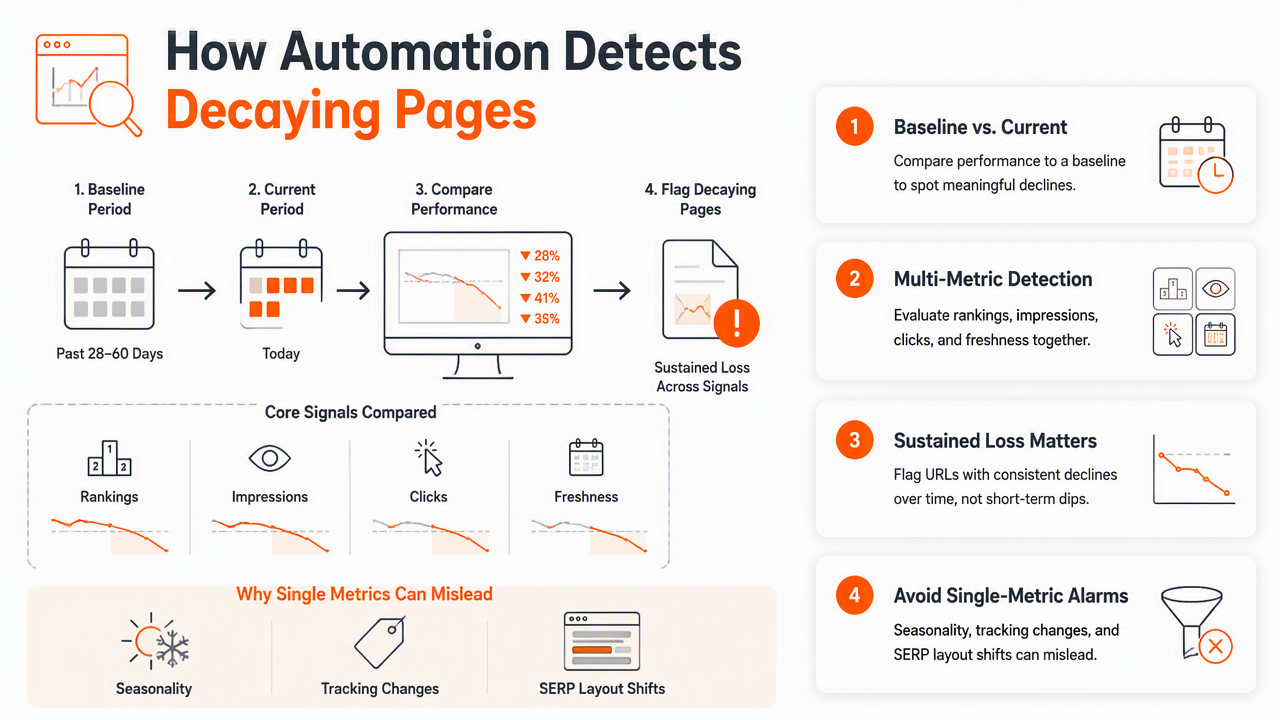
A practical setup pulls data from Google Search Console, analytics software, rank tracking, the CMS, and crawl tools. The system then scores every indexed URL on trend direction, business value, and update urgency.
Decay signal matrix for SEO teams
| Signal | What it means | Automation trigger | Best first response |
|---|---|---|---|
| Rankings down | Competitors or intent shifted | Average position drops across priority queries | Review SERP and update sections |
| Impressions down | Google is showing the page less | Query impressions decline across baseline | Expand topical coverage or improve relevance |
| Clicks down | SERP appeal or title fit weakened | CTR falls while impressions hold | Rewrite title, meta, intro, and snippet targets |
| Freshness gap | Page feels dated | Old dates, outdated examples, stale screenshots | Update facts, examples, and publication cues |
| Internal link loss | Page has less site support | Fewer contextual links from newer pages | Add internal links from related pages |
| Cannibalization | Multiple pages split intent | Two or more URLs rank for same query set | Merge, redirect, or clarify intent |
The best baseline depends on the site. A young blog may use the last 28 days versus the previous 28 days. A seasonal business may compare year over year. An e-commerce store may separate evergreen category pages from promotional articles.
A clean workflow usually follows five steps:
- Collect URL-level data from Search Console, analytics, rank tracking, and crawl reports.
- Calculate trend changes for clicks, impressions, average position, and indexed status.
- Tag page type such as blog post, service page, product category, guide, or local page.
- Score urgency using loss size, revenue value, ranking distance, and freshness risk.
- Create tasks for refresh, consolidation, internal linking, technical review, or pruning.
Teams building this from scratch can use a planning system such as the AI content planner to group topics and avoid refreshing pages in isolation. A decayed article often needs stronger cluster support, not just a rewritten first paragraph.
Which pages should be refreshed, merged, linked, or pruned?
The right content decay fix depends on whether the page still matches search intent, has unique value, and can realistically regain visibility. Automation should not send every declining URL into the same rewrite queue because some pages need consolidation, stronger internal links, or removal from the index.
A refresh is best when the page still has a clear audience and topic, but the content is thin, old, or less useful than current competitors. A merge is better when two pages overlap heavily. Internal linking helps when a useful URL lacks authority inside the site. Pruning fits pages with no demand, no links, and no business purpose.
Refresh decision tree for aging pages
| Automated finding | Decision | Action | Example |
|---|---|---|---|
| Rankings slipped, intent still matches | Rewrite | Update structure, examples, headings, and missing subtopics | A 2024 guide still ranking on page two |
| Impressions dropped, topic still valuable | Expand | Add related questions, comparisons, and current data | A SaaS article missing 2026 terminology |
| Clicks dropped, impressions stable | Improve SERP appeal | Rewrite title tag, meta description, and opening answer | A local page losing clicks to map results |
| Two URLs target same query | Consolidate | Merge strongest sections and redirect weaker URL | Two "SEO checklist" posts competing |
| Good page, weak internal support | Add links | Link from newer, relevant pages and hubs | An old guide not linked from new articles |
| No demand, no links, no conversions | Prune | Noindex, redirect, or remove after review | A discontinued product announcement |
Automation should recommend the action; humans should approve the final call when revenue, legal accuracy, or brand reputation is involved.
Several false positives deserve review before tasks are created:
- Seasonal drops for industries such as travel, tax, retail, and events.
- Tracking gaps caused by analytics migration or consent-banner changes.
- Intent shifts where Google now favors tools, videos, forums, or local packs.
- Temporary volatility after a core update or site migration.
- Product inventory changes that affect category demand.
For educational follow-up, a strong refresh brief should connect to broader planning. The guide to content strategy for new blogs and SEO helps teams avoid creating future pages that compete with existing URLs. A focused SEO content brief template also gives writers a repeatable structure for refresh assignments.
How Earlyseo handles the refresh workflow
Earlyseo handles the refresh workflow by combining decay detection with research-backed planning, competitor context, and human-curated content updates. The platform is designed for teams that need consistent SEO maintenance without turning every traffic dip into a manual audit.
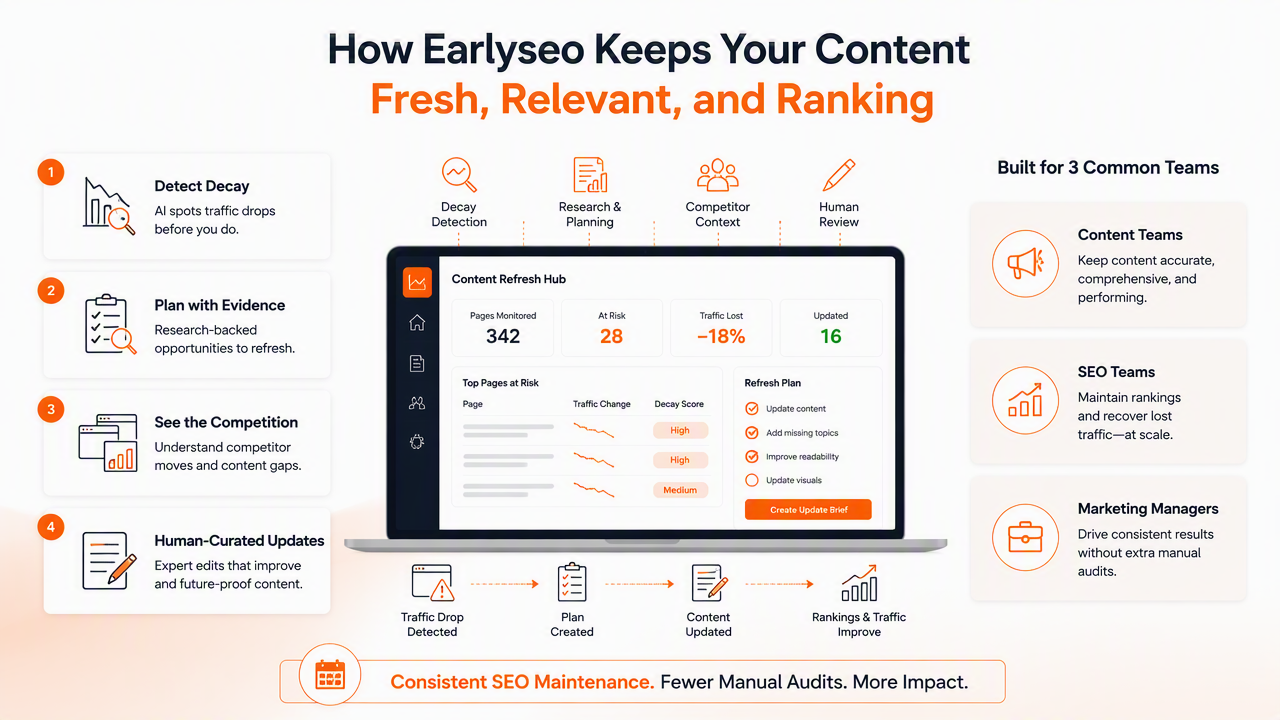
The Earlyseo platform fits three common situations: a founder with a small content library, a marketing manager maintaining dozens of blog posts, or an agency managing refresh work across clients. The workflow starts with URL review, then moves into prioritization and content planning. More on earlyseo.com explains how the system supports ongoing content operations.
Workflow stages from signal to published update
| Stage | What happens | Output |
|---|---|---|
| Detect | Pages are checked for loss patterns and freshness gaps | Shortlist of at-risk URLs |
| Diagnose | Search intent, competitors, and content gaps are reviewed | Reason for decline |
| Decide | Each URL receives a recommended action | Rewrite, merge, relink, prune, or monitor |
| Produce | Updated briefs and drafts are created | Refresh-ready content package |
| Review | Human checks improve accuracy and tone | Approved update |
| Measure | Performance is tracked after publishing | Recovery or next action |
Strong refreshes need evidence. The research-backed AI content workflow helps ground updates in current search patterns, while competitor-aware SEO content helps identify what newer ranking pages cover that an older page misses. For teams short on editing time, human-curated content service adds a quality layer before publishing.
What should teams expect in 2027?
Content maintenance will become more automated, but not fully hands-off. Search engines, AI Overviews, and answer engines increasingly reward pages that are current, clear, and easy to extract. That raises the value of structured definitions, comparison tables, FAQ blocks, and clean answer-first sections.
Software history suggests maintenance is normal, not a failure. The 2021 overview of the Q-Chem 5 package in The Journal of Chemical Physics examined ongoing software development across a complex scientific package. SEO content systems are far simpler, but the lesson applies: useful assets need versioning, updates, and review cycles.
By 2027, stronger teams will treat content like a managed product catalog. Pages will have owners, update dates, quality scores, and decision rules. Visit earlyseo.com when a repeatable refresh system becomes more useful than another disconnected audit spreadsheet.
FAQ
What is the fastest way to spot content decay?
The fastest way to spot decay is to compare URL-level Search Console data against a prior baseline and sort by lost clicks, lost impressions, and ranking drops. Pages with business value and multi-week losses should move to manual review first, especially when competitors have newer, richer content.
How often should decaying content be checked?
Most small and mid-sized sites should check decay monthly, while larger publishers and e-commerce stores may need weekly monitoring. High-value service pages, product categories, and lead-generation articles deserve tighter review cycles than low-priority news posts or temporary announcements.
Can AI rewrite old SEO pages automatically?
AI can draft updates, summarize competitor gaps, and suggest outlines, but automatic publishing is risky for claims, pricing, legal topics, medical content, and local details. A safer workflow uses AI for diagnosis and first drafts, then requires human approval before changes go live.
Is pruning bad for SEO?
Pruning is not bad when a page has no search demand, no useful links, no conversions, and no strategic purpose. The safest process reviews each URL, chooses between redirecting, noindexing, updating, or deleting, then monitors crawl behavior and traffic afterward.
Which metric matters most for content decay?
No single metric is enough. Clicks show traffic loss, impressions show visibility loss, rankings show competitive movement, and freshness shows whether the page still deserves trust. A combined score is more reliable than reacting to one temporary drop.
Conclusion
Content decay automation turns SEO maintenance into a repeatable operating system: detect the loss, diagnose the cause, choose the right action, publish the update, and measure recovery. The next practical step is to export the top 50 organic landing pages, score each one for clicks, impressions, rankings, and freshness, then assign every declining URL to rewrite, consolidate, relink, prune, or monitor. For teams ready to replace spreadsheet checks with a managed refresh workflow, Earlyseo gives that process a clear place to run.