TL;DR
Automated internal linking works best for small websites when software suggests contextual links, humans approve edge cases, and rules prevent repeated, irrelevant anchors. Small teams should start with crawl analysis, map priority pages, set anchor text limits, and review links monthly instead of adding links blindly.
Small websites often have a link equity problem before they have a traffic problem: useful pages exist, but crawlers and visitors do not have enough paths to find them. Automated internal linking for small websites solves that by finding relevant page-to-page connections faster than a manual spreadsheet can, while still requiring sensible rules, anchor variety, and periodic review. Earlyseo offers a practical way to manage this through its internal linking feature, especially for lean teams that need structure without building a full SEO department.
Table of Contents
What is automated internal linking for small websites?
Automated internal linking for small websites is the use of software to find, suggest, or place links between pages on the same domain based on topics, keywords, URLs, and site structure. The goal is to improve crawlability, distribute internal authority, and help readers move from supporting pages to priority pages without creating spammy link patterns.
Automated internal linking: a process where a tool scans website content, identifies relevant internal link opportunities, and suggests or inserts contextual links using rules set by the site owner.
Manual linking still matters. Automation simply removes the repetitive work of finding pages, matching topics, and checking whether a target page already has enough internal links.
Key insight: small websites do not need hundreds of links per page; they need clear paths from informational pages to the pages that matter most.
Core terms small teams should know
Internal linking becomes easier when the basic terms are clear.
- Source page: the page where the link is added.
- Target page: the page receiving the internal link.
- Anchor text: the clickable words used in the link.
- Crawl depth: the number of clicks needed to reach a page from the homepage.
- Topical cluster: a group of related pages covering one subject area.
A deeper guide to planning clusters and link paths is available in Earlyseo's article on internal linking strategy for SEO.
Why small sites benefit differently than large sites
Small websites usually have fewer pages, fewer backlinks, and less historical data than enterprise sites. That makes every internal link more visible in the site structure.
For a 25-page service site, one neglected pricing page or local landing page can sit too far from the homepage. For a 200-product store, category pages may need stronger links from buying guides, comparison posts, and best-seller collections.
Automation helps by showing gaps that are easy to miss during daily publishing.
How does automated internal linking work?
Automated internal linking works by crawling website pages, extracting topics or keywords, matching source pages with relevant target pages, and recommending anchor text based on content similarity. Better systems add guardrails, such as link limits, excluded pages, duplicate-anchor checks, and approval workflows, before links are published.
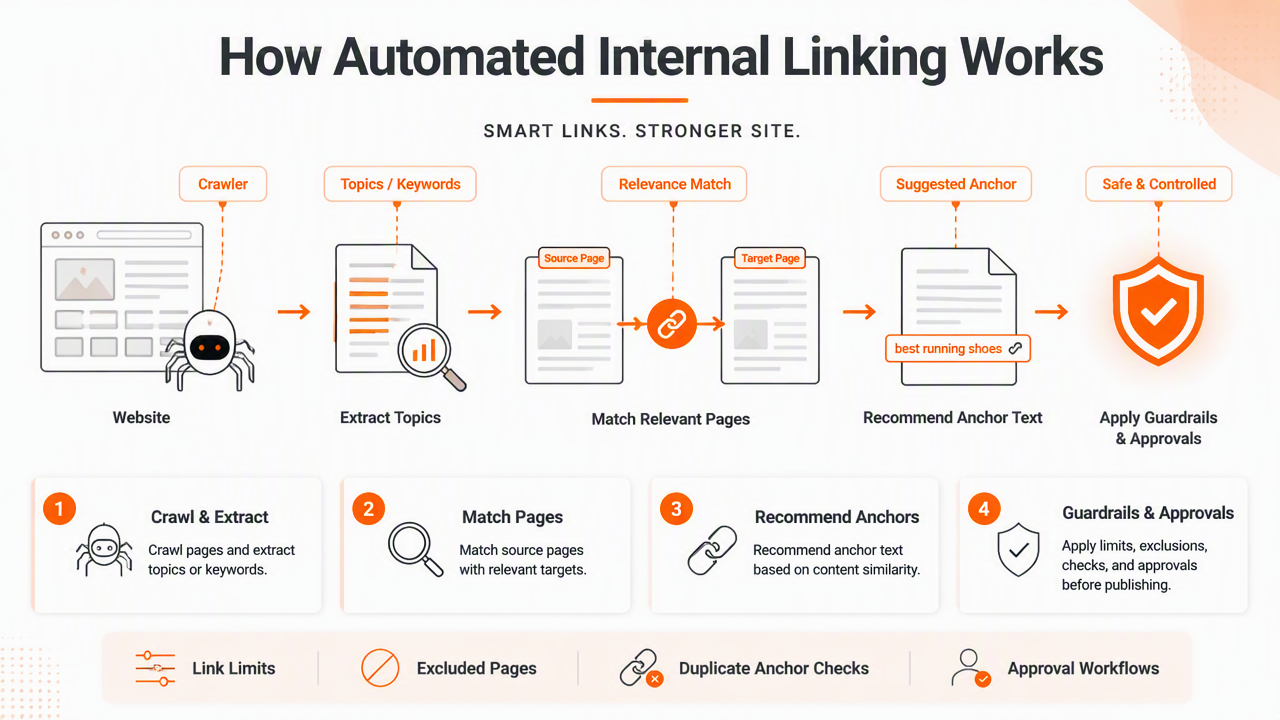
Most tools follow a simple sequence:
- Crawl the website and collect titles, headings, body text, URLs, and existing links.
- Identify important target pages, such as services, categories, guides, or product pages.
- Match related content using keywords, semantic similarity, or page templates.
- Suggest anchor text that appears naturally in the source page.
- Apply rules, such as maximum links per page or excluded anchors.
- Publish links automatically or send them for manual approval.
Some tools, including Surfer's Insert Internal Links feature, focus on content optimization workflows. Others, such as ClarityAutomate, present internal linking as a larger implementation and tracking system. WordPress plugins, including Automatic Internal Links by Pagup, often use focus keywords and custom rules to insert links inside posts.
Comparison of automation styles
Small teams should pick the lightest automation style that solves the actual bottleneck.
| Automation style | Best fit | Main strength | Main caution |
|---|---|---|---|
| Suggestion-only tools | Small service sites and blogs | Keeps human review in control | Slower than full auto-insertion |
| Rule-based plugins | WordPress sites with repeat keywords | Fast setup for predictable links | Can overuse exact-match anchors |
| Semantic link tools | Content-heavy blogs and stores | Finds topic-based connections | Needs review for commercial intent |
| Full implementation platforms | Growing sites with many pages | Handles discovery, deployment, and tracking | May be more than a tiny site needs |
The safest setup for a small website is usually suggestion-first automation. Human approval catches awkward anchors, thin pages, and links that might distract from a conversion goal.
How Earlyseo handles this
The Earlyseo platform is built for small teams that need clear SEO actions, not a long export full of vague tasks. Its linking workflow focuses on relevant opportunities, priority pages, and site structure, so a founder or marketing manager can act without spending hours in a crawler.
Before adding links, a site should also be checked for crawl issues, thin pages, and broken paths. Earlyseo's website analysis feature helps identify those structural problems before an internal linking push makes them more visible.
What rules prevent spammy internal links?
Spammy internal links are prevented by using relevance rules, varied anchor text, page-level link limits, excluded sections, and human review for high-value pages. Automation should support editorial judgment, not replace it. A link should make sense for the reader, match the source topic, and point to a genuinely useful next page.
A common mistake is treating internal links like a keyword insertion task. Search engines have become better at interpreting context, so exact-match repetition is less useful than a natural, descriptive link.
Safe rule: if the sentence would feel strange in a sales email or help article, the internal link probably needs a better anchor or a different target.
Safe anchor text guidelines
Anchor text should describe the destination without repeating the same phrase across every page.
- Use descriptive anchors, such as "local SEO checklist" or "product category guide."
- Mix partial-match anchors with branded, navigational, and natural phrases.
- Avoid stuffing the same commercial keyword into every article.
- Do not link every mention of a term on the same page.
- Keep anchors readable inside the sentence.
- Use image links sparingly and give them clear alt text when needed.
For new domains, internal linking should also be balanced with technical basics. Earlyseo's guide to SEO mistakes new websites make explains several problems that can weaken results before links have any chance to help.
Pages and sections to exclude
Not every page deserves automatic links. Login pages, cart pages, duplicate tag archives, legal pages, and thin announcement posts can clutter a link map.
A simple exclusion list should include:
privacy-policy,terms, and account pages.- Out-of-stock product pages unless they have replacements.
- Old campaign pages with no current value.
- Search result pages and filter URLs.
- Thank-you pages and checkout steps.
Research fields outside SEO also show the value of rules and reporting. The PRISMA 2020 guidance focuses on transparent review methods, while the STRING database 2023 paper describes structured association networks. Internal linking is simpler, but the lesson is similar: relationships become useful only when the rules behind them are clear.
How should small teams implement internal link automation?
Small teams should implement internal link automation by auditing the site first, choosing priority pages, setting anchor and placement rules, reviewing suggestions in batches, and measuring crawl and ranking changes over time. The process should start small, then expand after the first review cycle proves that the links are useful.
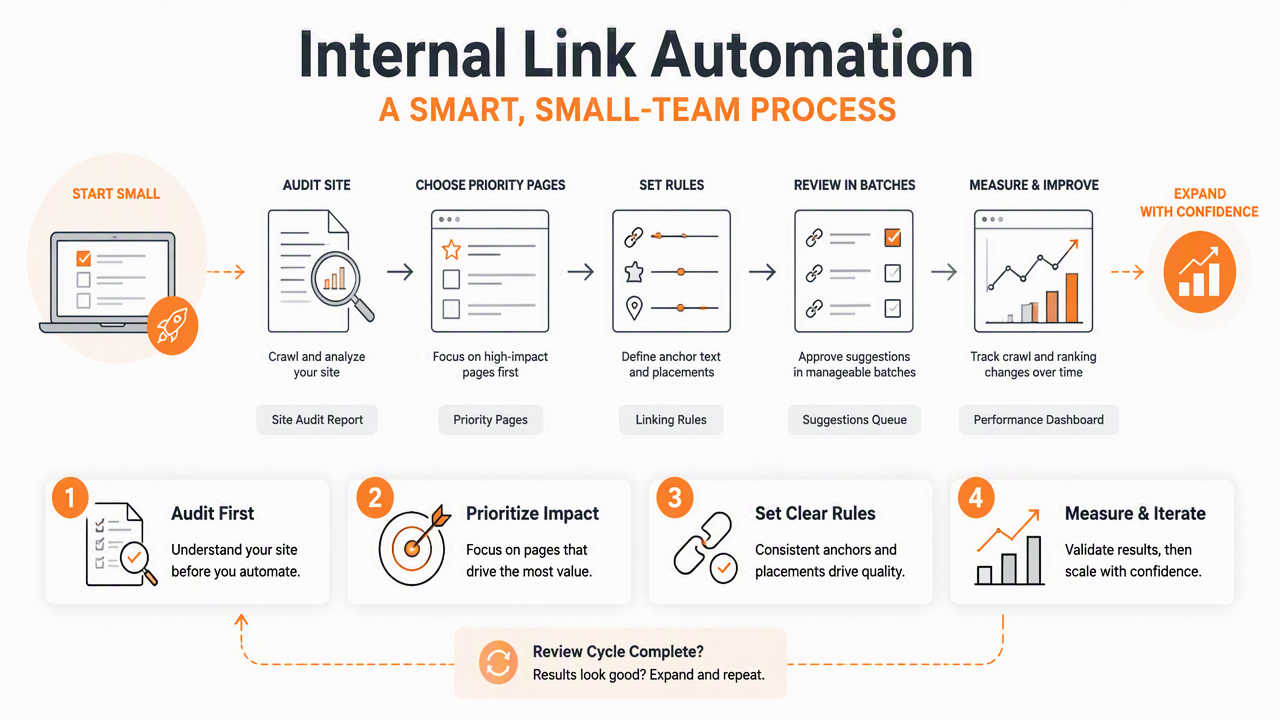
For small business SEO, internal links work best when tied to a clear business model. A local plumber may prioritize service pages and city pages. An online store may link from guides to categories and from categories to best-selling products. A SaaS startup may connect feature pages, comparison pages, and onboarding articles.
Implementation checklist
A practical rollout can be completed in one week for many small websites.
- Run a site crawl: find orphan pages, broken links, redirects, and pages buried too deep.
- Choose 5 to 10 priority targets: select money pages, category pages, or cornerstone guides.
- Group related pages: map blog posts, FAQs, and guides to those targets.
- Set link limits: cap new links per page to avoid clutter.
- Create anchor rules: allow partial-match and natural anchors, not only exact-match phrases.
- Review the first batch manually: approve only links that help the reader.
- Track changes monthly: watch indexation, rankings, crawl depth, and assisted conversions.
E-commerce teams can pair automation with category planning. Earlyseo's guide to ecommerce SEO for small online stores gives more context on how product, category, and guide pages support each other.
What to measure after links go live
Internal linking success should be judged by structure and behavior, not just rankings.
| Metric | What it shows | Good sign |
|---|---|---|
| Orphan pages | Pages with no internal links | Count decreases |
| Crawl depth | Click distance from key entry points | Priority pages move closer |
| Internal links to target pages | Support for business-critical URLs | Important pages gain relevant links |
| Click paths | Reader movement between pages | More visits to next-step pages |
| Indexation status | Search engine access | Valuable pages stay indexed |
A website redesign or domain move needs extra care. Before changing URLs, small teams should review a website migration SEO checklist, because automated links can spread redirect errors if old paths remain in templates or content.
FAQ: automated links, safety, and 2026 expectations
Automated internal links in 2026 should be treated as assisted SEO, not autopilot SEO. AI and semantic matching will keep improving, but small websites still need business rules, editorial review, and clean site architecture to avoid noisy links.
Are automated internal links safe for SEO?
Automated internal links are safe when the links are relevant, limited, and reviewed. Problems usually come from aggressive rules, repeated exact-match anchors, or links added to every keyword mention. A careful setup adds links where they help readers understand a topic or reach a useful next page.
How many internal links should a small page have?
There is no universal number that fits every small page. A short service page may need only a few contextual links, while a long guide can support more. The better test is usefulness: each link should point to a page that expands the topic, answers the next question, or supports a conversion path.
Should automated tools add links without approval?
Fully automatic publishing can work for very controlled templates, but approval is safer for small websites with limited content. Suggestion-based workflows reduce the risk of awkward anchors, irrelevant targets, and cluttered pages. After several clean review cycles, low-risk link types can be automated more confidently.
Can internal linking replace backlinks?
Internal linking cannot replace backlinks because backlinks signal external authority, while internal links organize authority already available on the site. Both matter. New websites often need internal structure first, then a steady plan for earning mentions, partnerships, and links from other sites.
What should change in 2027?
By 2027, internal linking tools will likely rely more on semantic matching, entity recognition, and AI-generated content maps. That should improve suggestions, but it will also make editorial rules more important. Small websites that define priority pages and approval standards early will be better prepared.
Conclusion
Automated internal linking for small websites works when the process stays disciplined: audit first, choose priority pages, set anchor rules, approve early suggestions, and measure crawl depth over time. Small teams do not need a complex enterprise setup; they need a repeatable system that keeps helpful pages connected.
For a practical next step, run a crawl, list the 10 pages that matter most to revenue or leads, then test one controlled batch of internal link suggestions. With Earlyseo, that workflow can move from guesswork to a clear action plan. For more small-site SEO help, visit earlyseo.com and start with the pages that deserve stronger internal paths.