TL;DR
AI SEO automation works best when it handles repeatable research, clustering, briefs, QA, and reporting while editors keep control of strategy and publishing. The safest setup uses clear inputs, defined tools, review checkpoints, and measurable outputs.
AI SEO automation workflows can cut hours from repetitive SEO work, but rankings still depend on human judgment, useful content, and clean operations. For startups, local businesses, e-commerce stores, and lean marketing teams, the goal is not "set and forget" SEO. The goal is a repeatable system that turns keyword data, competitor pages, product knowledge, and editorial rules into better decisions faster. Earlyseo fits this use case by helping teams organize SEO operations, competitor-aware content, and scalable publishing without treating automation as a replacement for strategy.
AI SEO automation workflow: a repeatable process that uses AI tools, SEO data, and human review to complete a defined search marketing task, such as keyword clustering, content briefs, internal linking, or performance reporting.
Table of Contents
What is an AI SEO automation workflow?
An AI SEO automation workflow is a structured sequence of inputs, AI processing, human review, and outputs that completes a specific SEO task faster than manual work alone. Common workflows support keyword research, content planning, optimization, technical checks, internal linking, and reporting while keeping final decisions with a marketer, editor, or website owner.
A webmaster, in the traditional sense, is responsible for maintaining one or many websites. Modern SEO automation expands that role by connecting content, analytics, technical health, and publishing workflows into one operating system.
Academic AI research supports this "assist, verify, improve" model. A 2021 Nature Machine Intelligence paper on an open source machine learning framework for systematic reviews focused on efficiency and transparency, which maps well to SEO tasks that need audit trails and reviewer control.
Key insight: good automation removes repetitive clicks, not accountability.
Core workflow terms
- Input: the data sent into the workflow, such as keywords, URLs, products, analytics exports, or brand rules.
- Processor: the AI model, SEO tool, spreadsheet, scraper, or automation app that transforms the input.
- Human review point: the stage where a person checks accuracy, intent, tone, compliance, and business fit.
- Output: the usable asset, such as a content brief, optimized draft, internal link map, redirect list, or report.
- Guardrail: a rule that prevents bad output, such as no medical claims, no copied headings, or no publishing without approval.
Best workflows to automate first
The best SEO tasks to automate first are repeatable, data-heavy, and low-risk before approval, such as keyword grouping, SERP research, brief creation, content refresh detection, internal link suggestions, and reporting. Publishing, strategy, brand positioning, and expert claims should stay under human control.
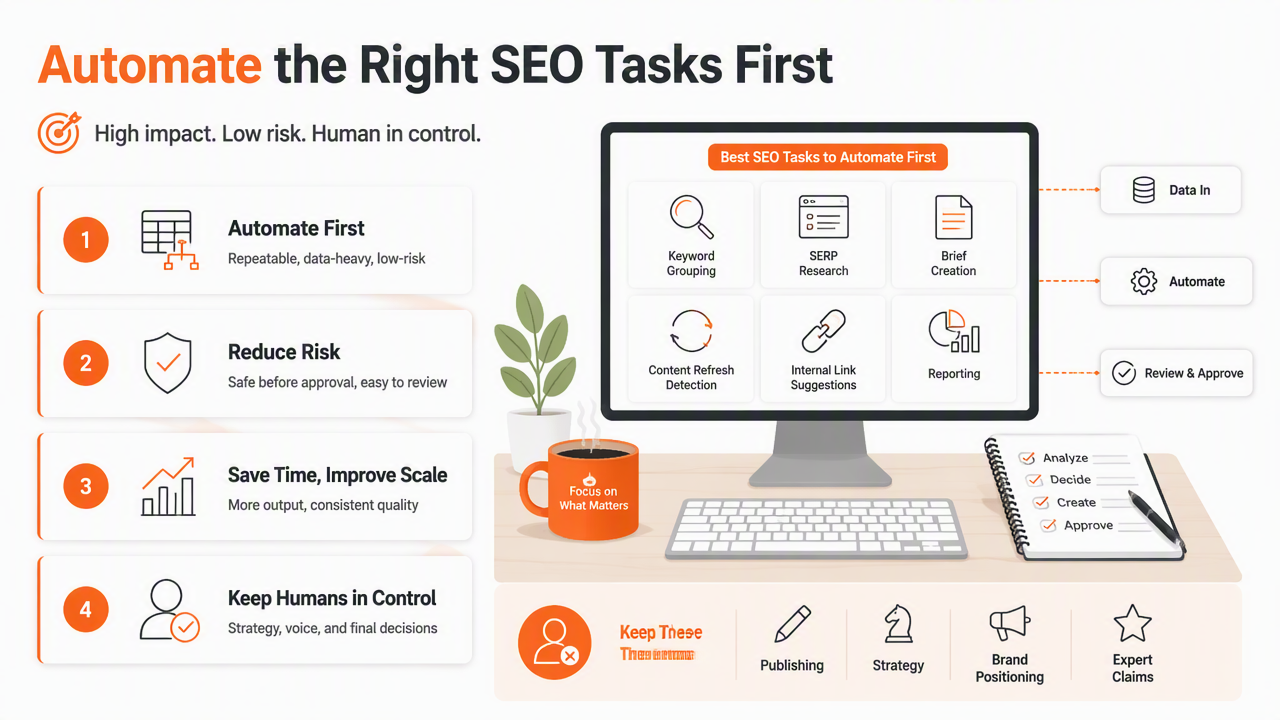
Small teams usually gain the fastest lift by automating the handoffs around content production. For example, a workflow can collect competing pages, extract common subtopics, create a brief, assign internal links, and flag missing schema before an editor starts. The Earlyseo platform is especially useful where content operations need structure across many pages, including SEO operations and repeatable sprint planning.
Automation use cases ranked by safety
| Workflow | Best input | Human review point | Typical output | Safety level |
|---|---|---|---|---|
| Keyword clustering | Keyword export, search intent labels | Check intent mismatches | Topic groups and page targets | High |
| Competitor SERP scan | Target keyword, ranking URLs | Remove irrelevant rivals | Content gaps and angle ideas | High |
| Content brief generation | Cluster, SERP notes, brand rules | Approve outline and claims | Editor-ready brief | Medium-high |
| Internal link suggestions | Sitemap, anchor text, page topics | Confirm relevance | Link insertion list | Medium-high |
| Content refresh detection | GSC data, rankings, dates | Prioritize by business value | Refresh backlog | Medium |
| AI draft generation | Approved brief, source notes | Full editorial review | Draft for editing | Medium |
| Auto-publishing | Final draft, CMS access | Approval before push | Live page | Low |
Competitor-aware workflows deserve early attention because search results change fast. Teams building repeatable briefs can pair automation with competitor-aware SEO content to compare angles, entities, and missing sections before writing starts.
Fast wins by business type
- Startup founders: automate keyword grouping, content briefs, and rank reports before hiring a large content team.
- Local businesses: automate location page checklists, review-response drafts, and Google Business Profile reporting.
- E-commerce stores: automate category page briefs, product FAQ extraction, and seasonal refresh lists.
- SaaS teams: automate comparison-page research, feature-page refreshes, and use-case clustering.
- Agencies: automate client reporting, brief production, and repeatable QA checks across accounts.
For teams with limited time, a focused 90-day SEO sprint can turn these automations into a publishing calendar instead of a loose tool stack.
Safe step-by-step workflow templates
Safe SEO automation templates define the task, collect reliable inputs, process data with AI, pause for human review, and save the approved output where the team already works. The best templates are narrow enough to test in one week and clear enough to repeat every month.
Research outside marketing shows why checkpoints matter. A 2021 Proceedings of the IEEE review of deep learning in medical imaging examined technical progress in a high-stakes field where model output still requires expert interpretation. SEO has lower stakes, but the operating lesson is similar: automation needs review before action.
A practical setup starts with one workflow. After the first version works, teams can document prompts, expected fields, owner names, and acceptance rules on earlyseo.com or in their project system.
Template matrix for repeatable SEO work
| Template | Inputs | Tools | Human review | Output |
|---|---|---|---|---|
| Keyword-to-brief | Keyword list, SERP URLs, audience, offer | SEO platform, scraper, LLM, doc tool | Intent, angle, source quality | Approved brief |
| Refresh finder | GSC export, rankings, publish dates | Spreadsheet, analytics, LLM classifier | Business priority, page purpose | Refresh queue |
| Internal link map | Sitemap, page titles, target URLs | Crawler, embeddings, LLM | Anchor fit, context fit | Link recommendations |
| Local SEO page plan | Service list, locations, reviews, competitors | Local rank tool, LLM, CMS | Accuracy of claims, NAP consistency | Location page brief |
| Shopify category update | Products, collections, queries, FAQs | Store export, SEO tool, LLM | Product fit, merchandising rules | Category optimization plan |
A store owner can adapt the Shopify version with a dedicated Shopify SEO playbook. A content manager can pair the brief template with a stronger content strategy for new blogs when the site has few existing pages.
Example: keyword-to-brief workflow
- Define the page goal: choose one primary query, one audience, and one conversion action.
- Collect SERP evidence: save ranking URLs, headings, featured snippets, People Also Ask patterns, and entity mentions.
- Generate a brief: ask the AI system to group search intent, outline sections, suggest examples, and list required sources.
- Review the brief: an editor checks whether the angle is useful, accurate, and different from the current search results.
- Assign internal links: map relevant pages, anchors, and insertion points using an internal linking strategy.
- Create the draft: use the approved brief, not a blank prompt.
- Run QA: check facts, duplicated phrasing, brand tone, schema needs, and publishing metadata.
- Measure results: track impressions, clicks, rankings, assisted conversions, and refresh needs.
A workflow becomes valuable when the next person can run it without asking how the last person did it.
Where human judgment belongs
Human judgment belongs at every point where automation could change meaning, make a claim, affect brand trust, or publish content. AI can sort, summarize, draft, and flag patterns, but people should approve strategy, factual claims, editorial quality, legal risk, and final publication.
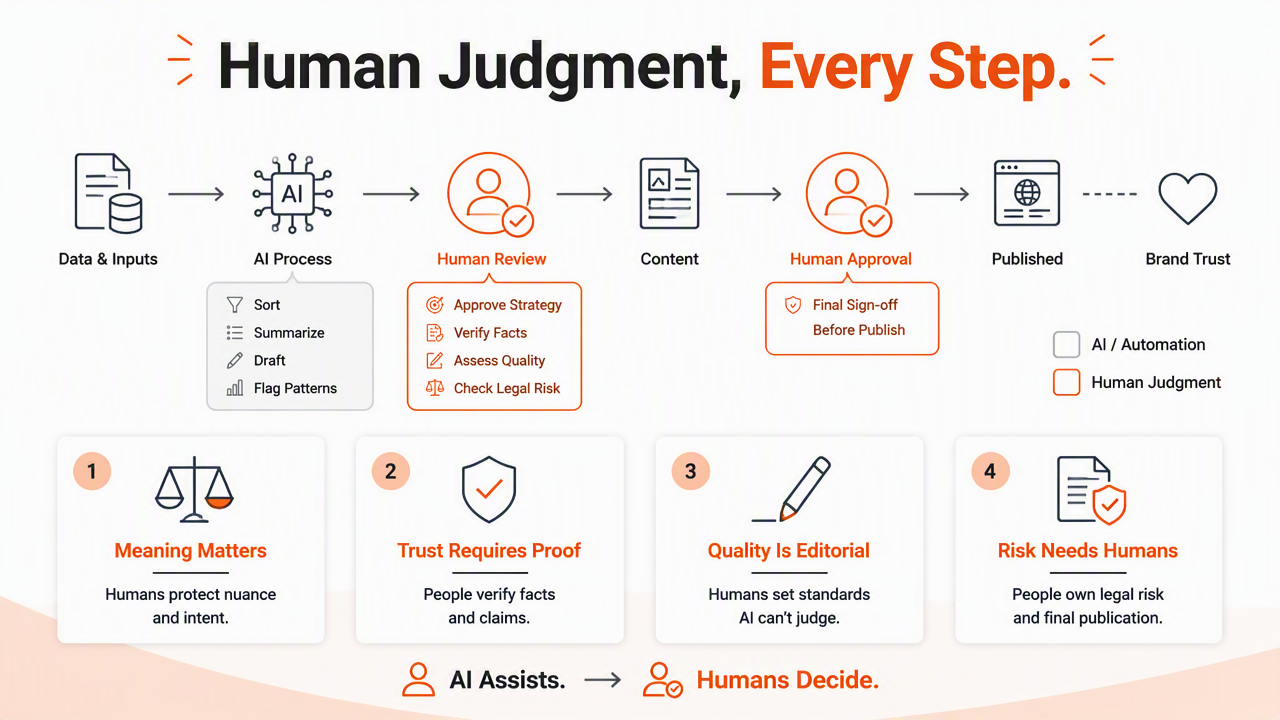
Weak automation usually fails in predictable ways. It can confuse search intent, overfit competitor headings, invent unsupported claims, recommend irrelevant links, or create content that sounds polished but says little. Those issues are not tool problems alone. They are workflow design problems.
A 2021 Journal of Building Engineering review of AI in the construction industry examined present status, opportunities, and future challenges. That framing fits SEO automation well: the opportunity is speed, while the challenge is governance.
Human review should cover:
- Intent: does the page match what searchers appear to need?
- Originality: does the page add examples, proof, or a clearer answer than rivals?
- Accuracy: are facts, names, dates, and product details checked?
- Brand fit: does the page sound like the company, not a generic model?
- Risk: could the advice create legal, financial, medical, or customer-support problems?
- Measurement: does the workflow define success before publishing?
Automation should also create logs. A simple record of inputs, prompts, reviewer names, and publication dates makes future refreshes easier and helps explain why a page exists.
What changes next, plus FAQ
By 2027, SEO automation will likely move from single-task prompts toward connected agents that monitor search results, propose updates, and route work for approval. The winning systems will still depend on clean data, clear owners, and editorial standards rather than fully automatic publishing.
Generative search also changes the target. Brands now need pages that answer humans and feed answer engines with clear definitions, tables, comparison blocks, and concise summaries. That means workflows should produce structured sections, not just long drafts.
International teams will also automate localization more carefully. Multilingual SEO requires search intent, terminology, and cultural fit by market, so translation alone is not enough. Teams expanding across countries can connect automation with multilingual SEO content while keeping native review in place.
Can AI SEO automation replace an SEO specialist?
AI SEO automation can replace repetitive production steps, but it should not replace an SEO specialist. Specialists still decide positioning, keyword priorities, technical tradeoffs, content quality, and measurement. Automation works best as an assistant that prepares evidence and drafts outputs for review.
Which SEO workflow should a small business automate first?
A small business should usually automate keyword clustering and content briefs first. Those tasks are repeatable, useful, and safe when reviewed before writing. Local businesses may start with service-page briefs, location-page checklists, review monitoring, and monthly visibility reports.
Can automation hurt search rankings?
Automation can hurt rankings when it publishes thin pages, copies competitor structures too closely, invents facts, or creates irrelevant internal links. The safer approach is to automate research and QA while keeping human approval for claims, tone, usefulness, and publication.
How many tools are needed for a basic workflow?
A basic workflow can run with an SEO data source, an AI model, a spreadsheet or project tool, and a CMS. Larger teams may add crawlers, automation builders, rank trackers, and approval systems, but the process matters more than the number of tools.
Conclusion
AI SEO automation workflows should start small: choose one repeatable task, define inputs, add one review checkpoint, and measure the output for 30 days. The highest-value starting points are keyword clustering, competitor research, content briefs, refresh queues, and internal link suggestions. For a practical next step, map one workflow on a single page, assign an owner, and test it on five URLs before scaling. More workflow ideas and operating templates can be found on earlyseo.com.