TL;DR
WordPress SEO automation works best when it handles repeatable checks, briefs, metadata drafts, internal link ideas, schema validation, image cleanup, and reporting. Human review should still own search intent, brand accuracy, expert insight, and final publishing approval.
WordPress SEO automation can turn a messy publishing process into a repeatable system, but it should not replace editorial judgment. For WordPress teams, the highest-value setup connects keyword research, content briefs, metadata, schema checks, internal links, image optimization, QA, and monitoring before a page goes live. Tools such as Earlyseo help teams organize that workflow around WordPress instead of treating SEO as a last-minute plugin checklist.
Table of Contents
What is WordPress SEO automation?
WordPress SEO automation is the use of software, rules, AI, and integrations to handle repeatable search optimization tasks inside or around WordPress. It can draft briefs, suggest titles, validate schema, find internal links, compress images, check indexability, and track performance while humans approve strategy, accuracy, and publishing decisions.
WordPress SEO automation: a workflow that uses tools to reduce manual SEO work across planning, publishing, technical checks, and reporting for WordPress websites.
Yoast SEO: a WordPress search engine optimization plugin, commonly used for page-level checks and metadata management.
Plesk: commercial hosting and server automation software for Linux and Windows hosting providers, relevant when SEO teams also manage server-side redirects, staging, and deployment controls.
Key insight: automation should remove repetitive work, not remove accountability for quality, expertise, or search intent.
The best jobs for automation
Strong automation targets predictable work with clear pass or fail rules. A missing meta description, oversized image, absent alt text, broken internal link, invalid canonical tag, or missing schema field can be flagged before publication.
Good candidates include:
- SEO content brief creation from keyword and competitor data
- Metadata drafts for titles and descriptions
- Schema validation for articles, products, services, and FAQs
- Internal link suggestions across related WordPress posts
- Image filename, compression, and
alttext checks - Publishing QA for slugs, headings, canonicals, and index status
- Performance monitoring from Google Search Console and analytics tools
The tasks that still need people
Human review matters most when judgment, experience, and brand context shape the answer. Search intent can look obvious in keyword tools, then shift once the actual SERP is reviewed.
Editors should still own:
- The final angle and promise of the page
- Factual accuracy and source quality
- Product claims and legal-sensitive wording
- Examples from real customers or internal experience
- Final approval before publishing or updating
How should an automated WordPress SEO workflow run?
An automated WordPress SEO workflow should move from keyword selection to brief, draft, optimization, QA, publishing, and performance review in a fixed sequence. The system should create checkpoints at each stage so weak pages do not reach WordPress just because a task was technically completed.
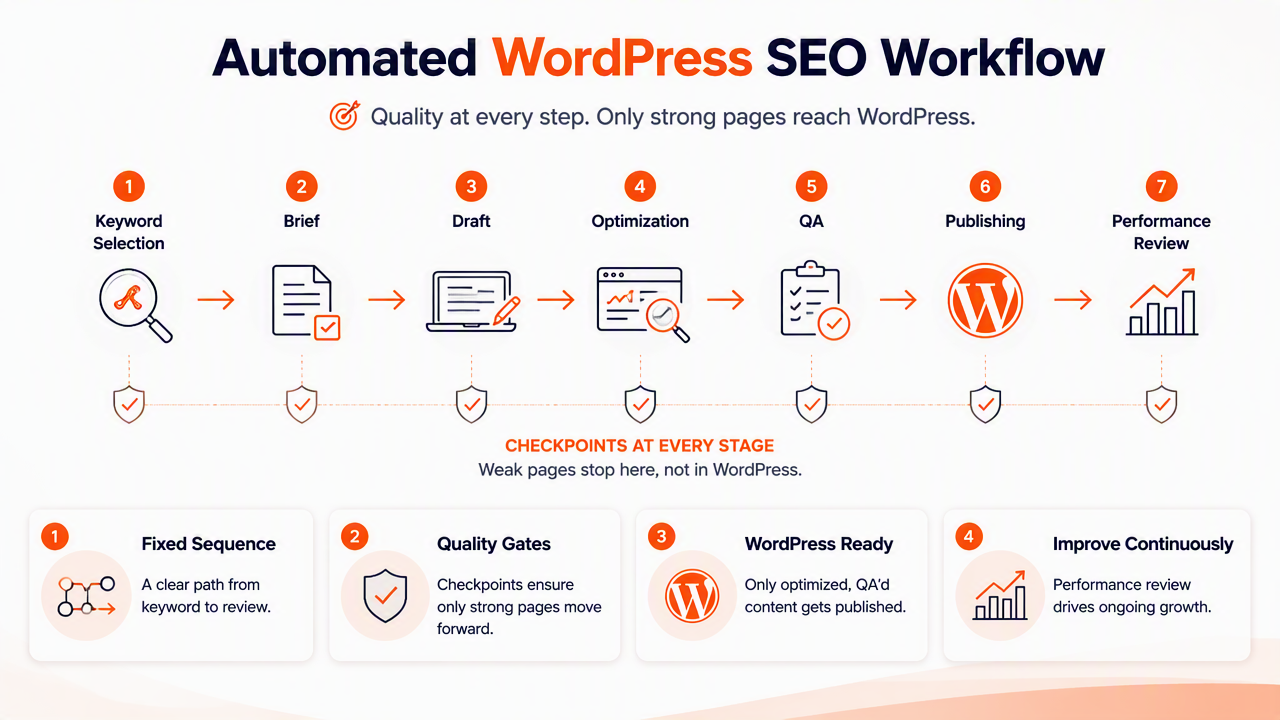
Workflow diagram from keyword to published page
A simple workflow keeps each SEO job visible and prevents the common handoff problem between strategy, writing, editing, and WordPress publishing.
Keyword idea
 -> SERP and competitor scan
 -> SEO brief
 -> Draft content
 -> Metadata and schema
 -> Internal links and images
 -> WordPress publishing QA
 -> Indexing and performance monitoring
 -> Refresh or expand
A team using a structured SEO content brief template can standardize the first half of this process before a writer opens WordPress. That reduces rework because headings, search intent, internal link targets, and required proof points are already defined.
Publishing QA checklist
The final WordPress check should be boring, consistent, and strict. A good QA rule set catches the small issues that often block organic growth.
Use this sequence before hitting publish:
- Confirm the target query and search intent match the page.
- Check the title tag, H1, slug, and meta description.
- Validate schema fields and remove duplicate markup.
- Add internal links to related posts, products, or service pages.
- Compress images and confirm descriptive filenames.
- Test mobile layout, page speed basics, and clickable elements.
- Confirm indexability, canonical tag, and sitemap inclusion.
- Schedule a post-publish review after search data appears.
Research on AI-empowered B2B customer management by Rusthollkarhu, Toukola, and Aarikka-Stenroos (2022) examined how artificial intelligence tools support digital customer processes, a useful reminder that automation works best when it improves workflows rather than replacing ownership of them (study).
Which SEO tasks are safest to automate in WordPress?
The safest WordPress tasks to automate are rule-based, repeatable, and easy to verify after the tool runs. Metadata drafting, schema checks, internal link discovery, image optimization, and performance reporting usually carry lower risk than full auto-publishing or unsupervised content generation.
Automation fit by task
| Task | Automation fit | Human review needed | Best output |
|---|---|---|---|
| Content brief generation | High | Search intent and angle | Approved outline |
| Title and meta description drafts | High | Brand tone and accuracy | Editable metadata |
| Schema checks | High | Entity accuracy | Valid markup |
| Internal link suggestions | High | Relevance and anchor text | Link queue |
| Image compression and filenames | High | Image meaning | Faster media assets |
| Full article generation | Medium | Accuracy and expertise | First draft only |
| Auto-publishing | Low to medium | Final QA | Scheduled page |
| Performance reporting | High | Strategic interpretation | Action list |
Internal links deserve special attention because WordPress sites often grow one post at a time. A clear internal linking strategy for SEO helps automation suggest relevant connections instead of stuffing random anchors into old content.
Common failure points to watch
Automation can create problems when rules are too loose. A tool may write repetitive title tags, add irrelevant links, generate thin summaries, or mark schema as valid even when the page content does not support the entity.
Risk control should include:
- A human approval step for every new page
- Change logs for metadata, redirects, and links
- Limits on bulk updates across important pages
- Separate rules for local, ecommerce, SaaS, and blog content
- Manual review of pages that already rank or convert
Security and privacy deserve the same caution. Mekdad, Arış, and Babun (2023) surveyed security and privacy issues in connected autonomous systems, and the broader lesson applies to SEO operations too: automated systems need access control, monitoring, and clear responsibility (study).
How Earlyseo handles WordPress SEO operations
The Earlyseo platform supports WordPress teams by turning SEO planning and production into a managed workflow rather than a pile of disconnected plugin warnings. Its strongest use case is helping growing teams connect briefs, competitor awareness, optimization tasks, and publishing operations before content reaches WordPress.
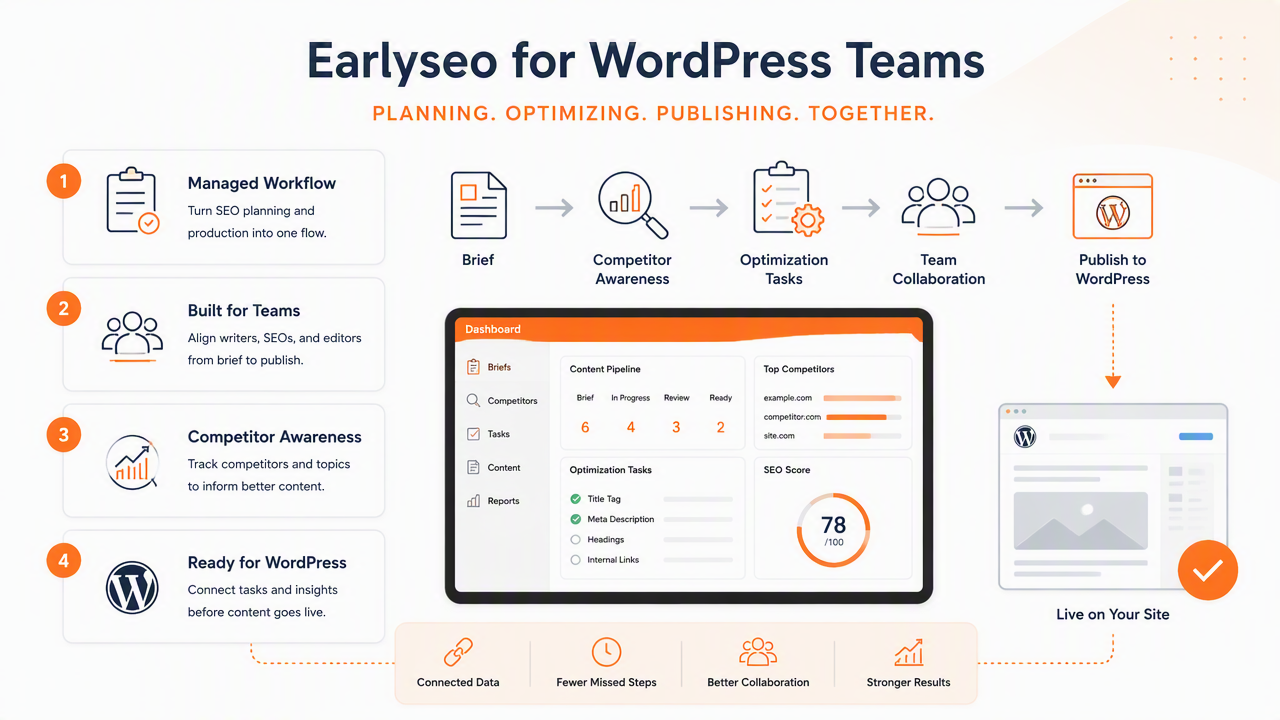
Where Earlyseo fits in the workflow
Earlyseo is useful when a team needs more than a page-level green light. WordPress plugins such as Yoast SEO and Rank Math can help inside the editor, while broader operations tools help coordinate what should be created, updated, linked, and monitored.
Practical uses include:
- Building competitor-aware briefs before drafting begins
- Organizing SEO tasks across multiple WordPress pages
- Creating repeatable processes for new posts and updates
- Planning topic coverage for new sites, local businesses, and ecommerce catalogs
- Supporting multilingual content workflows when expansion starts
Teams that need structured production can use SEO operations workflows, while content teams can build pages around competitor-aware SEO content. For WordPress-specific setup, Earlyseo for WordPress sites gives a more focused path.
Who should use plugin checks versus operations automation
| Situation | Better fit | Reason |
|---|---|---|
| Solo blogger publishing occasionally | WordPress SEO plugin | Simple page checks are enough |
| Local business adding service pages | Plugin plus brief automation | Local intent and structure matter |
| Ecommerce store growing categories | Operations automation | Many pages need consistent updates |
| Startup building topical authority | Operations automation | Briefs, links, and tracking need rhythm |
| Multilingual site expansion | Operations automation | Translation, intent, and structure need control |
For multilingual growth, multilingual SEO content can help teams avoid treating translation as the whole strategy. Search behavior, terms, and page structure often vary by country or language.
Moonkyoung Jang, Milla Aavakare, and Shahrokh Nikou (2021) studied digital technology literacy and intention to use learning technology across Korea and Finland, which reinforces a practical point for SEO managers: tool adoption improves when workflows are understandable to the people expected to run them (study).
What changes in WordPress SEO automation in 2027?
WordPress SEO automation in 2027 will likely focus more on answer-engine visibility, content refresh systems, structured data quality, and human proof signals. Search is already moving beyond classic blue links, so automated workflows need to prepare pages for Google AI features, ChatGPT-style answers, and entity-based retrieval.
The next workflow priorities
Content teams should expect less value from one-time publishing and more value from continuous improvement. A page may need new examples, clearer definitions, stronger internal links, or updated schema after search engines reinterpret the topic.
Priorities for the next year:
- Track pages by topic cluster, not only by keyword.
- Refresh declining posts before rankings fall too far.
- Add clear definitions, tables, and FAQs for answer engines.
- Keep author, product, organization, and local business entities consistent.
- Connect reporting to a quarterly action plan.
A structured 90-day SEO sprint can give automation a schedule, so reports turn into updates instead of sitting in a dashboard.
FAQ: Practical questions about automated WordPress SEO
Can WordPress SEO be fully automated?
WordPress SEO can be partly automated, but full automation is risky for quality and accuracy. Software can handle briefs, metadata drafts, schema validation, links, image checks, and reporting. Human review should still approve search intent, claims, examples, internal priorities, and final publishing decisions.
Is an SEO plugin enough for a growing WordPress site?
An SEO plugin is usually enough for basic page checks, but growing sites often need workflow automation outside the editor. Teams managing many posts, product pages, service pages, or languages need planning, task tracking, internal link systems, and performance reviews alongside plugin-level optimization.
How often should automated SEO reports trigger updates?
Automated reports should usually be reviewed monthly for active content and quarterly for larger strategy shifts. Pages losing impressions, dropping clicks, or ranking for unexpected queries should move into a refresh queue. New pages need enough time to collect search data before major changes.
What is the biggest risk with AI-generated WordPress content?
The biggest risk is publishing content that sounds polished but lacks accuracy, originality, or real expertise. AI drafts can help speed production, but thin summaries, unsupported claims, and duplicated angles rarely build durable organic traffic. Editorial review protects both search performance and brand trust.
Conclusion
WordPress SEO automation works when it acts like an operating system for repeatable SEO work: briefs first, optimization second, QA before publishing, and monitoring after launch. The practical next step is to document the current publishing process, mark every repeatable task, then automate only the steps that can be checked reliably. Teams ready to connect planning, production, and WordPress workflows can visit earlyseo.com and map the first 30 pages that need better briefs, links, metadata, schema, or refreshes.