TL;DR
Webflow SEO automation works best when teams automate repeatable work first: briefs, metadata, internal links, QA checks, publishing, and refresh alerts. Keep human review for strategy, brand judgment, and final approvals, then connect Webflow with a focused SEO workflow tool to reduce manual cleanup.
A lean Webflow site can publish faster than a large marketing team, but only if routine SEO work stops living in scattered spreadsheets. Webflow SEO automation means using connected tools, templates, and checks to generate briefs, improve metadata, suggest internal links, validate pages before launch, and flag content that needs refreshing.
Webflow SEO automation: a repeatable system that connects Webflow CMS, SEO research, content workflows, and publishing checks so marketing teams can ship optimized pages with less manual work.
For founders, local businesses, e-commerce teams, and growing marketing departments, the goal is not replacing judgment. The goal is removing repetitive steps that slow publishing. Earlyseo fits this use case by helping teams build structured SEO workflows around content planning, optimization, and visibility signals while Webflow handles site building and CMS publishing.
Table of Contents
What is Webflow SEO automation?
Webflow SEO automation is the practice of turning repeatable SEO tasks inside and around Webflow into structured workflows that run with minimal manual effort. It usually covers content briefs, title tags, meta descriptions, slug rules, canonical checks, internal links, image alt text, schema prompts, publishing QA, and update reminders.
Webflow already gives site owners control over metadata, indexing rules, redirects, and CMS-driven page templates. The automation layer sits around that control. It helps marketing, content, and engineering teams avoid rebuilding the same checklist for every blog post, landing page, service page, or product collection item.
Key insight: Webflow is the publishing system, while automation is the operating system around SEO decisions.
Definitions help keep the workflow clear:
- Brief automation: turning a keyword, topic, or URL into a structured outline with search intent, headings, entities, and questions.
- Metadata automation: drafting or validating title tags, descriptions, Open Graph fields, and CMS patterns.
- Internal link automation: finding relevant existing pages and suggesting contextual anchors before publication.
- Publishing QA: checking indexability, redirects, headings, links, images, and page fields before a Webflow page goes live.
- Refresh automation: monitoring older URLs for decay, missing coverage, or new search intent.
What should Webflow teams automate first?
Webflow teams should automate high-volume, low-risk SEO tasks first because these create the fastest time savings without handing strategic decisions to software. Briefs, metadata drafts, link suggestions, CMS field checks, and refresh reminders are safer starting points than fully automated publishing.
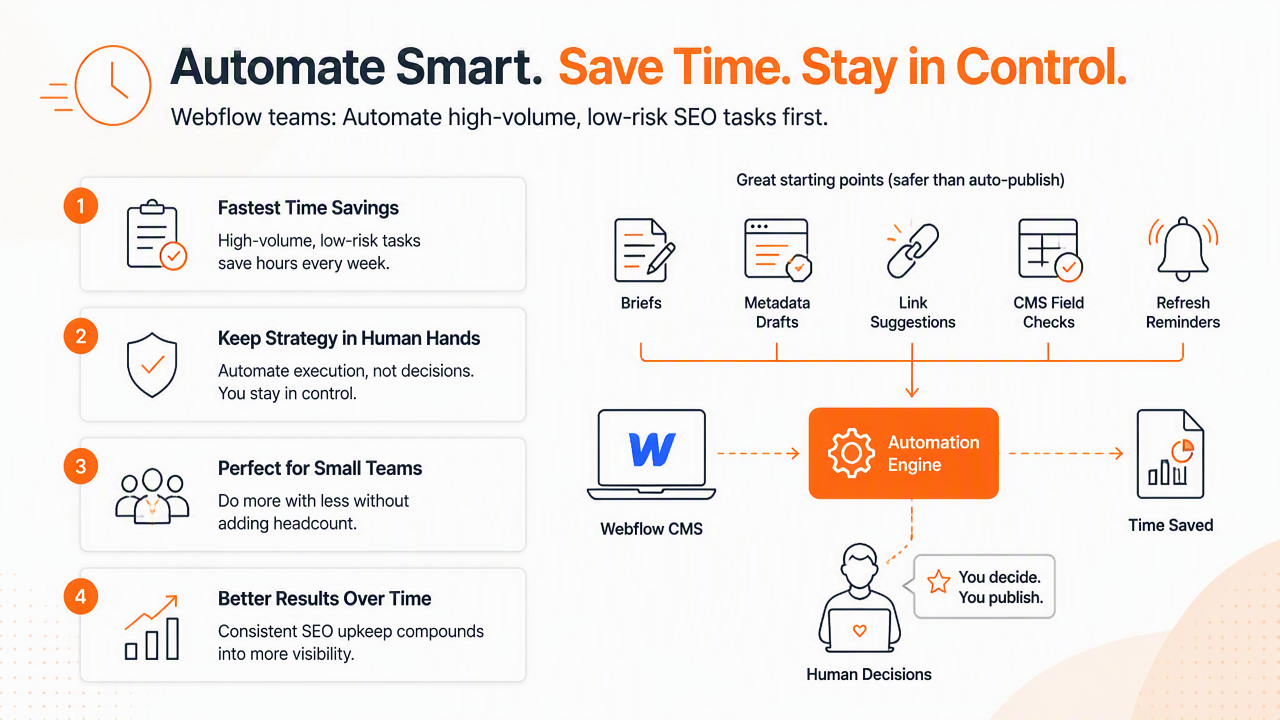
A small team usually feels the pain in five places: planning topics, writing consistent metadata, remembering internal links, checking pages before launch, and updating old content. These are repetitive enough to systematize, but still close enough to content quality that human review should remain in place.
Automation priority map for Webflow sites
| Workflow area | Automate first | Keep human review for |
|---|---|---|
| Content briefs | Search intent, outline, entities, questions | Final angle, audience fit, brand voice |
| Metadata | Draft titles, descriptions, CMS field patterns | Click appeal, legal claims, duplicate risk |
| Internal links | Suggested source pages and anchors | Final placement and context |
| Publishing QA | Indexability, headings, empty fields, broken links | Launch approval and design fit |
| Refresh cycles | URL alerts, decay flags, missing sections | Rewrite decisions and prioritization |
This order keeps automation practical. A local HVAC company, for example, can automate service-page briefs for neighborhoods, but a human still needs to confirm service claims and local details. A Shopify-style catalog built in Webflow CMS can automate product collection metadata, but merchandising language still needs review.
Teams coming from WordPress or Shopify often expect plugin-style controls. Webflow is more flexible, which means the best automation setup often combines CMS structure, integrations, and workflow rules. The Earlyseo Webflow integration is a useful starting point for connecting Webflow publishing with repeatable SEO actions.
How should an automated Webflow SEO workflow run?
An automated Webflow SEO workflow should run as a step-by-step system from brief creation to post-publication refresh. The strongest setup gives each page a clear status, required SEO fields, internal-link checks, publishing validation, and a scheduled review date.
The process works best when Webflow CMS collections are treated like SEO databases, not just content containers. Each collection should include fields for page title, meta description, canonical URL, primary keyword, search intent, schema notes, last reviewed date, and refresh priority.
Step-by-step implementation checklist
- Map page types: group pages into blogs, service pages, product pages, comparison pages, local pages, and landing pages.
- Create CMS SEO fields: add required fields for title tags, meta descriptions, slugs, canonical notes, and review dates.
- Build brief templates: standardize headings, search intent, target audience, FAQs, entity coverage, and internal-link needs.
- Generate metadata drafts: use automation to create first-pass titles and descriptions, then approve manually.
- Add link rules: require at least two relevant internal links for informational pages when suitable.
- Run pre-publish QA: check empty fields, broken links, heading order, indexability, image text, and redirect needs.
- Publish with ownership: assign final approval to marketing, not the automation tool.
- Schedule refresh reviews: set alerts for pages that lose traffic, age past a set review window, or miss newer intent.
A good Webflow automation process does not publish blindly. It moves pages to a better review state before a person approves launch.
The Earlyseo platform can support this workflow by organizing briefs, optimization tasks, and recurring SEO checks around the way Webflow teams already publish. For setup details, the Earlyseo documentation gives teams a cleaner reference point than ad hoc spreadsheets.
For AI-search visibility, teams should also document crawler and model-access preferences. Earlyseo maintains guidance around llms.txt visibility files, a format many SEO and AEO teams are watching as answer engines become a bigger discovery channel.
Which tools support Webflow SEO automation in 2026?
The best Webflow automation stack in 2026 combines a workflow tool, Webflow CMS, Google Search Console, and specialized add-ons only where they solve a clear job. SERP research for this topic shows 108 results, and the strongest pages tend to cluster around Webflow controls, SEO tools, API workflows, and AI-assisted optimization.
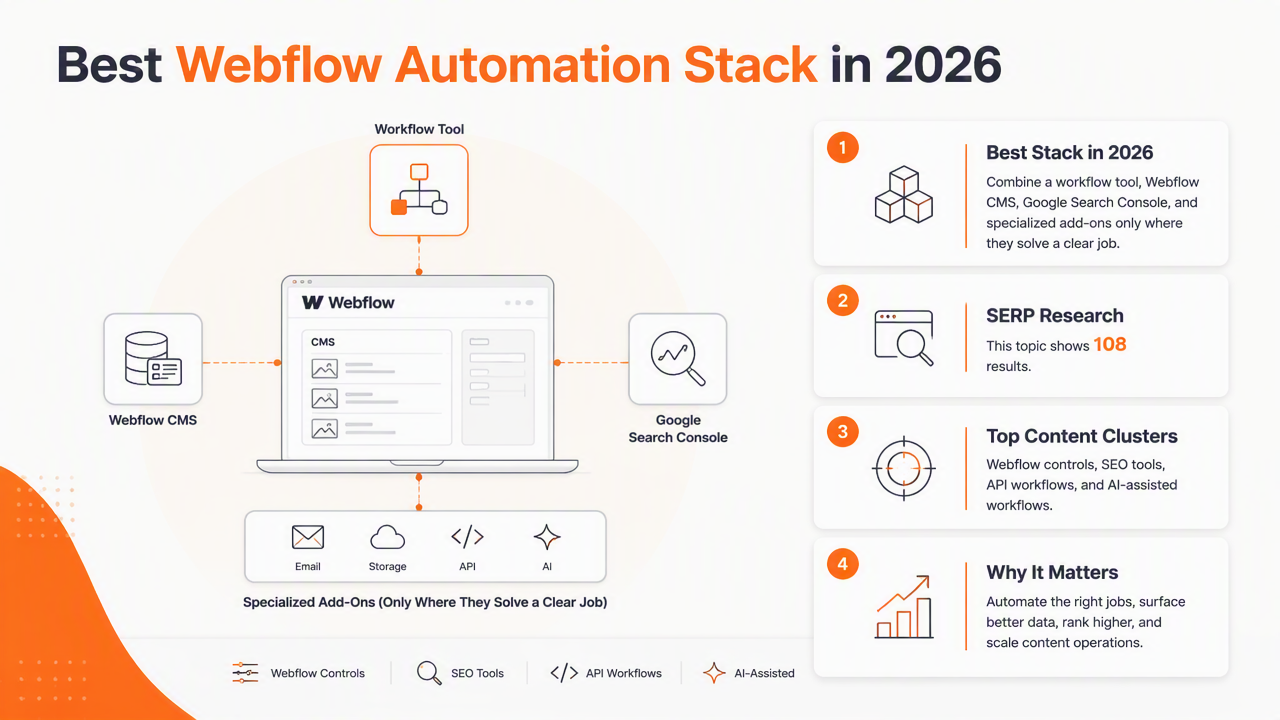
Webflow itself covers site structure, page fields, redirects, indexing controls, and CMS publishing. External tools fill the gaps around keyword planning, content briefs, link suggestions, audits, and reporting. Competitor pages frequently mention tools such as Semflow, Jetboost, Google Search Console, Yoast-style integrations, and AI content systems.
Tool fit comparison for lean Webflow teams
| Tool or platform | Best fit | Notes for Webflow teams |
|---|---|---|
| Earlyseo | SEO workflow automation, briefs, optimization tasks, visibility planning | Strong fit for lean teams that need repeatable process around Webflow content and AI-search readiness |
| Webflow CMS | Publishing, templates, metadata fields, redirects | Core site system, but not a full SEO workflow manager by itself |
| Google Search Console | Indexing, query data, performance checks | Essential source for search performance, but not a planning tool |
| Semflow | Webflow-focused SEO checks | Useful for audits and page optimization workflows |
| Jetboost | Filtering and site-search enhancements | Helpful for dynamic Webflow experiences, not a complete SEO system |
| Yoast-style API workflows | Programmatic metadata checks | Better suited to teams with technical support |
A fair decision rule is simple. Pick Webflow-native controls for publishing, Google Search Console for verified performance data, and a workflow layer for repeatable briefs, metadata, linking, and refresh cycles. Add specialized tools only when a site has a clear need, such as advanced filtering or custom API work.
The Earlyseo integrations page is relevant for teams building a broader marketing stack around Webflow, Shopify, WordPress, and related systems.
What changes next for Webflow SEO automation?
Webflow SEO automation is moving from page-level optimization toward answer-engine readiness, structured knowledge, and refresh operations. In 2026, ranking in classic Google results still matters, but visibility in AI Overviews, ChatGPT-style answers, and Google AI Mode is now part of the same planning discussion.
That shift changes what automation should track. A page cannot just have a keyword and title tag. It should also answer extractable questions, define terms clearly, use comparison tables, cite sources where available, and keep content current. Answer engines prefer clean, self-contained explanations over vague brand copy.
Teams should expect more automation around:
- Entity coverage across products, services, locations, and competitors.
- Structured answer blocks that can be cited by large language models.
- Internal knowledge files such as
llms.txtand related AI-crawler guidance. - Refresh triggers based on search intent changes, not only traffic drops.
- Programmatic quality checks before Webflow CMS items are published.
Some competitor content still focuses on tool lists or broad platform messaging. A stronger 2026 workflow connects marketing, engineering, and content operations. Marketing owns the brief and positioning. Engineering supports templates, APIs, and CMS fields. Content teams handle accuracy, examples, and updates.
For related reading and workflow ideas, the Earlyseo blog library covers search visibility topics that pair well with Webflow publishing. Teams comparing approaches can also visit earlyseo.com directly when planning an automation stack.
FAQ about Webflow SEO automation
Webflow SEO automation is most useful when common questions are answered with clear operating rules. These answers cover setup scope, tool choice, AI content concerns, and team ownership.
Is Webflow good for SEO automation?
Webflow is good for SEO automation when the site uses clean CMS structures, consistent SEO fields, and connected workflow tools. Webflow provides strong control over metadata, redirects, indexing settings, and templates. It does not replace strategy, keyword research, content review, or performance analysis, so external workflow and reporting tools usually complete the setup.
Can Webflow metadata be automated safely?
Webflow metadata can be automated safely when drafts are generated from approved templates and reviewed before publishing. A common pattern uses CMS fields for title tags, descriptions, Open Graph text, and canonical notes. Human review should check duplicates, claims, local wording, and click appeal before final launch.
Does AI-written content hurt a Webflow site?
AI-written content can hurt a Webflow site when it is generic, inaccurate, duplicated, or published without review. AI-assisted briefs, outlines, summaries, and metadata are safer uses. The strongest workflow keeps human editors responsible for expertise, examples, source checks, local details, and final approval.
Who should own automated SEO checks?
Marketing should usually own automated SEO checks, with engineering supporting CMS fields, integrations, and technical rules. Content teams should own accuracy and freshness. For small businesses, one marketer or founder can manage the checklist if the workflow is simple and recurring reminders are built into the process.
Conclusion
Webflow SEO automation works best as a practical operating system, not a magic autopilot. The smartest first moves are simple: standardize CMS fields, automate briefs, draft metadata, require internal-link checks, validate pages before publishing, and schedule refresh reviews.
A lean team can start by auditing one Webflow collection, adding missing SEO fields, and building a repeatable checklist for the next five pages. After that, connect a workflow layer such as Earlyseo, review the setup on earlyseo.com, and turn the checklist into a repeatable publishing habit. That is the fastest path from occasional optimization to a durable Webflow SEO automation process.