TL;DR
Technical SEO automation works best for repeatable checks such as indexing, redirects, broken links, metadata, sitemaps, schema validation, and page speed alerts. Expert review still matters for crawl budget strategy, canonical decisions, redirect mapping, JavaScript rendering issues, and any fix that can affect revenue pages.
Technical SEO automation can catch site problems faster than a manual audit, but it should not make strategic decisions without human review. Search engine optimization, as defined in standard references such as Wikipedia, is the practice of improving a website's visibility and performance in search results. In 2026, the strongest setup pairs automated monitoring with expert judgment, especially for startups, local businesses, ecommerce stores, and growing marketing teams that cannot afford slow discovery of crawl, indexation, or speed issues. Platforms such as Earlyseo fit this workflow by helping teams turn SEO operations into repeatable processes rather than occasional cleanups.
Table of Contents
What is technical SEO automation?
Technical SEO automation is the use of software, scripts, alerts, and scheduled workflows to detect, report, and sometimes fix technical issues that affect crawling, indexing, rendering, rankings, and user experience. It is best for repetitive checks, while SEO specialists should still approve changes that affect site architecture, canonical logic, redirects, and templates.
Technical SEO automation: a repeatable system that monitors and manages technical search visibility signals, including indexability, links, metadata, schema, sitemaps, redirects, and performance.
Automated SEO is not the same as autopilot SEO. A crawler can flag a missing canonical tag, but it cannot always know whether the page should consolidate signals, stand alone, or be removed from index coverage.
Research on generative AI by Feuerriegel, Hartmann, and Janiesch (2023) in Business & Information Systems Engineering explains how generative systems can create useful outputs from patterns in data, but that general idea still depends on governance and context in business use cases source. SEO automation follows the same pattern: machines scale detection, while people set judgment rules.
Key insight: automation should shorten the time between "something broke" and "someone qualified reviewed it," not remove review from the process.
Core jobs automation can handle daily
A technical workflow usually starts with scheduled crawls, log-like checks, and alert rules. A small business may only need weekly scans, while an ecommerce store with frequent product changes may need daily monitoring.
Common automated jobs include:
- Checking whether priority pages are indexable
- Finding
404,500, and redirect chain issues - Monitoring title tags and meta descriptions
- Validating canonical tags and hreflang patterns
- Detecting sitemap changes or missing URLs
- Testing structured data with schema validators
- Alerting teams when Core Web Vitals or speed metrics worsen
For teams building the basics first, a beginner-friendly technical SEO audit checklist can define the baseline before automation rules get added.
Which technical SEO tasks are safe to automate?
The safest technical tasks to automate are high-frequency checks with clear pass-or-fail logic, low editorial risk, and reversible actions. Examples include broken link detection, sitemap validation, metadata length alerts, structured data testing, robots rules monitoring, page speed alerts, and indexability checks for known page types.
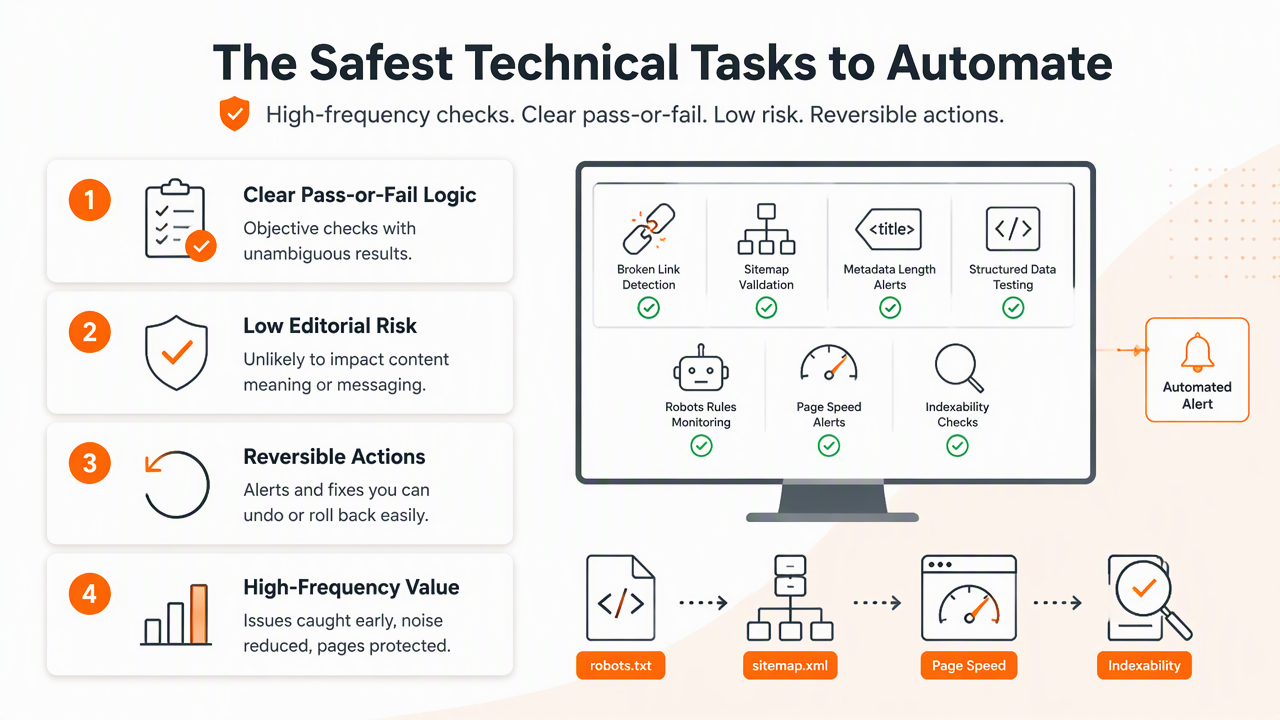
Automation decision table for 2026 workflows
| Task | Safe to automate? | Best automated action | Expert review needed when |
|---|---|---|---|
| Indexing checks | Yes | Flag noindex, blocked URLs, and unexpected status changes |
A page should be removed, merged, or reintroduced |
| Redirect checks | Partly | Detect chains, loops, and broken targets | Mapping old URLs to new commercial pages |
| Broken links | Yes | Find internal and external broken links | Links affect navigation, conversion, or legal pages |
| Canonical tags | Partly | Detect missing, self-referencing, or conflicting canonicals | Duplicate pages have different search intent |
| Metadata | Yes | Flag missing, duplicate, long, or short fields | Titles need positioning, messaging, or brand judgment |
| XML sitemaps | Yes | Compare sitemap URLs with crawlable URLs | Site sections should be added or removed |
| Schema markup | Yes | Validate syntax and required properties | Markup changes meaning, claims, or product data |
| Page speed alerts | Yes | Detect regressions and template-level problems | Fixes affect design, analytics, ads, or checkout |
A safe rule: automate detection first, then automate fixes only after a pattern has been reviewed across enough examples. For example, removing tracking parameters from internal links may be safe after testing, while changing canonical targets across thousands of product pages deserves approval.
The Earlyseo platform is most useful when technical tasks sit beside content and SEO operations. Growing teams can connect audit findings to execution plans through SEO operations workflows, which helps technical fixes avoid getting lost after a crawl report is exported.
Where automation saves the most time
Time savings usually come from frequency, not complexity. A person can manually check a few redirects, but software can check thousands of URLs every morning and alert the team only when rules are breached.
Strong automation candidates have three traits:
- The issue can be defined with a clear rule.
- The signal can be checked across many URLs.
- The fix can be grouped by template, page type, or system owner.
Technical blogs, SaaS documentation, and ecommerce catalogs benefit from this setup because new pages often follow templates. Teams publishing technical documentation can pair monitoring with a dedicated SEO approach for technical blogs so crawlability, internal links, and content depth improve together.
Where expert review still matters
Expert review matters whenever a technical fix changes search intent, site architecture, revenue paths, or how search engines consolidate ranking signals. Automation can reveal the issue, but specialists should decide the final action for canonicals, redirects, JavaScript rendering, crawl budget, international targeting, and large template changes.
Some mistakes are expensive because they scale fast. A script that updates every canonical tag to the wrong URL can erase page-level visibility. A redirect rule that points old category URLs to the homepage may pass a simple status check while still weakening relevance.
Tasks that need human judgment before release
The review queue should include issues where "technically valid" and "strategically right" are different.
Expert review is needed for:
- Canonical strategy: deciding whether near-duplicate pages should compete, merge, or remain separate
- Redirect mapping: preserving topical relevance during migrations or product removals
- JavaScript SEO: checking whether rendered content, links, and metadata are visible to search systems
- Faceted navigation: controlling crawl paths without blocking valuable long-tail pages
- International SEO: matching
hreflang, language, currency, and regional intent - Schema meaning: making sure structured data reflects the real page content
International sites deserve special care because automation can validate tag syntax but miss market fit. A team expanding across languages may need international SEO planning before large-scale hreflang and localized metadata rules are applied.
Common automation traps to avoid
Automation becomes risky when rules are copied from one site section to another without checking intent. A blog, product catalog, help center, and local landing page set often need different crawl and indexing rules.
Problems often come from:
- Treating every duplicate title as a defect
- Auto-generating metadata that does not match the page
- Blocking parameter URLs before checking search demand
- Redirecting discontinued products without category logic
- Marking schema valid while the page content is thin or outdated
A balanced process keeps destructive actions behind approval. No automated workflow should push sitewide robots.txt, canonical, redirect, or template changes without staging checks and rollback access.
How to build a technical SEO automation workflow
A reliable workflow starts with a crawl baseline, then adds rules, alerts, ownership, review gates, and reporting. The goal is not more dashboards. The goal is a clear operating system where recurring problems are detected early, assigned quickly, fixed safely, and checked after release.
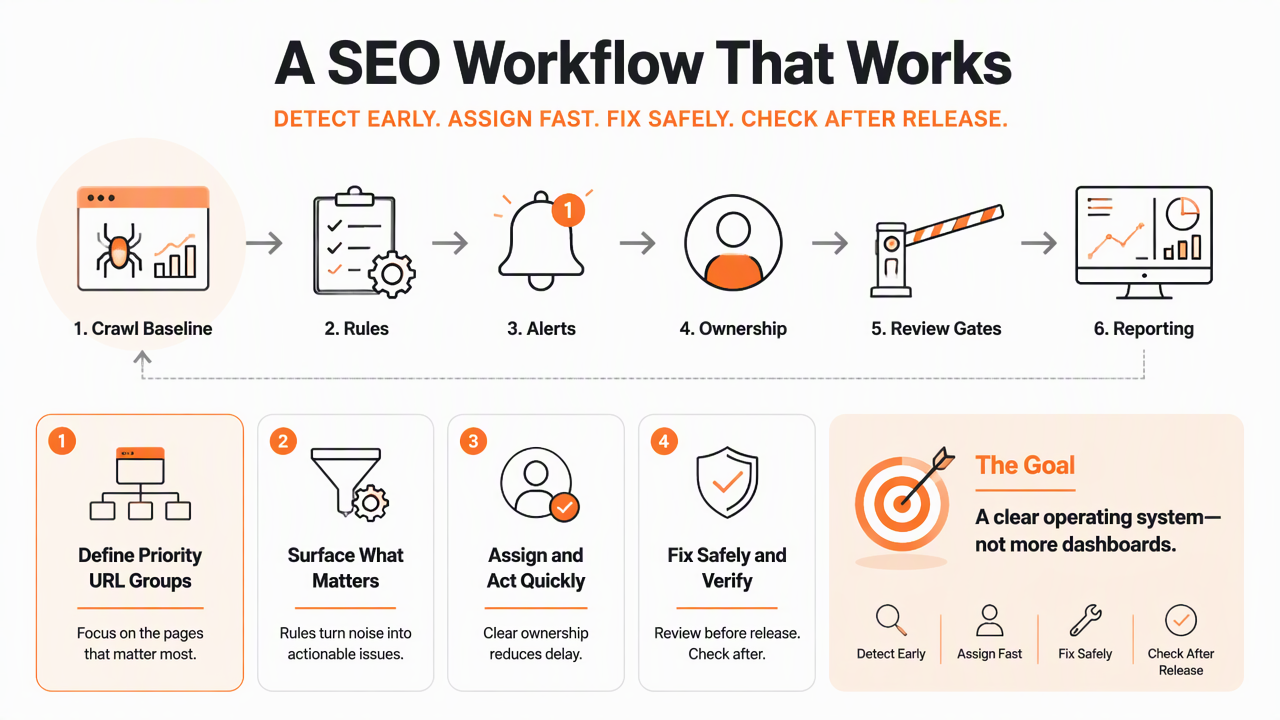
Seven-step setup for growing sites
- Define priority URL groups. Segment home, category, product, service, blog, location, and documentation pages.
- Run a baseline crawl. Record current indexability, status codes, canonicals, metadata, sitemap coverage, and structured data.
- Set alert thresholds. Trigger alerts for meaningful changes, not harmless noise.
- Assign issue owners. Route speed issues to developers, metadata issues to content, and redirects to site operations.
- Create review rules. Require approval for canonicals, redirects, noindex changes, and template-level edits.
- Track fixes by release. Connect each change to the page type, ticket, and deployment date.
- Re-crawl after changes. Confirm whether the fix worked and whether new issues appeared.
For a focused launch window, a 90-day SEO sprint can combine technical cleanup, content planning, and measurement into one operating rhythm.
Metrics that belong in the dashboard
A useful dashboard separates urgent technical failures from routine maintenance. Too many alerts create fatigue, while too few alerts miss problems until traffic drops.
Track these signals by template and page type:
- Crawlable URLs versus sitemap URLs
- Indexable priority URLs
- New
404and5xxerrors - Redirect chains longer than one hop
- Missing or conflicting canonical tags
- Duplicate or missing title tags
- Structured data validation changes
- Page speed and Core Web Vitals regressions
A 2021 paper by van de Schoot and coauthors in Nature Machine Intelligence examined transparent machine learning workflows for systematic reviews, a useful parallel for SEO systems that need auditability and repeatable decisions source. In practice, SEO dashboards should show why an alert fired, not just that something changed.
Earlyseo supports this kind of operational mindset by keeping SEO work tied to execution, not just inspection. For more context on technical workflows and growth planning, visit earlyseo.com.
What will change in 2027?
Technical SEO systems will become more predictive in 2027, but approval workflows will become more important as automation touches larger parts of websites. Search visibility now spans classic results, AI answers, shopping surfaces, local packs, and content citations, so technical health will need broader monitoring than a single crawl report.
Generative AI will likely help summarize crawl patterns, cluster issues, draft tickets, and suggest fixes. Still, the safest teams will treat AI recommendations as decision support, not direct publishing authority.
Practical shifts already worth preparing for
Teams should expect more automation around anomaly detection, content-to-template mapping, and AI visibility monitoring. The next step is not replacing technical SEO specialists. The next step is giving them cleaner evidence sooner.
Likely 2027 priorities include:
- Alerting when AI crawlers or search bots hit unexpected blocks
- Connecting structured data changes to rich result visibility
- Monitoring internal links as content libraries grow
- Grouping page speed issues by component, not only by URL
- Checking whether localized pages match regional search intent
Content and technical systems will also overlap more. A strong internal linking strategy helps automation tools spot orphaned pages, weak clusters, and navigation gaps before they become visibility problems.
FAQ
Can technical SEO be fully automated?
Technical SEO cannot be fully automated safely because many fixes require business, content, and search intent judgment. Software can detect crawl errors, redirect chains, missing metadata, invalid schema, and speed regressions. Experts should still approve high-impact changes involving canonicals, migrations, indexing rules, JavaScript rendering, and major templates.
What is the first task a small business should automate?
A small business should usually start with weekly crawl monitoring for broken links, indexability, metadata, and sitemap coverage. These checks are easy to define and catch common problems early. Local businesses should also watch location pages, service pages, and contact paths because technical errors there can affect leads quickly.
Is automated metadata safe for SEO?
Automated metadata is safe when rules are reviewed, page types are predictable, and outputs are checked before publishing. It works well for structured pages such as product or location templates. It is less reliable for strategic pages where positioning, differentiation, and search intent matter more than filling a title or description field.
How often should technical SEO audits run?
Audit frequency depends on site change volume. Static small business sites may only need monthly scans, while ecommerce, SaaS, publisher, and marketplace sites often need daily or weekly checks. Any migration, redesign, CMS change, or template release should trigger a fresh crawl before and after launch.
What should not be auto-fixed without approval?
Canonicals, redirects, noindex rules, robots directives, hreflang clusters, and sitewide template changes should not be auto-fixed without approval. These changes can affect indexing and ranking signals across many URLs. A safer workflow uses automation to detect and group issues, then routes final decisions to an SEO owner.
Conclusion
Technical SEO automation works best as a monitoring and operations layer, not a replacement for SEO judgment. The practical next step is to automate repeatable checks first, create approval gates for risky fixes, and review trends by page type every week. Teams ready to turn audits into a repeatable growth process can evaluate Earlyseo, map priority pages, and build a 30-day technical cleanup plan through earlyseo.com.