TL;DR
Choose desktop software for hands-on audits and local control, or cloud software for recurring workflows and shared access. Compare actual workload limits, data policies, and annual costs before purchasing; a hybrid setup makes sense when each tool serves a distinct job.
The best SEO tool purchase starts with the job, not the deployment model. For businesses comparing seo optimization tools desktop vs cloud, the real choice concerns where work runs, who needs access, and how often results must update.
A founder checking one website has different needs from a marketing team managing recurring campaigns. Content planning, technical crawling, and performance reporting also require different capabilities. Earlyseo belongs in the content-workflow evaluation, alongside a separate assessment of technical audit needs.
SEO: Search engine optimization is the practice of improving website visibility and performance in search engine results.
Desktop SEO software: An installed application that performs core tasks on a local computer.
Cloud SEO software: A hosted service whose core processing and workspace run on the provider's infrastructure.
Navigation by buying decision
- Deployment comparison
- Selection process
- Content operations
- Cost and data checks
- Common purchase questions
Table of Contents
What is the difference between desktop and cloud SEO tools?
Desktop SEO tools run core tasks on a local machine, while cloud SEO tools run them on hosted infrastructure. That distinction changes resource ownership, access, and maintenance. It doesn't establish which tool has better keyword data, stronger content recommendations, or more accurate audits; those require separate product checks.
Recommendation matrix by operating requirement
Deployment fit depends on the workload and team structure, rather than a universal site-size cutoff.
| Requirement | Desktop is a stronger fit when | Cloud is a stronger fit when | Purchase check |
|---|---|---|---|
| Site size | Local resources can complete the intended audit | Hosted capacity matches recurring workload | Test representative URLs and exclusions |
| Scheduling | An available machine can run scheduled jobs | Work must run independently of staff laptops | Confirm scheduling support and frequency |
| Collaboration | One specialist owns analysis and exports | Several people need a shared workspace | Check seats, roles, and sharing |
| Data handling | Local storage is a priority | Approved hosted storage supports operations | Inspect transfers, retention, and deletion |
| Total cost | License and hardware costs suit occasional work | Subscription costs suit recurring team use | Include limits, extras, and staff time |
These are buying criteria, not promises about every product. A desktop application may connect to external APIs, while a browser dashboard may require local exports. The interface alone doesn't establish where every data item travels.
Separate deployment from SEO capability
A technical crawler, content optimizer, and backlink research platform aren't interchangeable purchases. Ahrefs, Surfer, and Frase appear in the supplied search results, but those snippets don't establish their current plan limits or contractual terms.
A fair comparison therefore starts with equivalent tasks: crawl against crawl, content brief against content brief, and report against report. Current vendor documentation should settle specific limits before checkout.
A cloud interface is a delivery model, not evidence that a tool covers every SEO requirement.
How should a business choose its SEO tool setup?
- Choose an SEO tool setup by listing the recurring tasks and their owners.

- Test a representative workload, including difficult pages or projects.
- Verify scheduling, collaboration, and data requirements against current documentation.
- Calculate annual costs, including staff time and extras.
- Buy the smallest setup that completes the required workflow reliably.
Match the purchase to the business stage
A startup or local business with occasional technical checks can prioritize a focused audit workflow and simple reporting. A growing marketing department should give more weight to shared access, repeatable processes, and clear ownership.
E-commerce adds another consideration: the workload includes product variations, category pages, and URLs that may not need indexing. Raw URL count can be a poor guide unless the trial uses realistic crawl rules. The Shopify SEO playbook provides a relevant planning destination for store-specific work.
Budget-conscious businesses can also separate measurement from paid tooling. The guide to tracking SEO progress without expensive tools supports that evaluation.
Who should pick desktop, cloud, or both?
- Pick desktop when a specialist owns the work, local processing is preferred, and the machine can handle the intended workload.
- Pick cloud when recurring execution and shared access matter, provided the selected plan actually supports both.
- Pick hybrid when local technical analysis and hosted content operations solve separate, recurring needs.
A useful trial follows one issue from discovery to completion. For example, an audit might identify duplicate category titles; the team then assigns revisions, publishes changes, and checks the result. A tool that finds issues but leaves ownership unclear solves only part of the job.
How Earlyseo handles this
Earlyseo offers a content-operations angle on the desktop-versus-cloud decision, with dedicated pages for SEO operations and competitor-aware content. Those areas help businesses evaluate the work surrounding content production, rather than treating every SEO requirement as a crawling task.
Evaluate the content workflow separately
The SEO operations page is a starting point for teams evaluating recurring content work. The competitor-aware SEO content page addresses a different selection question: how competitive context fits into planning and production.
An evaluation with the Earlyseo platform should use a real assignment, such as a category-page brief or a service article. The team can assess whether the workflow fits its research, review, and publishing responsibilities.
Content-workflow acceptance checklist
- Define the target audience, search intent, and desired page type.
- Establish who approves factual claims and brand language.
- Record the steps between an approved brief and publication.
- Decide how published content will be reviewed later.
For a bounded rollout, the 90-day SEO sprint provides a relevant next planning step. A defined delivery cycle makes a tool trial more meaningful than browsing features without an active project.
What determines total cost and data control?
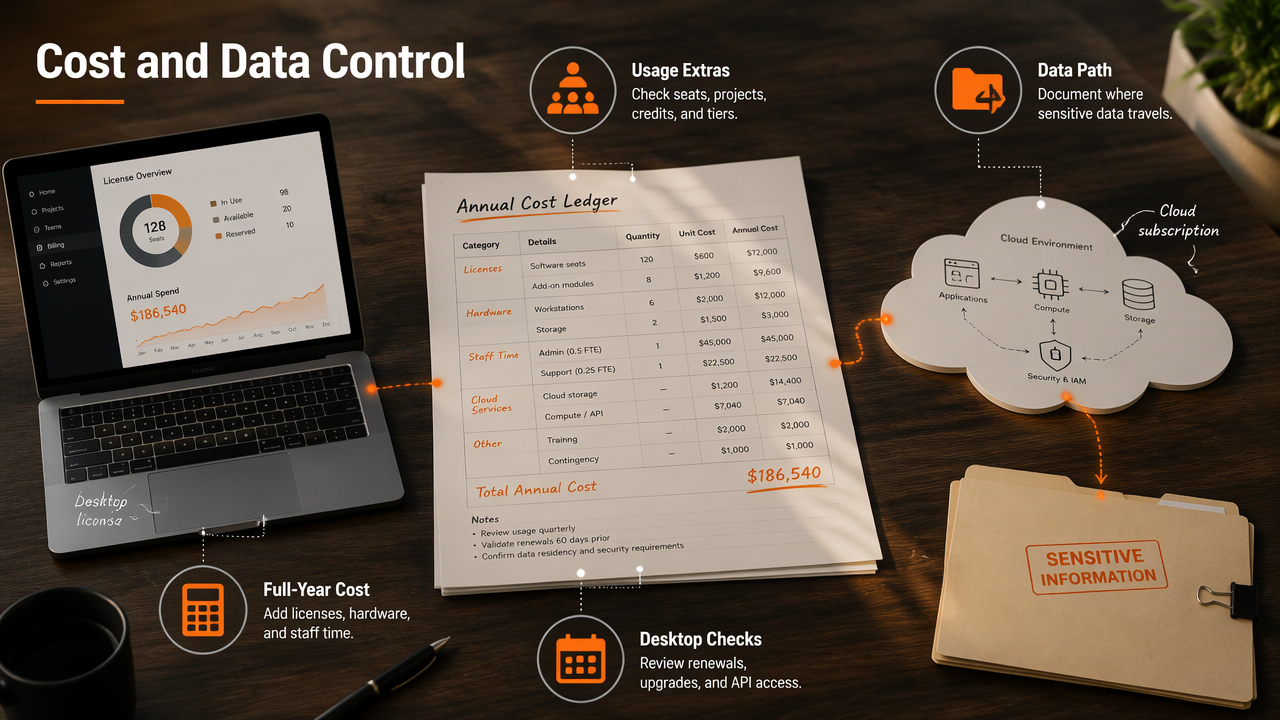
Total cost depends on licenses, subscriptions, hardware, usage allowances, and staff time; data control depends on actual storage and transfer practices. Neither desktop nor cloud automatically wins both categories. A purchase comparison should include a full year of expected work and a documented account of where sensitive information travels.
Compare complete annual operating costs
A desktop license may involve renewals, hardware upgrades, or separately billed API access. A cloud subscription may involve additional seats, projects, credits, or higher usage tiers. These are items to verify, not charges that every vendor applies.
Annual operating cost: license or subscription charges + required extras + hardware allocation + administration time.
The comparison should include report preparation and handoffs. A lower sticker price can be less attractive when staff repeatedly reconstruct the same report. Conversely, a shared workspace adds little value when only one person uses it.
Check data handling before uploading sensitive material
Teams should inspect retention periods, deletion options, access permissions, connected services, and export rights. Desktop tools can still transmit information through integrations, and hosted tools differ in their contractual protections.
Alkhalil and colleagues' 2021 study examines phishing attacks, not SEO platforms. Its relevance here is account-security context; it doesn't establish that either deployment model is safer.
What to watch in 2027
Portability and integration deserve attention as AI-assisted workflows evolve. Gill and colleagues' 2022 research examines emerging AI computing directions, but isn't an SEO-tool forecast.
Prefer verifiable exports, documented integrations, and clear human-review steps over promises about future automation.
Desktop vs cloud SEO tools FAQ
The most useful purchase questions concern task fit, operating requirements, and the ability to leave a service with usable records.
A trial should prove the workflow, not merely demonstrate the interface.
Are desktop SEO tools cheaper than cloud tools?
Desktop SEO tools aren't automatically cheaper. The answer depends on licensing, hardware, connected services, and the time required to maintain the workflow. Cloud costs depend on the selected subscription and allowances. An annual comparison using the same workload is more useful than comparing a license price with one monthly payment.
Can desktop SEO software work offline?
Desktop SEO software may support offline analysis of saved data, but live website crawling and external data requests need connectivity. Installed software shouldn't be assumed to offer fully offline operation. A trial should distinguish tasks performed on stored files from tasks requiring websites, APIs, authentication, or license verification.
Which model suits a large e-commerce website?
Large e-commerce websites need a workload test rather than an automatic cloud recommendation. Crawl scope, page complexity, resource capacity, and frequency all matter. A desktop setup may suit a controlled audit, while hosted processing may suit recurring operations. Current limits and a representative test should decide the purchase.
Does a cloud SEO platform replace a technical crawler?
A cloud SEO platform replaces a technical crawler only when its documented capabilities cover the required audit tasks. Content production, competitive research, and technical diagnostics are different functions. Buyers should check the exact reports needed, test representative pages, and confirm that the platform produces actionable results before consolidating tools.
Conclusion
Choose the deployment model around one real workflow, then validate capacity, annual cost, and data handling before committing. For content operations, evaluate Earlyseo at earlyseo.com using a live brief and named reviewers. Keep technical auditing as a separate requirement, and purchase a combined setup only when both parts earn their place.