TL;DR
WooCommerce stores can automate repeatable SEO work without handing quality to a robot. The best 2026 workflow starts with keyword intent, then automates product metadata, category copy, internal links, schema checks, content briefs, and refresh queues with human approval before publishing.
SEO automation for WooCommerce stores works best when it removes repetitive production work, not strategic judgment. WooCommerce is an open-source ecommerce plugin for WordPress, built for online merchants using WordPress, and its flexible product structure makes SEO powerful but time-consuming at scale. A store with hundreds of products needs repeatable systems for titles, descriptions, category pages, schema, links, and content updates. Earlyseo fits this workflow by helping ecommerce teams turn keyword opportunities into organized SEO tasks, briefs, and publish-ready content plans.
Table of Contents
What is SEO automation for WooCommerce stores?
SEO automation for WooCommerce stores is the use of software, templates, rules, and AI-assisted workflows to complete repeatable search optimization tasks across WordPress product, category, and content pages.
SEO automation: A controlled process that turns recurring SEO tasks into repeatable workflows while keeping human review for search intent, accuracy, brand voice, and conversion quality.
Automation is not the same as auto-publishing every page. Strong ecommerce SEO still needs product expertise, merchandising judgment, and clear positioning. The automation layer handles scale: keyword clustering, metadata drafts, schema checks, internal link suggestions, blog briefs, and refresh reminders.
A 2025 survey-based study in Data examined user experience and perceptions of AI-generated ecommerce content, including functionality, aesthetics, and security concerns, which makes quality control a core part of any automation plan (Stamkou, Saprikis, and Fragulis, 2025).
Key insight: ecommerce SEO automation should speed up research and production, while people still approve claims, tone, pricing context, and page usefulness.
Automation terms WooCommerce teams should know
| Term | Practical meaning for WooCommerce |
|---|---|
| Product metadata | SEO title, meta description, product slug, image alt text, and headings |
| Collection copy | Category or product archive text that explains buying intent and product differences |
| Structured data | Product, review, price, availability, and breadcrumb markup for search engines |
| Internal links | Links between products, categories, buying guides, and blog posts |
| Content refresh | Scheduled updates to pages with stale rankings, outdated products, or weak click-through rates |
Which WooCommerce SEO tasks should be automated first?
The best WooCommerce SEO tasks to automate first are high-volume, rules-based tasks that affect many pages but still allow human review before publication.
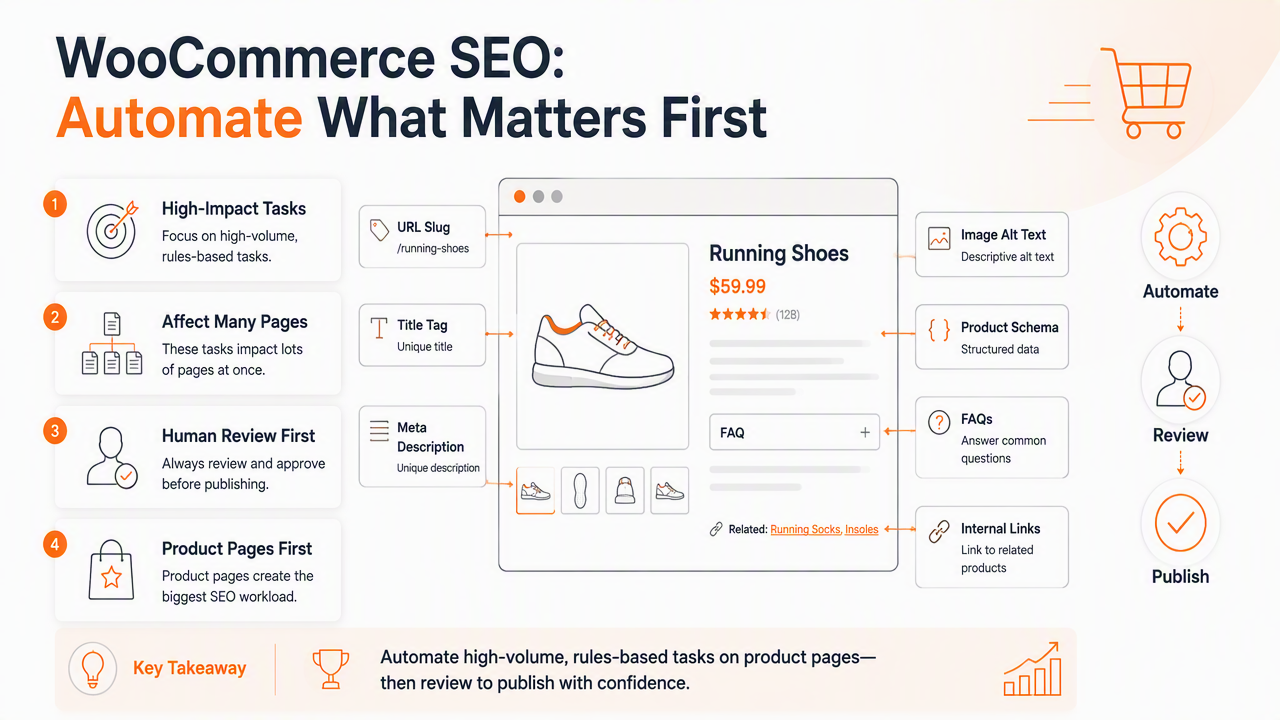
Product pages usually create the biggest workload. Each page may need a unique title, meta description, URL slug, image alt text, product schema, FAQs, and links to related categories. Category pages need broader intent matching, since shoppers often search by use case, material, size, brand, price, or problem.
The official WooCommerce ecommerce SEO guide for 2026 highlights product pages, keyword intent, XML sitemaps, site structure, mobile experience, and search engine discoverability as starting points for stores (WooCommerce, 2026). Automation should map directly to those areas.
For smaller catalogs, background reading on ecommerce SEO for small online stores can help teams choose tasks before building a large workflow.
Best first automation targets
- SEO titles and meta descriptions: generate drafts from product name, category, primary keyword, and differentiator.
- Category intro copy: create short buying-intent summaries for filtered or curated collections.
- Image alt text: combine product type, material, color, and use case without keyword stuffing.
- Internal link suggestions: connect products to related categories, guides, and comparison content.
- Schema validation: flag missing price, availability, review, breadcrumb, or product identifiers.
- Content briefs: build outlines for buying guides, comparison posts, and product-led tutorials.
- Refresh queues: identify pages that need updated copy, links, images, or seasonal relevance.
What should stay human-reviewed
| Task | Automate the draft | Human review needed |
|---|---|---|
| Product SEO title | Yes | Yes, for uniqueness and click appeal |
| Meta description | Yes | Yes, for claims and offers |
| Product description | Partly | Yes, for accuracy and conversion fit |
| Category copy | Yes | Yes, for merchandising intent |
| Schema markup | Yes | Yes, for data consistency |
| Internal links | Yes | Yes, for relevance and crawl depth |
| Medical, legal, safety, or regulated claims | No | Always manual |
How should a WooCommerce automation workflow run?
A reliable WooCommerce automation workflow moves from keyword opportunity to approved page updates through a clear queue, not random one-off edits.
- Export products, categories, URLs, current metadata, and performance data.
- Group products by category, intent, margin, season, or stock priority.
- Match keyword opportunities to product pages, category pages, or blog content.
- Generate metadata, internal links, schema checks, and brief recommendations.
- Review drafts for accuracy, brand voice, and conversion value.
- Publish in controlled batches, then monitor indexing and performance.
- Refresh pages based on rankings, clicks, inventory, and competitor movement.
Research in Industrial Marketing Management studied artificial intelligence-empowered tools across B2B customer process management activities, showing how AI can support digital customer process work when paired with management processes (Rusthollkarhu, Toukola, and Aarikka-Stenroos, 2022). For ecommerce SEO, the same idea applies: process design matters as much as the tool.
The Earlyseo platform supports this kind of repeatable planning through SEO operations workflows, especially when product launches, blog content, and refresh work need one shared queue.
Workflow diagram from keyword to published page
Keyword opportunity
 ↓
Intent match: product, category, guide, or FAQ
 ↓
WooCommerce product and category data pulled into workflow
 ↓
Automated draft: metadata, links, schema notes, brief
 ↓
Human review: accuracy, offer, brand voice, compliance
 ↓
WordPress update or new page publish
 ↓
Indexing check, ranking watch, refresh queue
This workflow keeps automation tied to real demand. A keyword such as washable wool runner rug might map to a category page, while best washable wool rug for hallway might need a buying guide that links to the category and selected products.
Where competitor data improves automation
Competitor data helps automation avoid generic copy and spot gaps in page coverage. A product category can be compared against ranking pages for headings, attributes, FAQs, internal links, and missing modifiers.
Tools that create competitor-aware SEO content are useful when a WooCommerce store competes with Amazon, Etsy, Wayfair, niche retailers, and brand-owned stores. The goal is not copying competitors. Better automation finds where a store can answer intent more clearly.
How does Earlyseo handle WooCommerce SEO automation?
Earlyseo handles WooCommerce SEO automation by organizing keyword research, content briefs, internal linking, page refreshes, and multilingual planning into repeatable SEO production workflows.
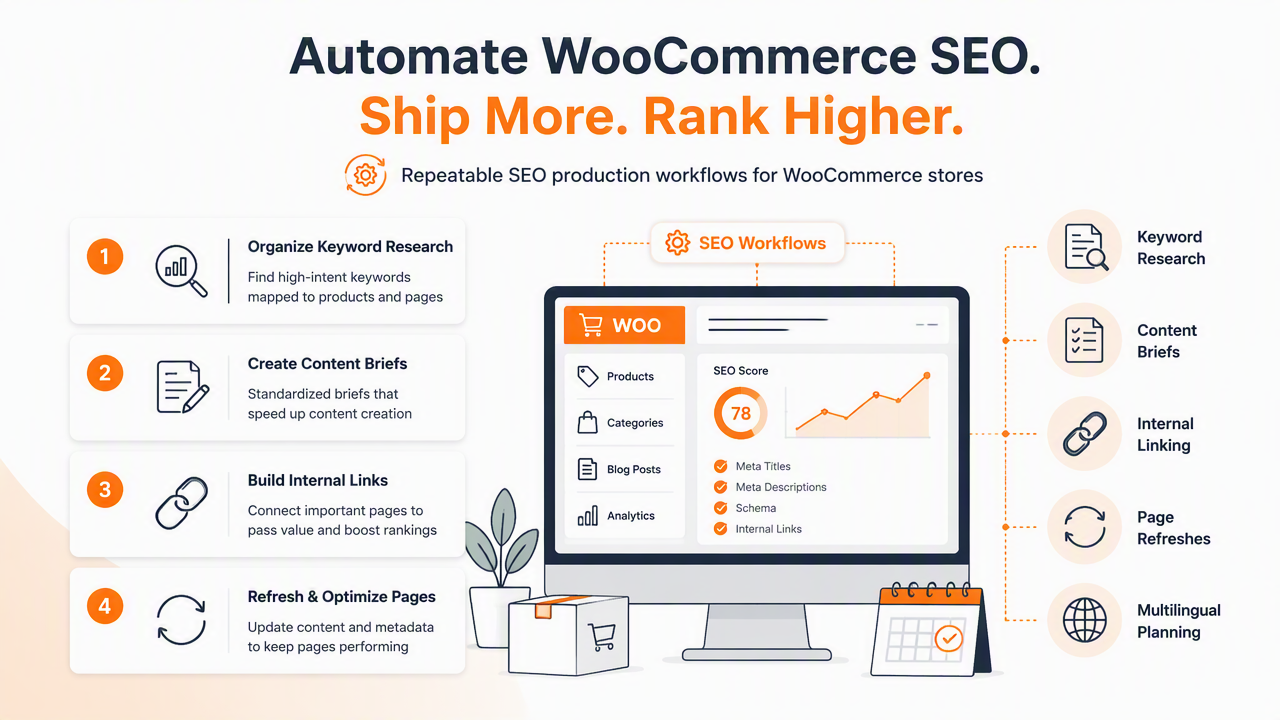
WooCommerce stores often run into the same operational problem: the backlog grows faster than the team. New products need launch metadata. Old collections need better copy. Blog ideas pile up. International pages need local intent. Manual spreadsheets can work for a small catalog, but the process gets messy once product, content, and technical tasks overlap.
With Earlyseo, ecommerce teams can plan SEO work around product groups, search intent, competitors, and content priorities. The platform is especially useful when SEO needs to support catalog growth rather than sit as a separate marketing task. Stores expanding across regions can also connect automation planning with multilingual SEO content and broader international SEO workflows.
Strong automation creates a publishing system: every new product gets a keyword target, internal links, metadata, schema checks, and a refresh path before it disappears into the catalog.
WooCommerce automation tool comparison
| Option | Best fit | Main strength | Watch area |
|---|---|---|---|
| Earlyseo | Growing ecommerce teams that need SEO planning and content operations | Connects keyword opportunities, briefs, internal links, and refresh workflows | Best paired with a clear publishing process |
| All in One SEO | WordPress teams focused on plugin-level SEO settings | WooCommerce SEO features, rich snippets, and on-page controls | Strategy and content planning still need a workflow |
| Rank Math | WordPress users wanting technical SEO controls inside the dashboard | Metadata, schema, redirects, and content scoring | Large catalogs still need editorial prioritization |
| ContentGecko | Ecommerce teams focused on automated SEO content production | Product and category content automation across platforms | Human review remains needed for brand and accuracy |
Who should pick which approach
- Earlyseo: best for teams that need SEO operations, content planning, competitor research, internal links, and refresh management across many ecommerce pages.
- AIOSEO or Rank Math: best for stores that mainly need WordPress plugin controls for metadata, schema, sitemaps, and technical settings.
- A specialist agency: best when strategy, technical cleanup, migration work, or custom development is needed.
- Manual spreadsheets: acceptable for very small catalogs, but harder to maintain when products, categories, and blog content grow.
For teams building supporting articles alongside product pages, a reusable SEO content brief template can keep writers focused on search intent, product links, and conversion paths.
What will change in WooCommerce SEO automation in 2027?
WooCommerce SEO automation in 2027 will likely move from simple content generation toward agent-like workflows that monitor demand, suggest updates, and prepare page changes for approval.
Search is becoming more answer-driven. Google AI Overviews, AI Mode-style experiences, and LLM assistants tend to favor clear entities, direct answers, structured comparisons, and well-marked product data. That means WooCommerce pages need cleaner information architecture, stronger category explanations, and content that answers buying questions directly.
Automation will also become more connected to inventory. If a product goes out of stock, a smart workflow should suggest alternatives, update internal links, adjust related content, and flag affected category pages. If a product gains demand, the system should recommend a guide, comparison page, or FAQ expansion.
Stores should prepare now by building clean product attributes, consistent category naming, and internal linking rules. The guide to internal linking strategy for SEO is a useful next step for making product and content pages work together.
2027-ready automation checklist
- Standardize product attributes such as size, color, material, use case, brand, price range, and availability.
- Add unique category copy for priority collections instead of relying on thin archive pages.
- Keep product schema, breadcrumb schema, and review data clean.
- Build internal link rules between products, categories, blog posts, and buying guides.
- Track pages that deserve refreshes after stock changes, seasonal shifts, or ranking drops.
- Create comparison content where shoppers need help choosing between products.
- Use human approval for claims, regulated products, discounts, and brand-sensitive language.
FAQ
Is WooCommerce SEO automation safe for search rankings?
WooCommerce SEO automation is safe when it drafts and checks work rather than publishing low-quality pages without review. Search risk rises when stores create duplicate descriptions, thin category pages, or inaccurate claims at scale. A safer setup keeps humans responsible for accuracy, usefulness, and final approval.
Can AI write WooCommerce product descriptions?
AI can draft WooCommerce product descriptions, but product facts, sizing, materials, guarantees, and compliance-sensitive claims need human review. Better workflows use AI for first drafts, variants, summaries, and metadata, then route the copy through merchandising or marketing approval before publishing.
Should every WooCommerce product target a unique keyword?
Not every product needs a unique primary keyword. Some products should support a category page, collection page, or buying guide instead. Automation should group products by intent and avoid forcing near-identical keywords across similar SKUs, since that can create overlap and weak pages.
How often should WooCommerce SEO pages be refreshed?
Priority product and category pages should enter a refresh queue when rankings decline, click-through rates lag, inventory changes, competitors improve content, or seasonal demand shifts. Evergreen guides may need scheduled reviews, while fast-moving categories need more frequent checks tied to stock and demand.
Conclusion
SEO automation for WooCommerce stores should turn catalog growth into a repeatable publishing system: find demand, map intent, draft page improvements, review quality, publish in batches, and refresh based on performance. The strongest starting point is product metadata, category copy, internal links, schema checks, content briefs, and update queues.
For stores ready to replace scattered SEO tasks with a cleaner workflow, Earlyseo can help organize the process from keyword opportunity to approved content plan. Visit earlyseo.com to connect automation with practical ecommerce SEO operations, then start with the next 20 priority products or categories rather than trying to fix the whole catalog at once.