TL;DR
Faceted filters help shoppers narrow category pages, but unmanaged filter URLs can create duplicates, thin pages, and crawl waste. The practical rule is simple: index only filtered pages with search demand and unique value, then control the rest with canonicals, noindex rules, crawl settings, and clean internal links.
Faceted navigation SEO for ecommerce category pages turns ordinary product filters into a search system that Google can understand without indexing thousands of near-identical URLs. Faceted navigation: a category-page filtering system that lets shoppers narrow products by attributes such as size, color, brand, price, rating, fit, material, availability, or use case. For ecommerce, which covers buying and selling products online, this setup supports usability, meaning safe, effective, efficient task completion with a better browsing experience. The SEO challenge is deciding which filtered URLs deserve search visibility and which should stay out of the index.
Table of Contents
What is faceted navigation SEO for ecommerce category pages?
Faceted navigation SEO for ecommerce category pages is the practice of controlling how product filter URLs are crawled, indexed, canonicalized, and internally linked so search engines rank valuable filtered categories without wasting attention on duplicates or thin pages.
A typical category such as /mens-shoes/ may create filtered URLs for /mens-shoes/?color=black, /mens-shoes/?brand=nike, or /mens-shoes/?size=10&price=under-100. Some match real search demand. Many exist only to support browsing.
Key insight: every filter URL needs a clear job, either rank, support shoppers, or stay hidden from search results.
Core terms that matter
- Facet: a product attribute used for filtering, such as brand, color, size, material, or price.
- Filtered URL: the page state created after one or more facets are selected.
- Indexable page: a URL allowed to appear in search results.
- Canonical URL: the preferred version selected with
rel="canonical". - Crawl trap: a URL pattern that creates too many low-value combinations for bots to crawl efficiently.
Keyword research, defined as the SEO practice of finding and analyzing search terms people use, decides which filter combinations deserve dedicated landing pages.
Why ecommerce filters need SEO rules
Filters improve product discovery, but search engines see URLs, links, templates, and content. A useful shopping interface can look like a duplicate-page factory when every filter creates an indexable URL.
The stronger approach is to separate user experience from search exposure. Category pages can keep rich filtering for shoppers while only selected filtered pages receive indexable URLs, unique copy, optimized titles, and internal links.
Which filtered pages should be indexed?
Filtered pages should be indexed only when they match real search intent, contain enough relevant products, and can offer content that is meaningfully different from the parent category.
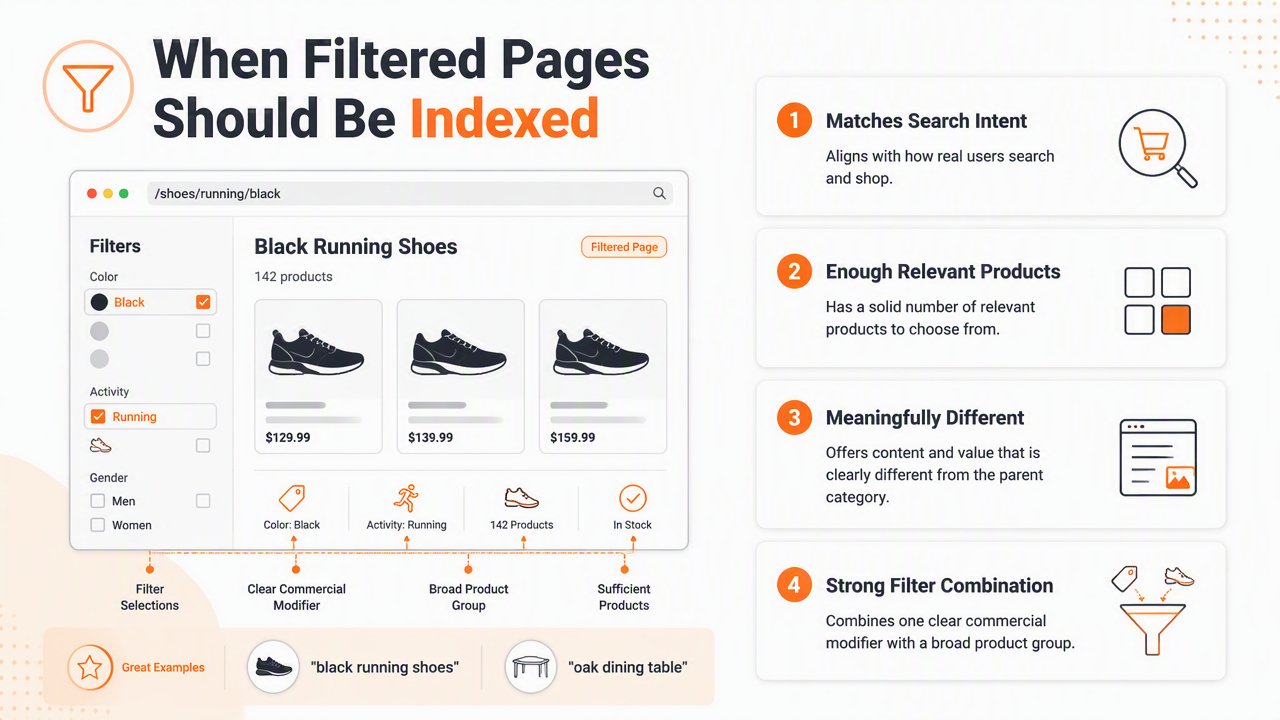
The best candidates usually combine one clear commercial modifier with a broad product group: "black running shoes," "oak dining tables," "organic baby clothes," or "waterproof hiking jackets." Multi-filter combinations can rank, but only when demand and inventory justify them.
Indexing decision table
| Filtered page type | SEO action | Reason |
|---|---|---|
| Brand plus category, such as "Nike running shoes" | Index if demand and stock exist | Clear commercial intent and stable inventory |
| Color plus category, such as "black dresses" | Index selectively | Often searched, but may overlap with parent pages |
| Size-only pages, such as "size 10 shoes" | Usually noindex | Useful for shoppers, weak standalone intent |
| Price-sort or newest-sort pages | Noindex or canonical to parent | Sorting changes order, not topic |
| Multi-select filters, such as brand plus color plus size | Usually noindex | Narrow and often thin |
| In-stock filter | Usually noindex | Inventory changes too often |
| High-demand use case, such as "wedding guest dresses" | Build as landing page | Strong intent and content opportunity |
Landing page requirements before indexing
An indexable filtered page should behave like a real category page, not a temporary filter state. That means unique metadata, stable URLs, useful copy, crawlable product listings, and internal links from relevant pages.
A page worth indexing should have:
- A clean URL, preferably
/category/attribute/rather than a long parameter chain. - A unique title tag and H1 that match the target query.
- Enough products to avoid a thin or empty page.
- Intro copy that helps shoppers choose, not filler text.
- Links from parent categories, buying guides, or navigation.
- A self-referencing canonical tag.
For broader store planning, the ecommerce guidance on the Earlyseo ecommerce SEO page fits teams building a scalable organic traffic base.
How should noindex, canonicals, and robots rules work?
Noindex, canonicals, and robots rules should work together by assigning each filter URL one clear instruction: rank as a landing page, consolidate signals to a parent page, or stay crawl-limited.
Many ecommerce sites mix signals. A URL may be blocked in robots.txt, canonicalized elsewhere, and marked noindex at the same time. That creates uncertainty because blocked pages may not be crawled often enough for search engines to read page-level directives.
Rule set for common filter controls
- Use self-referencing canonicals on indexable filtered landing pages.
- Use canonical to parent when a filter creates a minor variant, such as sort order.
- Use noindex, follow for filter pages useful to shoppers but not search results.
- Use
robots.txtcarefully for infinite URL patterns, not pages that need directive discovery. - Avoid internal links to blocked or noindex pages from main category copy.
- Keep XML sitemaps limited to canonical, indexable category and landing pages.
Search engines need consistency more than complexity. One clean instruction beats three conflicting hints.
A simple technical setup
A practical setup starts with URL classification. Green URLs rank, yellow URLs support browsing, and red URLs get restricted. The color labels are not technical standards, but they help teams make repeatable decisions.
Green pages get indexable HTML links, metadata, copy, schema where relevant, and sitemap inclusion. Yellow pages can be accessible through filters with noindex, follow. Red patterns, such as endless price ranges or sort parameters, can be blocked, disallowed, or prevented from generating crawlable links.
Research context for 2026
Modern ecommerce SEO also has to account for accessibility and machine interpretation. A 2024 paper by Patricia Acosta-Vargas, Belén Salvador-Acosta, and Sylvia Novillo-Villegas examined generative AI and web accessibility, a useful reminder that cleaner navigation helps both people and automated systems when page structure is understandable source.
Large-scale browsing behavior also matters. Kimberly Ruth, Aurore Fass, and Jonathan J. Azose studied worldwide web browsing patterns in 2022, reinforcing that the web is interpreted through URLs, navigation paths, and page structures at scale source.
How can ecommerce teams audit faceted URLs?
Ecommerce teams can audit faceted URLs by crawling category pages, grouping filter patterns, checking index status, and mapping each URL type to an SEO action.
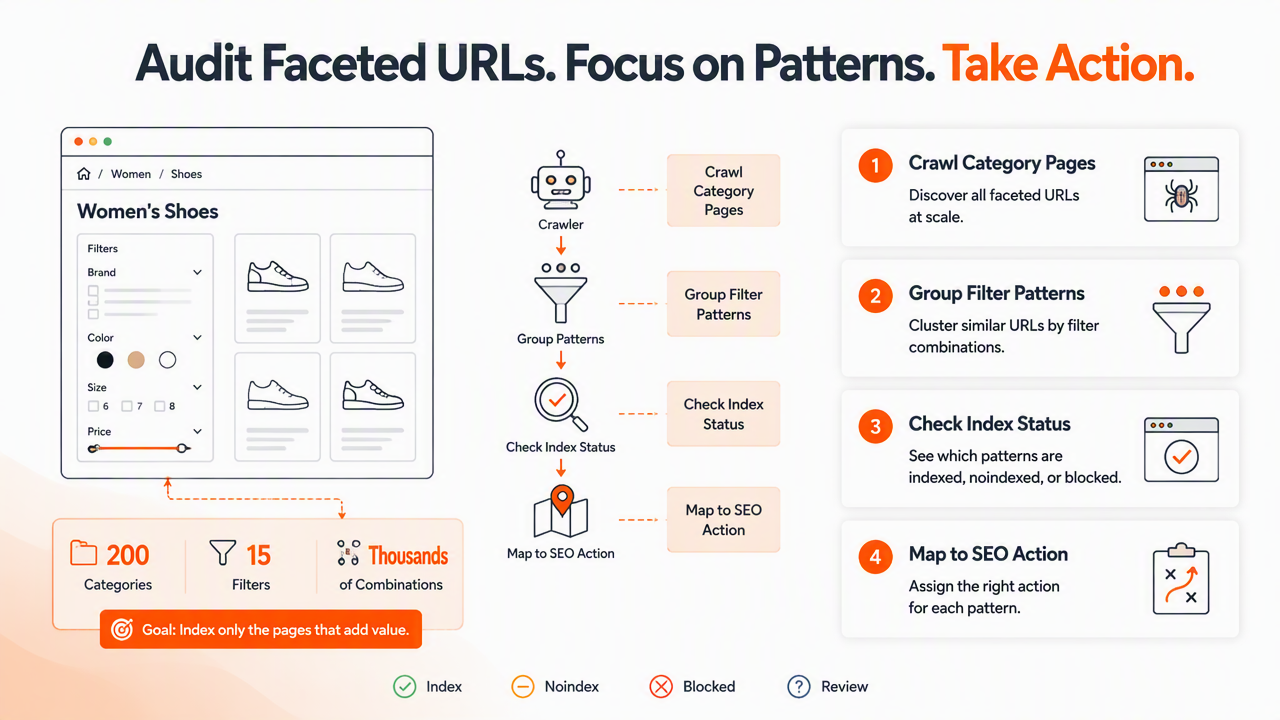
The fastest audits focus on patterns rather than individual URLs. A store with 200 categories and 15 filters can generate thousands of combinations, so the goal is to identify templates, parameters, and rules that create the largest search impact.
Facet audit checklist
- Crawl category pages with JavaScript rendering if filters depend on scripts.
- Export all discovered filter URLs and group them by parameter or path.
- Check Google Search Console for indexed, crawled, and duplicate category URLs.
- Compare indexable filtered pages against keyword demand and product depth.
- Review title tags, H1s, canonicals, and robots directives by URL pattern.
- Confirm only valuable filtered pages appear in XML sitemaps.
- Test internal links from parent categories and merchandising modules.
- Document final rules for developers, merchandisers, and content editors.
The process pairs well with an on-page SEO checklist template because titles, headings, canonicals, and index directives all need consistent review.
What to look for in analytics
Useful signals include organic landing-page sessions, impressions by filtered URL, product availability, conversion rate, and internal search queries. A filtered URL with impressions but poor ranking may need better content and links. A URL with no demand and thin inventory should probably stay out of the index.
Earlyseo can help organize these decisions into repeatable SEO operations, especially when category owners, developers, and marketers share responsibility. The Earlyseo platform is strongest when the team needs a practical workflow instead of one-off notes scattered across spreadsheets.
How Earlyseo handles this
Earlyseo treats category filters as an operations problem: each pattern needs an owner, a rule, and a review cycle. With Earlyseo, ecommerce teams can turn keyword research, competitor-informed content planning, and page-level SEO tasks into a cleaner publishing process.
For stores that sell across countries or languages, filter logic should also account for localized search intent. A color, material, or size modifier may deserve a landing page in one market and noindex treatment in another, which makes multilingual SEO content planning valuable for international catalogs.
FAQ: Faceted navigation SEO decisions
Faceted navigation decisions get easier when every filter URL is judged by demand, uniqueness, inventory, and crawl impact. These answers cover the common edge cases that ecommerce owners face while cleaning up category-page filters.
Should filtered category pages be in the XML sitemap?
Filtered category pages should appear in the XML sitemap only when they are indexable landing pages with self-referencing canonicals. Temporary filter states, sort URLs, size-only pages, and noindex pages should stay out. Sitemaps act as a quality signal about preferred URLs, so including low-value filter combinations weakens crawl focus.
Is canonicalization enough for duplicate filter pages?
Canonicalization helps consolidate duplicate or near-duplicate filter pages, but it should not be the only control for massive URL generation. Canonicals are hints, not absolute commands. Internal linking, sitemap hygiene, parameter handling, and selective noindex rules still matter when filters create thousands of low-value combinations.
When does a filter deserve a dedicated landing page?
A filter deserves a dedicated landing page when it matches a real search query, has stable product depth, supports unique copy, and fits the store's merchandising strategy. Brand-category, color-category, material-category, and use-case pages often qualify. Pages based only on sort order, availability, or narrow multi-select combinations usually do not.
Can JavaScript filters hurt ecommerce SEO?
JavaScript filters can hurt SEO when they hide products, links, or canonical signals from crawlers. They can work well when the default category page loads crawlable content and important filtered landing pages have clean, accessible URLs. Testing rendered HTML is necessary before assuming Google can read every filter state.
Conclusion
Faceted navigation SEO for ecommerce category pages works best when every filter has a defined search role. Index the pages that match demand and deserve unique content, canonicalize minor variants, noindex useful browsing states, and restrict crawl traps before they spread across the catalog. The next step is a pattern audit: export filter URLs, group them by rule, and assign each group to index, noindex, canonical, or block. For a more guided process, visit earlyseo.com and turn those rules into a repeatable category SEO workflow.