TL;DR
Google Maps visibility usually fails for one of seven reasons: an unverified profile, category mismatch, weak relevance, distance limits, low prominence, suspension, or duplicate listings. The fastest fix is to verify the Google Business Profile, clean up core business data, choose accurate categories, and build local proof across the website, reviews, and citations.
A business can exist, serve customers, and still be nearly invisible when someone searches nearby, which is why the question "why is my business not showing up on Google Maps" matters so much for local revenue. Google Maps is a web mapping platform and consumer application from Google that includes street maps, satellite imagery, real-time traffic, and local business information. For founders and local operators building search visibility, Earlyseo helps connect website SEO work with the local signals that make a Google Business Profile easier to understand.
Table of Contents
Why is my business not showing up on Google Maps?
A business usually does not appear on Google Maps because Google cannot confidently verify, categorize, locate, or trust the listing for the search being performed. The issue may be technical, such as an unverified Google Business Profile, or competitive, such as stronger nearby businesses earning more reviews, links, and local engagement.
Google Business Profile: the free Google listing that controls how a business can appear across Google Search and Google Maps.
Key insight: Maps visibility is not a single switch. Google needs proof that the business is real, relevant to the query, located near the searcher, and prominent enough to show.
Research on digital transformation by Verhoef, Broekhuizen, Bart, and coauthors describes how digital channels change customer interaction and business visibility, which fits the practical shift toward map-based discovery for local services and stores (Journal of Business Research, 2021).
Fast diagnostic table for Maps visibility
| Symptom | Most likely cause | Quick fix |
|---|---|---|
| Business name appears only when searched exactly | Weak relevance or low prominence | Add complete services, photos, reviews, and local website content |
| Listing does not appear at all | Unverified or suspended profile | Check Google Business Profile status and complete verification |
| Listing appears in one area but not another | Distance limits | Track rankings from multiple locations, not just one device |
| Wrong business shows at the same address | Duplicate or practitioner listing conflict | Merge, remove, or clarify listings |
| Profile appears for odd terms | Category mismatch | Set the primary category to the main service or business type |
Local visibility has two layers: eligibility and ranking. Verification, policy compliance, and accurate data make the profile eligible. Relevance, distance, and prominence influence where it ranks after that.
Check verification, suspension, and profile basics first
Verification, suspension, and incomplete profile data should be checked before any deeper SEO work because they can block or weaken visibility even when the business is legitimate. A verified profile gives Google stronger confidence that the business owner or authorized manager controls the listing.
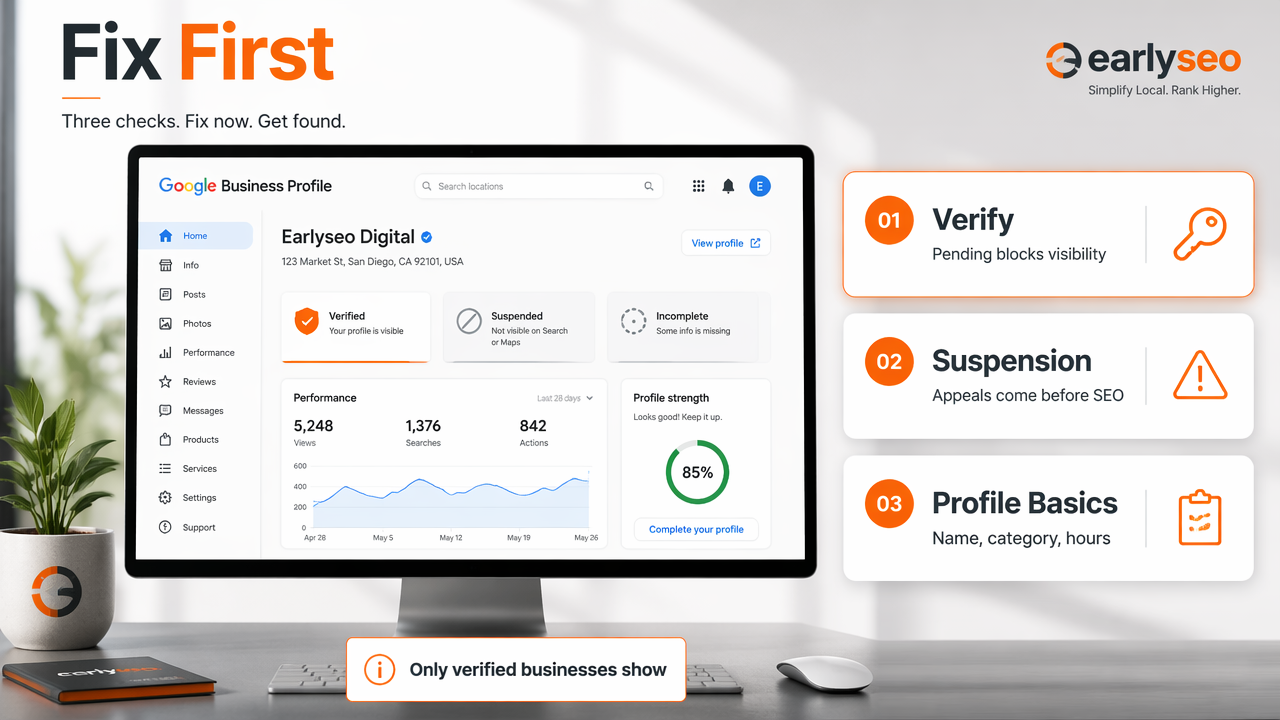
Google's search result for finding a business states that only verified businesses can show business information on Maps and Search. That means a business can create a profile but still fail to display properly if verification remains pending, rejected, or inconsistent.
Verification checklist
- Open the Google Business Profile dashboard and confirm the profile status.
- Complete the verification method offered by Google, such as video, phone, email, or postcard where available.
- Match the business name, address, phone number, website, and hours to real-world operations.
- Avoid adding marketing phrases to the business name unless they are part of the legal or public-facing name.
- Add core profile assets: primary category, services, products, opening date, photos, and service area if relevant.
A pending verification can look like a ranking problem, but the real issue is eligibility. The profile may exist in the account while Google still limits how it appears publicly.
Suspensions create a different problem. A hard suspension can remove public visibility, while a soft suspension can leave a listing visible but remove management access. In both cases, the fix starts with policy cleanup before an appeal.
Profile fields that matter most
- Name: should reflect the real business name used on signage, website, and legal records.
- Address: should be accurate for storefronts and hidden for service-area businesses that do not serve customers at the location.
- Phone: should connect directly to the business, not an unrelated call center.
- Website: should point to a real local landing page, not a broken homepage or unrelated marketplace page.
- Hours: should match actual customer availability, including holidays when possible.
For businesses running on WordPress, local landing pages and schema updates can be managed alongside search work through the Earlyseo WordPress integration. The Earlyseo platform is useful when profile fixes need matching website updates, not just one-off edits inside Google.
Fix category mismatch and weak relevance
Category mismatch and weak relevance cause a listing to appear for the wrong searches or disappear for the searches that matter most. Google uses the primary category as a strong clue about what the business is, so a vague or inaccurate category can suppress Maps visibility.
A plumber categorized as "Contractor" may be eligible but less relevant than a competitor categorized as "Plumber." A boutique categorized as "Store" may struggle against listings marked as "Women's Clothing Store," "Gift Shop," or another closer entity.
Relevance signals to strengthen
| Signal | Weak version | Strong version |
|---|---|---|
| Primary category | Broad or adjacent category | Closest exact business type |
| Services | Empty or generic services | Specific services customers search for |
| Website page | Thin homepage only | Local service page with address, hours, and service details |
| Photos | Stock images or none | Real exterior, interior, team, product, and job photos |
| Reviews | Short, vague feedback | Reviews mentioning services, neighborhood, and experience |
Relevance should be consistent across the profile and website. If the Google profile says "Emergency Dentist" but the site talks mostly about cosmetic dentistry, Google receives mixed signals.
Website alignment for local intent
A Google Business Profile should not carry local SEO alone. The linked website needs clear local language, crawlable pages, and consistent details so Google can connect the entity to services and geography.
Helpful local page elements include:
- Business name, address, and phone number in plain text
- A short description of the service area or neighborhood
- Service-specific headings, not only brand slogans
- Embedded map or driving context when useful
- Internal links to related service, product, or booking pages
E-commerce businesses with local pickup, showrooms, or service areas can connect store content and organic search improvements through the Earlyseo Shopify integration. That matters because Maps relevance often improves when the website and Google profile describe the same entity clearly.
Understand distance limits and local competition
A business may not show on Google Maps because the searcher is too far away or because nearby competitors have stronger local signals. Distance is a built-in local ranking constraint, so a business can rank well near its address and poorly a few miles away.
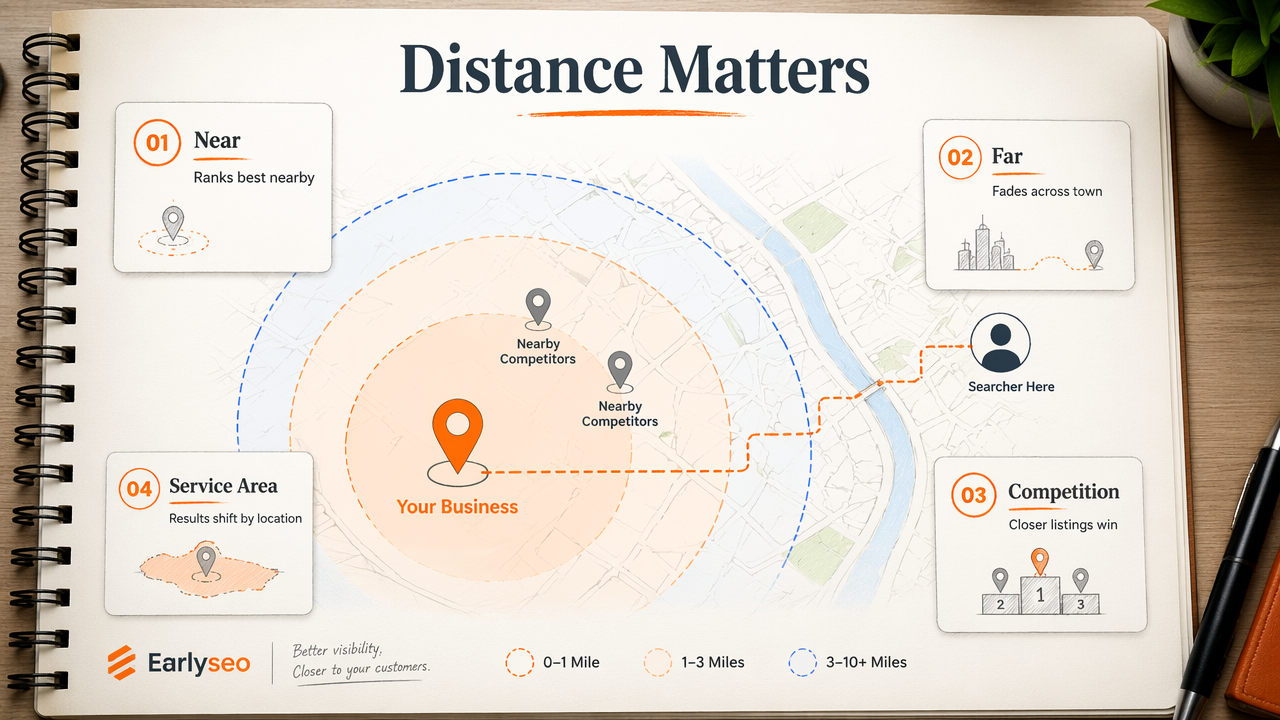
This point gets missed often. A business owner searching from home, across town, or outside the service area may see results that do not match what nearby customers see. Maps rankings are location-sensitive, not fixed.
When the problem is not really a problem
- The listing appears for searches near the business address but not across the city.
- Competitors closer to the searcher appear first for broad terms.
- The business appears for brand searches but not competitive non-brand terms.
- A service-area business ranks better near its verified base than in distant towns.
Distance can limit rankings even when every profile setting is correct. No amount of keyword editing can make a business equally visible in every neighborhood.
Prominence is the other major constraint. Businesses with more local recognition, stronger review profiles, better links, and clearer citations usually earn more trust. Academic work such as Hair, Hult, and Ringle's 2021 book on PLS-SEM explains modeling relationships between variables, a useful reminder that visibility depends on many interacting factors rather than one isolated setting (Springer, 2021).
Prominence signals that support Maps rankings
Prominence grows when Google finds steady evidence that a business is known and active in its market. That evidence can come from reviews, local press, directories, website authority, social profiles, and consistent customer engagement.
Strong local prominence work includes:
- Earning recent, honest Google reviews from real customers.
- Responding to reviews with useful, specific replies.
- Building citations on trusted local and industry directories.
- Publishing location-specific pages for important services.
- Getting mentioned by local organizations, partners, or media.
- Keeping photos and posts current when they support real activity.
Technical SEO still matters because a weak website can reduce trust in the business entity. Teams that want a structured workflow can use the Earlyseo documentation to keep content, integrations, and site visibility tasks organized.
Resolve duplicate listings and data conflicts
Duplicate listings and inconsistent business data can confuse Google enough to split visibility between profiles or show the wrong result. This happens often with old addresses, former business names, practitioner profiles, department listings, franchises, and reused phone numbers.
A duplicate can outrank the correct listing, attract reviews to the wrong place, or make Google uncertain about which profile represents the business. The fix is usually cleanup, not more posting.
Duplicate cleanup checklist
- Search Google Maps for the business name, old names, address, and phone number.
- Identify profiles that share the same address, phone, website, or branding.
- Decide which profile should remain as the primary listing.
- Suggest edits, request ownership, or contact support when a duplicate needs removal or merging.
- Update major directories so outside citations match the surviving profile.
- Check the website footer, contact page, and local landing pages for outdated NAP data.
Do not create a second profile to "start fresh" unless Google's rules clearly allow it. Extra listings often create a larger visibility problem later.
Business research methods literature, including Donthu, Kumar, Mukherjee, and coauthors' 2021 bibliometric analysis guide, shows the value of structured evidence review when diagnosing complex systems (Journal of Business Research, 2021). The same discipline applies here: collect signals, isolate conflicts, and fix the root cause.
What to expect for Google Maps visibility in 2026
Google Maps visibility in 2026 is becoming more entity-driven, review-sensitive, and tied to the wider web presence around a business. Profiles still matter, but Google increasingly benefits from consistent confirmation across the website, directories, content, photos, and customer activity.
Local SEO now overlaps with AI search. Search systems need clean facts about a business before they can summarize, rank, or recommend it confidently. That makes structured, consistent business data more valuable than scattered keyword edits.
2026 action plan
| Priority | Action | Expected impact |
|---|---|---|
| Eligibility | Verify the profile and fix policy issues | Restores basic visibility potential |
| Relevance | Align categories, services, and website pages | Improves query matching |
| Distance | Track rankings from real customer areas | Sets realistic expectations |
| Prominence | Build reviews, citations, links, and local content | Improves competitive strength |
| Data quality | Remove duplicates and inconsistent NAP | Reduces confusion across Google systems |
For ongoing local SEO learning, the Earlyseo SEO learning hub gives growing teams a place to connect Maps visibility with broader organic search work. More on earlyseo.com can help teams turn one diagnostic fix into a repeatable visibility process.
FAQ: Why does a verified business still not show?
A verified business can still fail to rank because verification only proves control of the profile. Google also evaluates relevance, distance, and prominence. A listing may be valid but less relevant than competitors, too far from the searcher, or weaker in reviews, website signals, and local mentions.
FAQ: How long does Google Maps visibility take?
Visibility can change quickly after verification or suspension fixes, but competitive ranking gains usually take longer. Profile completeness, review growth, citation cleanup, and website improvements need time to be crawled, trusted, and compared against nearby competitors.
FAQ: Can a service-area business rank without showing an address?
A service-area business can appear on Google Maps without displaying a public address when it follows Google's service-area rules. Ranking may still be strongest near the verified base location, and distant towns can be harder to win without strong local proof.
FAQ: Should keywords be added to the business name?
Keywords should not be added to the business name unless they are part of the real-world name. Keyword-stuffed names can create policy risk and may lead to edits or suspension. Better relevance comes from accurate categories, services, reviews, and local website content.
Conclusion
The practical answer to "why is my business not showing up on Google Maps" is usually found by checking eligibility first, then relevance, distance, prominence, and data conflicts. Start with verification and suspension status, fix categories and profile fields, align the website, remove duplicates, and build real local proof through reviews and citations. For teams that want this handled as an ongoing SEO system rather than a one-time cleanup, Earlyseo can support the next round of local visibility work at earlyseo.com.