TL;DR
Start with PageSpeed Insights, Chrome Lighthouse, and Google Search Console to combine diagnosis with real-user reporting. Add paid monitoring when scheduled tests and release tracking justify the cost, and prioritise customer-facing improvements rather than promised ranking gains.
A fast-looking homepage can still feel slow when a customer taps a menu or opens a product filter. Choosing seo optimisation tools for core web vitals means separating actual visitor experience from controlled test results. For founders and small marketing teams, Earlyseo can sit alongside performance measurement in a broader SEO operations workflow. The useful starting point is a small measurement stack, clear ownership, and repeatable checks, not another dashboard.
Table of Contents
What do Core Web Vitals tools measure?
Core Web Vitals tools measure loading performance, interaction responsiveness, and visual stability through real-user reporting or controlled diagnostic tests. The current metrics are Largest Contentful Paint, Interaction to Next Paint, and Cumulative Layout Shift. Choosing a tool depends on whether the task is assessing visitor experience, finding a technical cause, or checking a release.
The three metrics and their practical meaning
- Largest Contentful Paint (LCP): Measures when the largest visible content element appears, such as a prominent product image or headline block.
- Interaction to Next Paint (INP): Measures responsiveness to interactions, such as opening navigation or changing a product option.
- Cumulative Layout Shift (CLS): Measures unexpected movement of visible content, such as a button shifting when an image loads.
These metrics answer different questions. Image delivery can affect loading, JavaScript work can delay interactions, and missing space for banners can disturb layout. A single overall performance score doesn't explain all three.
Field data versus lab data
Field data: Measurements collected from actual visits, reflecting the devices, connections, and interactions of the observed audience.
Lab data: Measurements from a controlled test, useful for reproducing loading behaviour and examining technical causes.
PageSpeed Insights brings these perspectives together when real-user data is available. Chrome Lighthouse provides controlled audits. A standard page-load audit doesn't reproduce every interaction behind INP, so interactive debugging remains important.
Field data identifies the customer experience worth improving; lab data helps explain the work required.
Which performance tools fit each job?
The most useful tool combination pairs real-user reporting with diagnostic testing, then adds scheduled monitoring when manual checks become costly. For 2026 buying decisions, supported metrics matter more than a polished summary score. Teams should also compare testing frequency, debugging depth, and the cost of monitoring their actual page set.
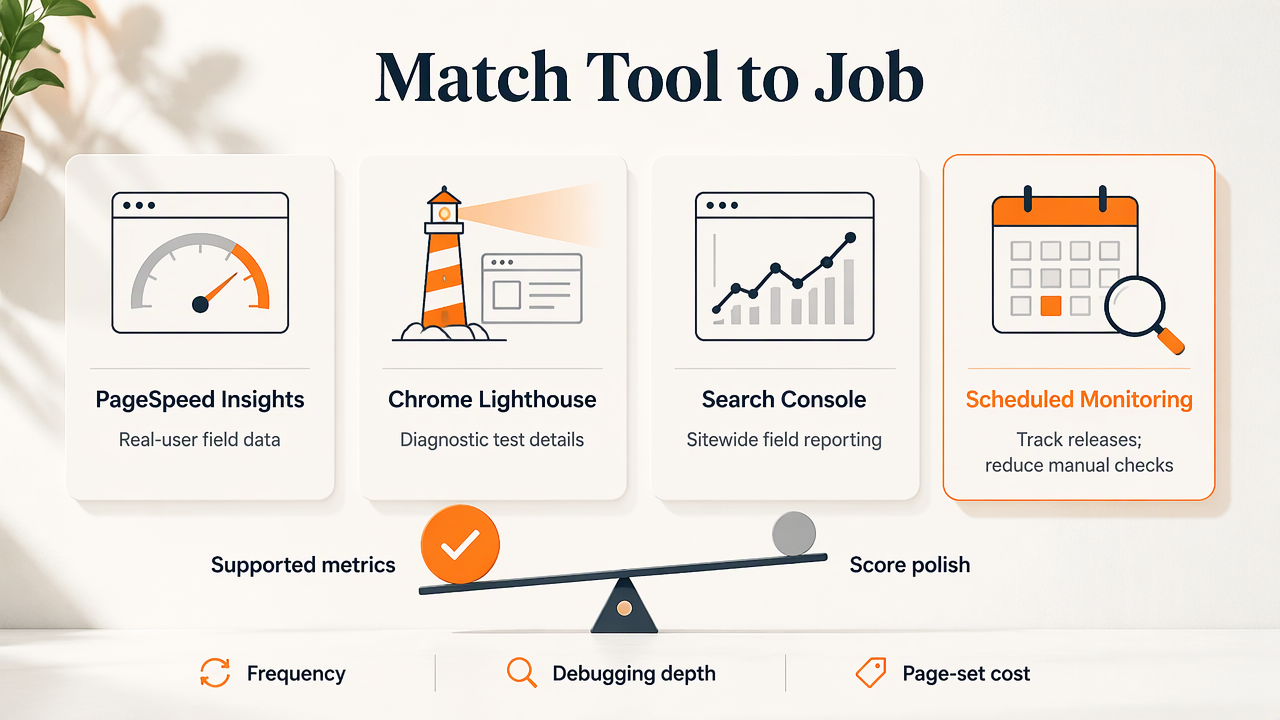
Side-by-side tool and workflow comparison
| Tool or platform | Measurement role | Frequency | Debugging or workflow value | Pricing approach |
|---|---|---|---|---|
| Earlyseo | SEO operations alongside performance tools | Team-defined workflow | Connects performance priorities with broader SEO planning | Confirm current terms |
| PageSpeed Insights | Lab LCP and CLS; field LCP, INP, and CLS when available | On demand | Page-level diagnostics and improvement opportunities | Free |
| Chrome Lighthouse | Controlled audits, including LCP and CLS | On demand; automation possible | Reproducible audits during development | Free |
| Google Search Console | Real-user Core Web Vitals reporting | Ongoing reporting | Groups affected URLs for prioritisation | Free |
| DebugBear | Synthetic monitoring and real-user measurement options | Configuration-dependent | Performance investigation and change tracking | Check current plans |
| Calibre | Scheduled performance testing | Configuration-dependent | Tracks test results over time | Check current plans |
| Semrush Site Audit | Site-wide audit context and performance checks | Scheduled or on demand | Connects performance findings with other SEO issues | Check current plans |
The supplied research identifies these performance products but doesn't provide current subscription prices. Paid-tool costs should therefore be checked directly, including page limits, test frequency, locations, retention, and access to real-user monitoring.
Who should pick which stack?
- Startups and local businesses: Begin with PageSpeed Insights, Search Console, and Lighthouse. Assign one owner to investigate priority pages.
- E-commerce teams: Consider scheduled monitoring when product templates, apps, and promotional changes create frequent releases.
- Developers: Use controlled audits and browser debugging to reproduce issues before deployment.
- Marketing managers: Consider Semrush when performance findings need to sit beside existing site-audit work.
- Teams managing frequent releases: Evaluate DebugBear or Calibre against their required monitoring and investigation workflow.
An affordable baseline is easier to maintain than a large subscription stack. The guide to tracking SEO progress without expensive tools offers a related approach to measurement discipline.
How should teams measure and fix performance?
- Select important page templates and customer actions.
- Check real-user reporting for affected groups.
- Run controlled tests under consistent conditions.
- Investigate the relevant loading, interaction, or layout cause.
- Assign a focused fix with an owner.
- Retest the release and follow subsequent field reporting.
Choose representative pages before testing
A useful test set includes the homepage and the templates that support revenue or enquiries. For a shop, that means category and product pages; for a local business, service and booking pages deserve attention. Testing only the homepage leaves important customer actions unexplored.
E-commerce teams can connect this work with a Shopify SEO workflow. Service businesses can place booking-page checks within a local business SEO plan.
Record the tested URL, device setting, date, relevant metric, suspected cause, and release identifier. Repeat tests under similar conditions so comparisons remain useful.
Match the fix to the affected metric
- For LCP: Investigate the main content resource, image delivery, server response, and render-blocking work.
- For INP: Reproduce important interactions and examine JavaScript execution, event handlers, and main-thread activity.
- For CLS: Reserve space for media and inspect fonts, banners, and content inserted after loading.
A 2024 paper, Building high-performance web applications with NextJS, addresses application performance as an engineering topic. Its supplied metadata doesn't establish a particular Core Web Vitals improvement or ranking result.
Performance fixes should be evaluated alongside functionality. A faster test result has limited value if product selection, checkout, or enquiry submission becomes harder.
How Earlyseo handles this
Earlyseo fits this process at the SEO operations layer, where teams organise performance work alongside content and visibility priorities. Measurement tools supply the evidence; a planned workflow gives each action an owner and a review point. The SEO operations offering is the relevant starting point for exploring that role.

Turn test results into a focused work queue
Each performance task should name the affected template, the customer action, the proposed change, and the evidence needed after release. That keeps a vague request such as "improve mobile speed" from becoming an open-ended project.
A practical queue can include:
- A product-image delivery change, checked through LCP diagnostics.
- A navigation interaction review, checked through responsiveness testing.
- Reserved banner space, checked through layout stability observations.
The 90-day SEO sprint provides a planning destination for organising this work alongside other SEO priorities.
A purchase checklist for 2026 and beyond
Tool evaluation should focus on evidence that remains useful as sites become more interactive. Before purchasing monitoring, teams should confirm support for realistic user actions, mobile conditions, release comparisons, and shareable diagnostic evidence.
The strongest differentiator is a shorter path from an observed customer issue to a verified improvement, not the largest collection of scores.
Scheduled monitoring earns its place when someone reviews the results and acts on meaningful changes.
Core Web Vitals tool FAQs
Core Web Vitals buying decisions usually depend on measurement coverage, debugging needs, and the team's ability to act on findings.
Are free Core Web Vitals tools enough?
Free tools can provide a useful starting stack for small websites. PageSpeed Insights supports page-level investigation, Lighthouse supports controlled audits, and Search Console provides real-user reporting where available. Paid monitoring becomes more useful when teams need scheduled checks, historical comparisons, or a consistent process across frequent releases.
Why do lab results and real-user results differ?
Lab tests use controlled conditions, while real visitors bring varied devices, connections, and behaviours. The tested page state can also differ from a visitor's experience. Teams should compare like-for-like tests and use field reporting to assess observed experience rather than expecting both sources to produce identical results.
Can a Lighthouse score confirm good INP?
A standard Lighthouse page-load score cannot confirm the responsiveness of every real interaction. INP concerns interactions during visits, including activity after the initial load. Teams should use real-user INP reporting and reproduce important actions in browser debugging to understand which interaction needs attention.
Does improving Core Web Vitals guarantee higher rankings?
Improving Core Web Vitals doesn't guarantee higher rankings. Performance work should support usable pages and customer tasks alongside relevant content, crawlability, and other SEO priorities. A purchase decision based on promised ranking gains is less useful than one based on clearer diagnosis and measurable experience improvements.
Conclusion
The best seo optimisation tools for core web vitals combine visitor evidence, repeatable diagnostics, and accountable follow-up. The next step is to select three representative templates, record a baseline, and assign one focused improvement. Teams organising that work alongside broader visibility goals can explore Earlyseo at earlyseo.com.