TL;DR
Startup founders need SEO dashboards that connect non-brand growth, qualified pages, conversions, technical health, and content progress. The strongest setup pairs founder-level summaries with drill-down data, while avoiding vanity charts that make traffic look better than pipeline impact.
Most SEO dashboards look busy, but founders need a short path from search visibility to business decisions. The best SEO reporting dashboards for startup founders show which organic efforts create qualified demand, which pages deserve more investment, and which technical issues block growth. Search engine optimization: SEO is the practice of improving website visibility and performance in search engine results pages, with the goal of increasing relevant traffic and measurable outcomes. For early-stage teams that want a focused system rather than a bloated reporting stack, Earlyseo gives founders a practical way to track SEO work tied to visibility, content, and execution.
Table of Contents
What should startup founders track in an SEO dashboard?
A founder-ready SEO dashboard should track non-brand growth, qualified landing pages, conversions, technical health, and content pipeline progress in one clear view. Weekly reports should explain whether SEO is creating demand, not just whether traffic increased.
Key insight: a founder dashboard is not an analyst workspace. It should answer, "Is organic search helping the company grow, and what decision comes next?"
The research field around startups keeps moving toward trend detection and market signals. A 2022 study by Ivan Savin, Kristina Chukavina, and Andrey A. Pushkarev examined topic-based classification for identifying global trends among startup companies, showing why founders benefit from structured signal tracking rather than scattered metrics source.
The core metrics should stay tight:
- Non-brand clicks and impressions: shows whether new buyers are finding the company, not just searching its name.
- Qualified landing pages: identifies pages that attract relevant visitors and match business intent.
- Organic conversions: connects SEO to signups, demos, purchases, calls, or lead forms.
- Technical health: catches crawl, indexation, speed, and schema issues before growth stalls.
- Content pipeline progress: tracks briefs, drafts, published pages, refreshes, and pages awaiting indexing.
A good dashboard also separates signal from noise. Total traffic, average position, and keyword count can help analysts, but founders need segmented views tied to acquisition quality. Startup teams using WordPress, Shopify, Webflow, or custom stacks should also confirm that reporting data can flow from the site platform into the dashboard. Early-stage teams can review available SEO reporting integrations before locking in a tool.
Best SEO reporting dashboards for startup founders in 2026
The best SEO reporting dashboards for startup founders are the ones that turn organic search data into operating decisions without requiring a full analytics team. The right choice depends on company stage, reporting depth, budget, and whether SEO work lives with the founder, marketer, agency, or content lead.
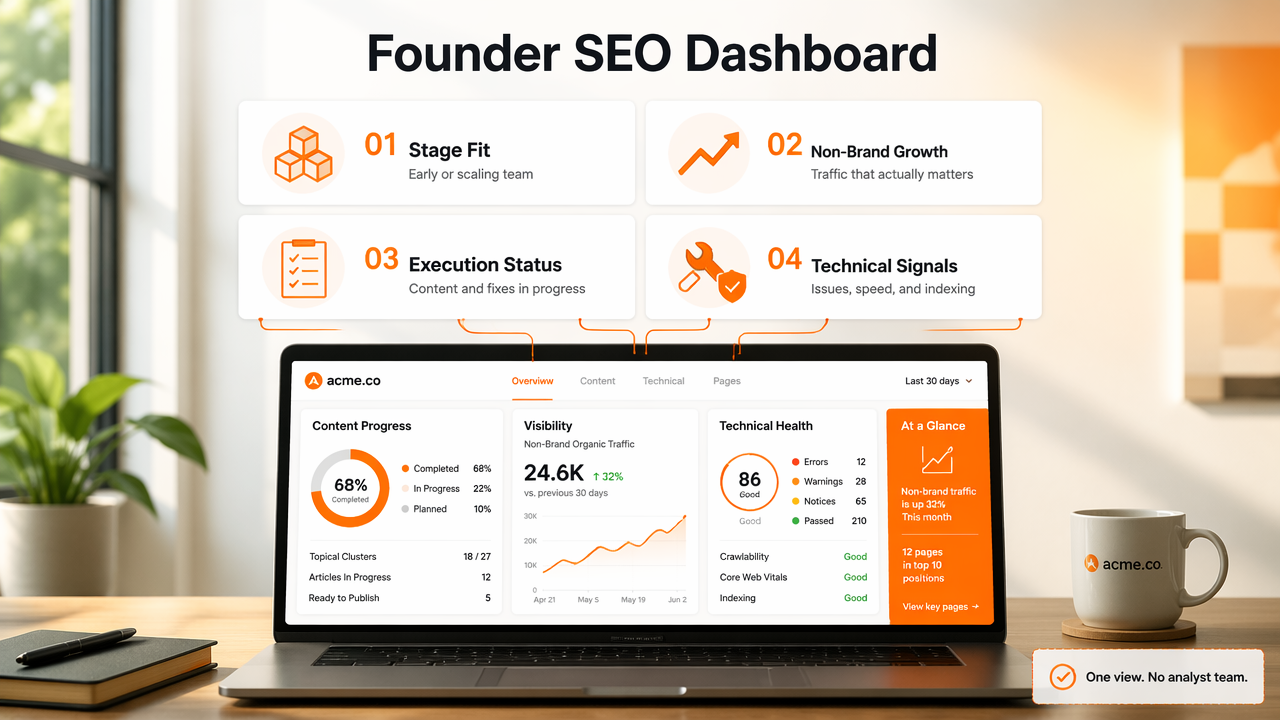
Founder-focused dashboard comparison
| Dashboard | Best fit | Founder metrics covered | Pricing model |
|---|---|---|---|
| Earlyseo | Startups that want SEO visibility, workflow, and reporting in one focused platform | Content progress, visibility, execution status, technical signals | Platform pricing, check earlyseo.com |
| Google Analytics 4 plus Looker Studio | Teams needing free custom reporting from analytics data | Conversions, channels, landing pages, events | Free tools, setup time required |
| Ahrefs | Startups prioritizing backlinks, keyword research, and competitor tracking | Rankings, links, content gaps, search demand | Paid subscription |
| Semrush | Teams needing broad SEO, PPC, and competitive intelligence | Rankings, audits, competitors, content ideas | Paid subscription |
| HubSpot | Startups already running marketing, sales, and CRM in one system | Leads, campaigns, landing pages, contacts | Paid tiers with bundled CRM features |
| SE Ranking | Budget-conscious teams needing rank tracking and audits | Rankings, site audits, keyword groups, reports | Paid subscription |
HubSpot deserves a clear definition because it often appears in founder reporting stacks. HubSpot, Inc. develops marketing, sales, and customer service software, and was founded in 2006 by Brian Halligan and Dharmesh Shah. For startups already using HubSpot CRM, its SEO reporting can work well because lead records and marketing activity sit close together.
Ahrefs and Semrush are stronger when the main question is competitive search visibility. They help founders see what competitors rank for, where backlink gaps exist, and which topics may be worth building. Their dashboards can feel more SEO-specialist oriented, so founder reporting usually needs filters or custom exports.
Google Analytics 4 with Looker Studio remains the best low-cost path for custom reporting. The tradeoff is setup effort. A founder or marketer has to define conversions, connect Search Console, clean landing page data, and build scorecards that do not overload the viewer.
For commerce businesses, dashboard choice should include platform fit. Store owners can connect SEO reporting to product and collection-page workflows through the Shopify SEO integration, which keeps organic visibility closer to revenue-driving pages.
How should a founder dashboard be laid out?
A founder SEO dashboard should be laid out as an executive summary first, then drill-down panels for growth, conversions, technical health, and content execution. The first screen should show progress against goals, not every SEO metric available.
The best layout uses five stacked sections:
- Business outcome scorecard: organic conversions, assisted conversions, qualified leads, sales, or trials.
- Non-brand discovery: clicks, impressions, and landing pages excluding branded queries.
- Page opportunity view: pages gaining traction, pages losing visibility, and pages close to page-one rankings.
- Technical risk panel: indexation issues, crawl errors, Core Web Vitals, broken pages, redirects, and schema alerts.
- Content pipeline board: planned, briefed, drafted, published, refreshed, and indexed assets.
This order matters. Founders make better decisions when revenue and demand signals appear before keyword charts. A report that opens with ranking movement can send teams chasing small position changes while higher-value pages sit untouched.
Practical rule: if a metric cannot lead to a decision, it belongs in a drill-down tab rather than the main dashboard.
A dashboard should also include a "next action" field beside each section. For example, a landing page with rising impressions and low clicks may need a title rewrite. A product page with organic visits and no conversions may need pricing clarity, trust signals, or stronger internal links.
Teams building repeatable reporting can document metric definitions, update frequency, and ownership inside Earlyseo documentation. Clear definitions prevent monthly meetings from turning into debates about what a chart means.
How do pricing and setup costs compare?
SEO dashboard pricing should be judged by total operating cost, not only the monthly subscription. A cheap dashboard can become expensive if it needs hours of setup, manual exports, or analyst support every week.
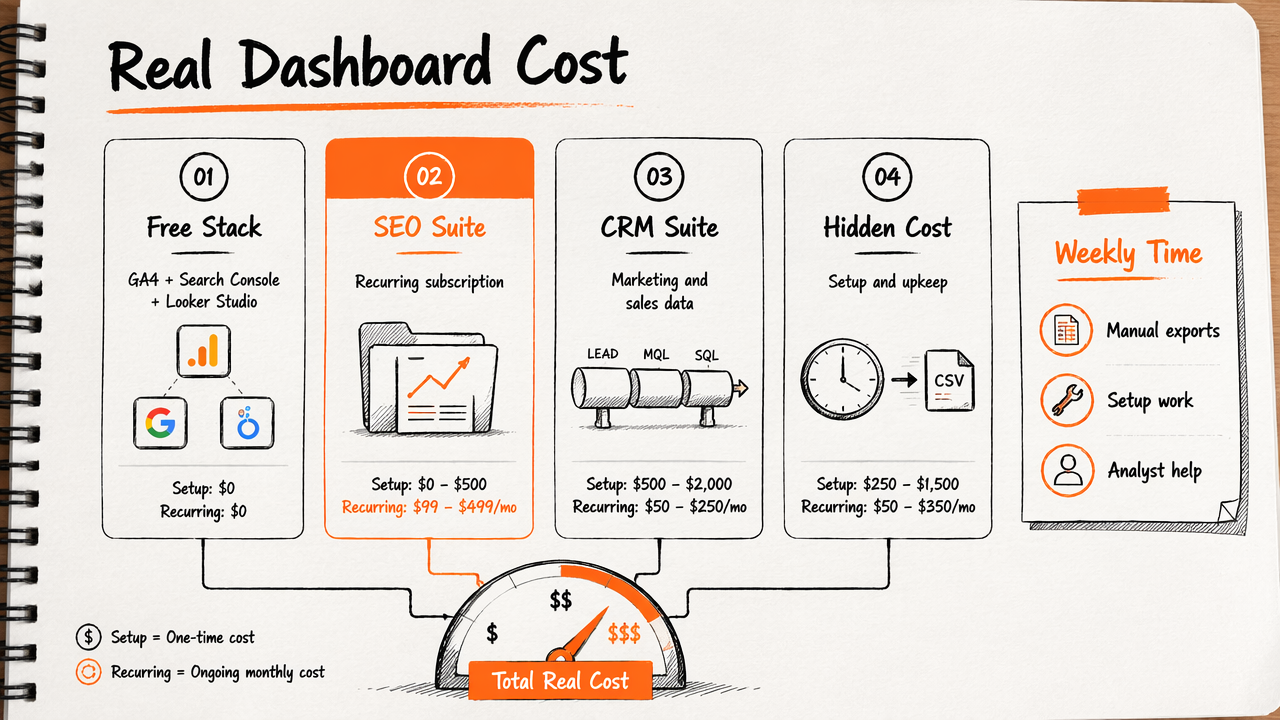
Most tools fall into four cost patterns:
- Free analytics stack: GA4, Google Search Console, and Looker Studio cost nothing in software fees, but setup and maintenance take time.
- SEO suite subscription: Ahrefs, Semrush, and SE Ranking charge recurring fees for research, rank tracking, audits, and reports.
- CRM marketing suite: HubSpot can connect marketing and sales data, but pricing expands with contacts, features, and team needs.
- Focused SEO workflow platform: Earlyseo is built for teams that want visibility tracking and execution context without stitching together too many tools.
Setup cost also depends on data cleanliness. If conversions are not defined, landing pages are duplicated, or branded traffic is mixed with non-brand traffic, every dashboard will mislead the team. That issue is not a tool problem. It is a measurement design problem.
A 2023 Oxford University Research Archive item by Nic Newman and Federica Cherubini on journalism, media, and technology trends reflects a broader shift toward technology-driven reporting and prediction workflows source. SEO reporting is moving the same way: fewer static spreadsheets, more connected dashboards, and more automated signal detection.
For content-led teams, reporting should also connect to the publishing process. Founders can use the Earlyseo blog resources for related SEO planning topics while keeping the dashboard focused on execution and outcomes.
What dashboard mistakes should founders avoid?
Founders should avoid SEO dashboards that reward activity instead of business progress. The most common reporting mistake is treating traffic growth as success without checking whether that traffic comes from qualified, non-brand searches.
Several reporting traps create false confidence:
- Blended organic traffic: branded and non-brand visits get mixed, hiding whether new demand is growing.
- Keyword count inflation: ranking for more keywords can mean little if the terms have weak intent.
- No conversion layer: traffic reports without lead, trial, purchase, or call tracking miss business impact.
- Too many charts: large dashboards slow decisions and create reporting theater.
- No content status view: teams cannot connect SEO results to briefs, drafts, refreshes, and publishing pace.
Technical dashboards can also become noisy. Crawl errors, redirects, duplicate titles, and performance warnings need prioritization by business impact. A broken page with no traffic matters less than an indexation problem on a high-intent landing page.
AI search adds another layer for 2026. Search visibility now includes traditional rankings, AI summaries, and machine-readable brand context. Teams that want clearer AI discovery signals can review the site's LLM access file as part of broader search-readiness work.
A smart dashboard turns SEO into an operating rhythm: weekly issue review, monthly content investment decisions, and quarterly strategy checks. Anything more complex should earn its place by improving one of those decisions.
FAQ: SEO dashboards for startup founders
What is the best free SEO reporting dashboard for startups?
The best free setup is usually Google Search Console, Google Analytics 4, and Looker Studio. It covers search visibility, landing pages, and conversions without software fees. The main cost is setup time, because conversion events, branded query filters, and page groups need careful configuration.
How often should founders review SEO reports?
Founders should review a short SEO dashboard weekly and a deeper report monthly. Weekly reviews work best for technical issues, publishing progress, and major traffic shifts. Monthly reviews are better for non-brand growth, page performance, conversion quality, and decisions about future content investment.
Should a startup track rankings or revenue first?
A startup should track revenue-related outcomes first, then use rankings to explain movement. Rankings help diagnose why pages gain or lose traffic, but they do not prove business value alone. Organic conversions, qualified landing pages, and non-brand discovery give a clearer view of growth.
Can one dashboard replace an SEO tool?
One dashboard can replace manual reporting, but it may not replace every SEO tool. Research-heavy work such as backlink analysis, competitor keyword discovery, and technical crawling may still need specialist software. The dashboard should combine the signals that matter most for founder decisions.
Conclusion
The best SEO reporting dashboards for startup founders make organic growth easier to manage, not harder to explain. A strong dashboard starts with non-brand growth and conversions, then adds qualified pages, technical health, and content pipeline movement.
The next step is practical: define the five founder metrics, choose a dashboard stack, connect the site platform, and schedule a 30-minute monthly SEO decision meeting. For a focused setup built around execution and visibility, founders can evaluate Earlyseo and visit earlyseo.com to map reporting to the next stage of growth.